
Caret-T
Fork of Caret Editor that has full Tern integration (Intellisense for Javascript)
As of June 2026, Caret-T has 7,000 users and a 3.73/5 rating from 62 reviews in the Developer Tools category.
Usersdown 30.0 percent−30.0%
7.0K
7,000
Ratingno change0%
3.73
62 reviews
Reviewsno change0%
62
Version
1.7.134
Manifest V2
90-day change · In the last 90 days this extension lost 3.0K users.
History
2 snapshotsTracking since May 3, 2026.
View as table
| Date | Users | Rating | Reviews | Version |
|---|---|---|---|---|
| May 3, 2026 | 10.0K | 3.73 | 62 | 1.7.134 |
| Jun 2, 2026 | 10.0K | 3.73 | 62 | 1.7.134 |
| Now | 7.0K | 3.73 | 62 | 1.7.134 |
Permissions & access
- Permissions
- webviewclipboardReadclipboardWritecontextMenusstoragenotificationssyncFileSystem
- Host access
- *://*/*
Screenshots
About
Features:
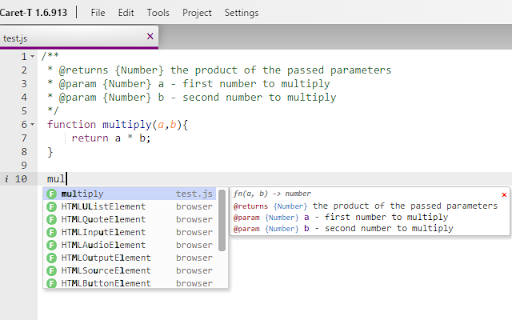
- Intelligent auto complete for Javascript (Ctrl+Space)
- Beautification for Javascript, HTML, and CSS (Ctrl+B)
- Auto Beautification for Javascript and CSS when typing a closing bracket ('}')
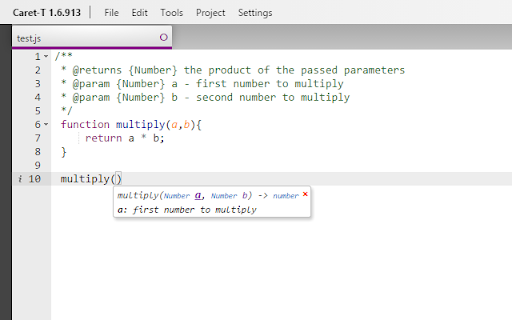
- Tern Hotkeys (Javascript Only)
    Ctrl+I - Show Type
    Ctrl+E - Find References
    Ctrl+Shift+E - Rename (including references)
    Alt+. - Jump to definition
    Alt+, - Jump back


Project Page: https://github.com/sevin777/CaretTern


Credits:

Caret: https://chrome.google.com/webstore/detail/caret/fljalecfjciodhpcledpamjachpmelml?hl=en
(The vast majority of this code was taken from Caret, I just added Tern, Beautification, and a few other things)

Tern: http://ternjs.net/doc/demo.html


-------------------------------------------------
Updates
-------------------------------------------------
***1.12.133 - (2017.01.12) Fixed bug with user settings file not working (reset your user settings to get latest settings and to fix any issues: settings --> user preferences --> reset)


***1.7.134 - (2017.02.08) Bug fixes: Auto beautify no longer inserts extra lines if using \r\n line breaks. Javascript linting works inside of html mode (regression in 1.3.2)


***1.7.132 - (2017.01.05) Updated to Ace editor v1.2.6. Added many new modes including JSX.


***1.7.131 - (2017.01.04) Updated to jsBeautify v1.6.8. Added option "autoBeautify".


***1.7.130 - Added user preferences to change beautify options (you will need to reset your preferences to get the new options)
Technical
- Version
- 1.7.134
- Manifest
- V2
- Size
- 3.46MiB
- Min Chrome
- 23
- Languages
- 1
- Featured
- No
Metadata
- ID
- agiednhnlghobdgpgfdnbdaflnngmoij
- Developer ID
- u27016bb7261fd328dc4bc7716e047474
- Developer Email
- [email protected]
- Created
- Oct 12, 2014
- Last Updated (Store)
- Aug 9, 2022
- Last Scraped
- Jun 2, 2026
- Website
- —
- Support URL
- https://github.com/sevin7676/CaretTern/wiki
- Privacy Policy
- —
Similar extensions
Alternatives to Caret-T, ranked by description similarity.
Webpad
A text editor for ChromeOS and Chrome.
3.0K
★ 3.9

JavaScript Code Beautifier
Transform plain JavaScript files into beautifully formatted, syntax-highlighted code
81
★ 5.0

CodePrettify: JS, JSON, CSS & RSS Formatter
Format, preview, and highlight JS, TS, JSON, JSONL, YAML, Markdown, CSS, and XML/RSS. Themes, tools, and line numbers.
173
★ 5.0

Tachi Code
A simple editor for raw text files based on the Monaco editor
107

Archetype Code Editor
A fast, offline code editor for all Chromebooks, based on the Monaco editor from VS Code.
659
★ 4.7

Inline Code Editor
Turn a focused element into an Editor.
63
★ 5.0

Beautifer & Minify
HTML & CSS & JavaScript Beautifier/Minifier
1.0K
★ 4.2

Pretty Code
Highlights and formats code files visited in the browser based on their extension.
61
★ 5.0
Data sourced from the Chrome Web Store · last verified Jun 2, 2026.