Vocha | Voice for ChatGPT
Voice for ChatGPT
As of June 2026, Vocha | Voice for ChatGPT has 113 users and a 3.00/5 rating from 4 reviews in the Productivity category.
Usersup 31.4 percent+31.4%
113
113
Ratingno change0%
3.00
4 reviews
Reviewsno change0%
4
Version
1.0.6
Manifest V3
History
3 snapshotsTracking since Apr 1, 2026.
View as table
| Date | Users | Rating | Reviews | Version |
|---|---|---|---|---|
| Apr 1, 2026 | 86 | 3.00 | 4 | 1.0.6 |
| May 3, 2026 | 87 | 3.00 | 4 | 1.0.6 |
| Jun 2, 2026 | 99 | 3.00 | 4 | 1.0.6 |
| Now | 113 | 3.00 | 4 | 1.0.6 |
Permissions & access
- Permissions
- None declared
- Host access
- *://*.openai.com/*
Screenshots


About
Meet Vocha: Your Voice, Your Message!

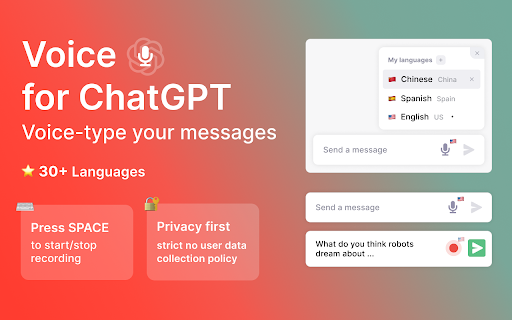
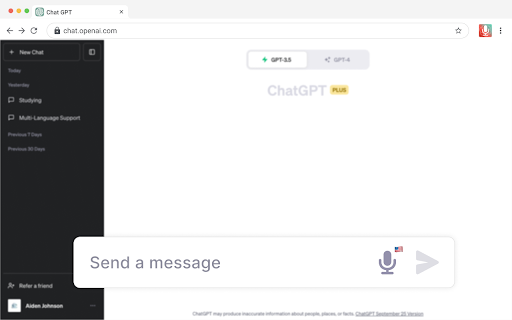
Voice-type your messages for ChatGPT with the Vocha extension. This tool adds a microphone button to the message field which you can activate easily with the SPACE shortcut or a click.

Why Vocha?
• Privacy First: We value your privacy. Vocha is designed with a strict no user data collection policy.
• Clean Design: Its minimalistic design blends perfectly with the ChatGPT interface, providing you a smooth user experience.
• Easy to Use: Vocha requires minimal setup.

🔥Top Features:
• Effortless Usage: “SPACE” shortcut for start/stop recording.
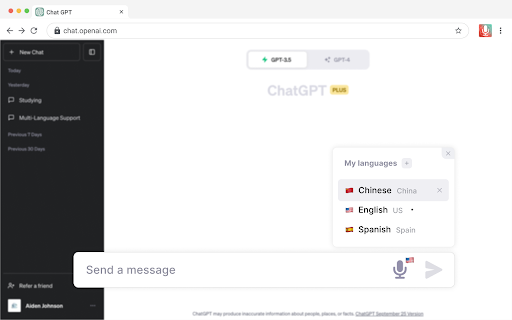
• Multi-Language Support: If you communicate in multiple languages, Vocha supports easy switching between them.
• Editable Message Option: After your recording has stopped, you can choose to send, edit, or resume recording your message.
• Support 30+ languages

Quick Start Tips:
1️⃣  A mic button will show in the message field after installation.
2️⃣  If you want to change language of speech recognition click the flag icon near microphone button and choose another one.
3️⃣  Accept access to the microphone when prompted.

📪 Contact us:
Any questions or suggestions? Please contact us at [email protected]

____________________________________________________

⚒️ Vocha based on browser’s native speech recognition.

💡 Important notes
1. Make sure to reload/refresh the webpage after installing the extension to ensure its proper functionality.
2. Access to the microphone when prompted.
Technical
- Version
- 1.0.6
- Manifest
- V3
- Size
- 244KiB
- Min Chrome
- 88
- Languages
- 1
- Featured
- Yes
Metadata
- ID
- agciioechifjhhkcaaejddhibamepgnb
- Developer ID
- u8c7ac8947b0fa1eac8ad53622e929401
- Developer Email
- [email protected]
- Created
- Oct 12, 2023
- Last Updated (Store)
- Nov 6, 2023
- Last Scraped
- Jun 2, 2026
- Website
- —
- Support URL
- —
- Privacy Policy
- —
Similar extensions
Alternatives to Vocha | Voice for ChatGPT, ranked by description similarity.

Talk With Me ChatGPT
Enables you to talk to ChatGPT and Automatically reads new paragraphs once it's printed.
1.0K
★ 1.0

Voicy - Transcribe & Translate
Instantly transcribe and translate your voice into any text field. Seamless, highly accurate speech-to-text for any website.
39
★ 1.0

Voice Command: voice control and dictation
VOICE COMMANDS and VOICE TYPING anywhere on the web. Ask AI, search, open bookmarks instantly. Supports OpenAI Whisper
130
★ 3.0

Voice AI Assistant
Voice-activated Google Search and ChatGPT assistant with hands-free control
32

ChatGPT Voice Master
Supports English voice engine for chatgpt.com, making conversations more natural and interactions smoother.
4.0K
★ 4.1

Voice for GPT
Auto-reads ChatGPT replies out loud in real time.
6
★ 5.0

VoiceMate - Voice to Text
Transform your voice into text instantly. AI-powered speech recognition with 24 languages, punctuation commands & UK spelling.
17
★ 5.0

Voz - Voice to Clean Text
Voice to text with AI transformation. Record, get clean text, transform to emails, summaries, bullets & more.
4
Data sourced from the Chrome Web Store · last verified Jun 2, 2026.