
Type Case
A simple text editor for Chrome and Chrome OS
As of June 2026, Type Case has 2,000 users and a 3.89/5 rating from 28 reviews.
Usersno change0%
2.0K
2,000
Ratingno change0%
3.89
28 reviews
Reviewsno change0%
28
Version
0.5.3
Manifest V2
History
1 snapshotsTracking since May 3, 2026.
View as table
| Date | Users | Rating | Reviews | Version |
|---|---|---|---|---|
| May 3, 2026 | 2.0K | 3.89 | 28 | 0.5.3 |
| Now | 2.0K | 3.89 | 28 | 0.5.3 |
Permissions & access
- Permissions
- storage
- Host access
- None declared
Screenshots


About
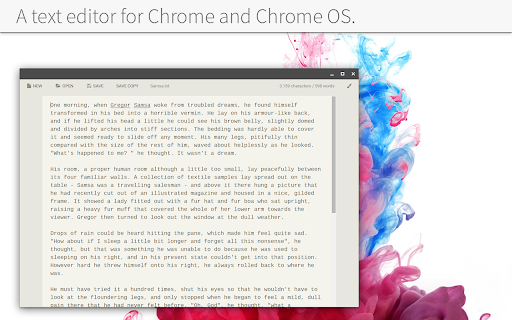
A text editor for Chrome OS. It's the equivalent to Windows Notepad plus some neat extras.

Currently I'm working on something bigger, so this needed to be a "quick'n'dirty" solution because I just missed an app like this. So functionality is very basic for now. Take care when you close the app!

# KEYBOARD SHORTCUTS #

[ctrl] + [n] = create a new file
[ctrl] + [s] = save current file
[ctrl] + [shift] + [s] = save as new file
[ctrl] + [o] = open file
[ctrl] + [,] = open settings
[ctrl] + [+] = increase font size
[ctrl] + [-] = decrease font size

# CHANGELOG #

## 07.11.2016 - 0.5.3
- [FIX] 'Tab' key is now supported (but it won't be affected by Ctrl + Z undo. So be careful using it)
- [CHG] small UI clean up

## 11.08.2016 - 0.5.2
- [FIX] files couldn't be opened anymore due to an Chrome API change
- [NEW] added 3 new themes: Material Blue, Material Tael, Material Green
- [CHG] app uses the fonts "Open Sans" and "Source Code Pro" now
- [CHG] changed the settings dialog layout a little

## 07.09.2015 - 0.5.1
- [CHG] added option "offline_enabled" to manifest

## 06.09.2015 - 0.5.0
- [NEW] added icons
- [NEW] added settings to change themes, font size and text width (settings get synced)
- [NEW] new app icon
- [CHG] changed the user interface to play well with themes and small window sizes

## 03.09.2015 - 0.4.1
- [FIX] [ctrl] + [n/t] opened a new window/tab on Chrome OS

## 03.09.2015 - 0.4.0
- [NEW] added notifications to see what just happened
- [NEW] added keyboard shortcuts for saving, opening and creating a new file ([ctrl] + [N/O/S] and [ctrl] + [shift] + [s] for "save copy")
- [FIX] ask user to save changed files before opening a file via drag and drop
- [CHG] renamed "save as..." to "save copy"

## 02.09.2015 - 0.3.0
- [NEW] ask user to save changed files before opening or creating a new one
- [FIX] you can now open files from file explorer via double click while the app is running
- [FIX] added a few more file extensions like `.md` and `.js` so Type Case can be used as their default app.
- [FIX] display 1000 as 1,000 in the word counter (character depending on the machines locale settings)

## 01.09.2015 - 0.2.0
- [NEW] added support for "open with..." on Chrome OS (and maybe other systems that support it yet)
- [NEW] open files via drag'n'drop into the app is now possible
- [FIX] textarea now scales correctly with window width
- [FIX] application bar on top now uses multiple lines if necessary

## 01.09.2015 - 0.1.0
- Initial release
Technical
- Version
- 0.5.3
- Manifest
- V2
- Size
- 803KiB
- Min Chrome
- 40
- Languages
- 1
- Featured
- No
Metadata
- ID
- afgojplakjihkbpjdemlbedkkgpbojeg
- Developer ID
- u1aa231bd21f9da93bb2b449b2ef3676f
- Developer Email
- [email protected]
- Created
- Sep 1, 2015
- Last Updated (Store)
- Jul 16, 2019
- Last Scraped
- Jun 2, 2026
- Website
- —
- Support URL
- —
- Privacy Policy
- —
Similar extensions
Alternatives to Type Case, ranked by description similarity.

Text
A text editor for Chrome OS and Chrome.
—
★ 4.0

Archetype Code Editor
A fast, offline code editor for all Chromebooks, based on the Monaco editor from VS Code.
659
★ 4.7

BrowserNotes
A simple note taking application that overlays the browser for a convenient quick jot. Saves to local browser storage.
8

eDoC
eDoC is both an offline and an online editor with dropbox and local file integration. Built on top of the ace editor it offers many…
417
★ 3.3

New Tab Notepad
A simple new tab notepad to write quick notes.
77

Text Canary
A text editor for Chrome OS and Chrome.
—
★ 4.2

Keypress Editor
An code editor for Chrome.
1.0K
★ 3.9

Chrome Notes
A simple notepad extension for Google Chrome
100.0K
★ 4.4
Data sourced from the Chrome Web Store · last verified Jun 2, 2026.