
Google Slides & Docs - Download Image
Adds a 'Download Image' option to Google Slides & Docs context menu
As of June 2026, Google Slides & Docs - Download Image has 20,000 users and a 4.57/5 rating from 37 reviews in the Productivity category.
Usersno change0%
20.0K
20,000
Ratingup 0.9 percent+0.9%
4.57
37 reviews
Reviewsup 8.8 percent+8.8%
37
Version
0.4.1
Manifest V3
History
4 snapshotsTracking since Apr 1, 2026.
View as table
| Date | Users | Rating | Reviews | Version |
|---|---|---|---|---|
| Apr 1, 2026 | 20.0K | 4.53 | 34 | 0.4.1 |
| Apr 16, 2026 | 20.0K | 4.54 | 35 | 0.4.1 |
| Apr 20, 2026 | 30.0K | 4.54 | 35 | 0.4.1 |
| May 31, 2026 | 40.0K | 4.54 | 35 | 0.4.1 |
| Now | 20.0K | 4.57 | 37 | 0.4.1 |
Permissions & access
- Permissions
- None declared
- Host access
- https://docs.google.com/*, https://slides.google.com/*
Screenshots
About
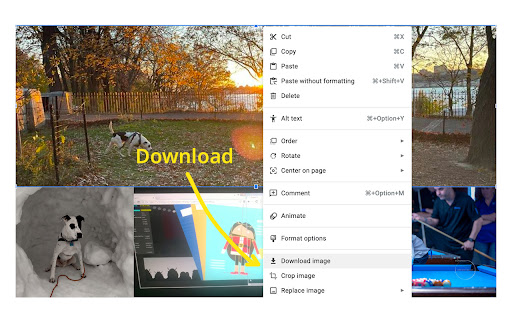
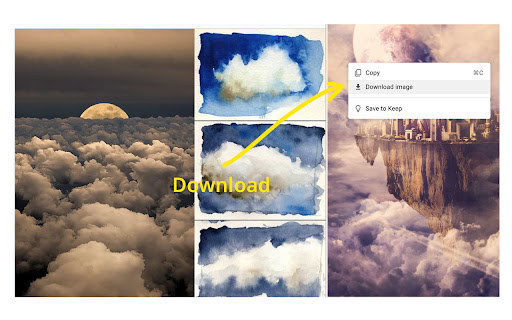
🟦 𝐆𝐫𝐞𝐚𝐭 𝐧𝐞𝐰𝐬! You can now use our extension with Google Docs! To save an image (JPG, PNG, or GIF), simply right-click it and select Download Image. Your file will appear in your downloads folder as "google-docs-image".

If prompted, please click Allow for clipboard permissions to let the magic happen!

𝗥𝗲𝗺𝗲𝗺𝗯𝗲𝗿! After installing, you should refresh any docs or slides you already have open otherwise this extension won't work.

---


🎨 Finally! Download images from Google Slides without the headache.

You know the frustration: you see a perfect image in a Google Slides presentation, you right-click to save it... and nothing happens. Google Slides simply doesn't let you download images. At all.

This extension fixes that glaring oversight by adding a proper "Download image" option to your right-click menu.

✨ What it does:
- Adds a "Download image" option when you right-click any image in Google Slides
- Downloads JPEGs, PNGs, and GIFs at their original quality and dimensions
- Works on any image in any presentation you can view
- No more screenshots, no more hunting for original files, no more workarounds

🚀 Why you'll love it:
Google Slides is fantastic for presentations, but terrible for image management. Want to reuse an image from a colleague's presentation? Screenshot and crop it (ugh). Need that graphic at full resolution? Hunt down the original file or publisher (if you can). This extension eliminates all of that by giving you the one-click download that should have existed from day one.

Perfect for designers, educators, marketers, content creators, and anyone who's ever been baffled by Google's decision to make image downloading impossible.

💡 Use cases:
- Grabbing assets from team presentations for reuse
- Downloading images from templates and shared decks
- Saving graphics at full quality instead of taking screenshots
- Building image libraries from presentation content

⚠️ Important: Refresh any open Google Slides presentations after installing for the extension to work properly.

Stop screenshotting. Start downloading. Your workflow (and your image quality) will thank you.


𝐂𝐇𝐀𝐍𝐆𝐄𝐋𝐎𝐆

𝟬.𝟰.𝟭
- Support for Google Docs
- Right click JPG, PNG, or GIF for Download Image option

𝟬.𝟯.𝟮
- Some images weren't being picked up because there was a path shape on top of them. This version should pick up on more images.

𝟬.𝟯.𝟭
- Menu option now appears for non-English languages
- Translations for 10 common languages including: Spanish, French, German, Italian, Portuguese, Russian, Japanese, Korean, Chinese, and English

𝟬.𝟮.𝟬
- Add support for Control+Click
Technical
- Version
- 0.4.1
- Manifest
- V3
- Size
- 40.32KiB
- Min Chrome
- 88
- Languages
- 1
- Featured
- No
Metadata
- ID
- afeblchodacmkncajakgjhfobkpbadnd
- Developer ID
- u3840864285ba1b60c84c26bfbe765fe3
- Developer Email
- [email protected]
- Created
- Nov 15, 2023
- Last Updated (Store)
- Mar 18, 2026
- Last Scraped
- Jun 16, 2026
- Website
- —
- Support URL
- https://www.polymermallard.com
- Privacy Policy
- https://www.polymermallard.com/privacy-policy
Similar extensions
Alternatives to Google Slides & Docs - Download Image, ranked by description similarity.

Download Images for Google Slides™
Incorporates a 'Download Image' feature into the context menu of Google Slides™.
33

ImageSnatch
Instantly extract and download all images from Google Docs
219
★ 5.0

Expand Image Formats
Expand Image Formats in Google Docs/Sheets/Slides. Support Format:'.webp','.bmp','.svg','.avif'. Previous name: Allow WebP
2.0K
★ 4.0

Slides Image Hoover
Hoover up full-resolution images from your Google Slides presentations.
10

Image Download Button
Adds a download button to images on hover with format options.
144

Téléchargeur d'image Docs / Slides
Téléchargez des images contenues dans un Docs/Slides directement sur votre PC/Chromebook, en un seul clic.
555
★ 5.0

Save Image as JPG
Right-click any image to convert and download as JPEG. All processing happens locally on your device.
986
★ 3.0

AI Visual Translator
AI-powered extension that converts text into beautiful Visualizaiton.
87
★ 5.0
Data sourced from the Chrome Web Store · last verified Jun 16, 2026.