
Save Image as JPG
Right-click any image to convert and download as JPEG. All processing happens locally on your device.
As of June 2026, Save Image as JPG has 986 users and a 3.00/5 rating from 2 reviews in the Productivity category.
Usersup 346.2 percent+346.2%
986
986
Ratingno change0%
3.00
2 reviews
Reviewsno change0%
2
Version
1.0.0
Manifest V3
History
5 snapshotsTracking since Apr 17, 2026.
View as table
| Date | Users | Rating | Reviews | Version |
|---|---|---|---|---|
| Apr 17, 2026 | 221 | — | — | 1.0.0 |
| May 2, 2026 | 322 | — | — | 1.0.0 |
| May 11, 2026 | 410 | — | — | 1.0.0 |
| May 24, 2026 | 604 | 1.00 | 1 | 1.0.0 |
| Jun 5, 2026 | 890 | 3.00 | 2 | 1.0.0 |
| Now | 986 | 3.00 | 2 | 1.0.0 |
Permissions & access
- Permissions
- contextMenusdownloadsstorageoffscreenactiveTabscripting
- Host access
- <all_urls>
Screenshots

About
Save any web image as JPEG with a single right-click - no complex software, no uploads, no hassle.

WHY YOU NEED THIS:

Ever tried uploading an image to a website, only to get rejected because it's in WebP, AVIF, or PNG format? Or struggled with massive PNG files that take forever to share? This extension solves both problems instantly.

With one right-click, convert any image you see online into a universally-compatible JPEG file that works everywhere - social media, email attachments, online forms, you name it.


WHAT MAKES IT ESSENTIAL:

* Universal Compatibility
Convert modern formats (WebP, AVIF, SVG) that many platforms still don't accept into JPEGs that work everywhere, every time.

* Reduce File Sizes
PNG files can be 5-10x larger than necessary. Convert them to JPEG and slash file sizes for faster uploads, emails, and sharing - without noticeable quality loss.

* Your Privacy Matters
Unlike online converters that upload your images to unknown servers, this extension processes everything directly on your device. Your photos never leave your computer.

* Ridiculously Simple
No tutorials needed. Right-click any image, select "Save image as JPG," and you're done. The file downloads instantly with the perfect filename.

* Handle Tricky Images
Works with transparent PNGs (adds your chosen background color), animated WebPs (extracts the best frame), SVG graphics, and even cross-origin images that regular "Save Image As" can't download.

* Customize to Your Needs
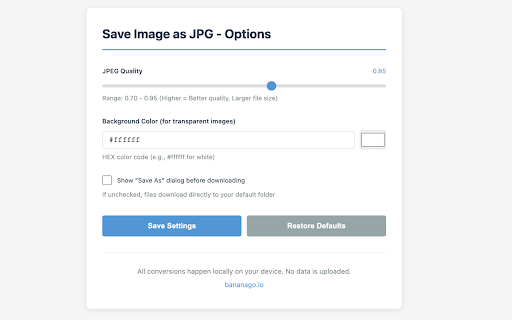
Adjust JPEG quality from 70-95% to balance file size and image sharpness. Change background colors for transparent images. Set your preferences once and forget about them.


PERFECT FOR:

- Uploading profile pictures to sites that reject PNG/WebP formats
- Sharing photos via email without hitting attachment size limits
- Downloading images from websites that block standard right-click saving
- Converting screenshots and graphics for presentations or documents
- Preparing images for platforms with strict file format requirements
- Anyone who regularly works with web images and needs quick, reliable conversions


HOW IT WORKS:

1. Right-click any image on any website
2. Select "Save image as JPG" from the menu
3. Done! The converted file downloads automatically to your device

Customize quality and colors by clicking the extension icon -> Options.


PRIVACY & SECURITY YOU CAN TRUST:

This extension runs entirely offline after installation. Zero data collection. Zero uploads. Zero tracking. All image processing happens in your browser using standard web technologies. We can't see your images because they never leave your computer - and that's by design.


TECHNICAL HIGHLIGHTS:

- Supports PNG, WebP, AVIF, GIF, SVG, BMP, and more
- Works with images from any website (bypasses CORS restrictions)
- Handles transparent images intelligently
- Fully offline capable - no internet required after installation
- Built with modern Manifest V3 standards
- No external dependencies or third-party code


COMMON USE CASES SOLVED:

"This site only accepts JPEG files" -> Convert instantly
"This PNG is 15MB and won't upload" -> Reduce to 2MB JPEG
"This image won't download due to CORS" -> Fetch and convert anyway
"This SVG looks perfect but I need a raster image" -> Convert to JPEG
"This transparent logo needs a white background" -> Auto-fill and convert


Join thousands of users who've simplified their image workflow. Install now and never wrestle with image formats again.
Technical
- Version
- 1.0.0
- Manifest
- V3
- Size
- 43.48KiB
- Min Chrome
- 88
- Languages
- 1
- Featured
- No
Metadata
- ID
- koehgljbpkhmfncenflpmccflmcholmi
- Developer ID
- u8b8f2784a955eb41c28372a50c152814
- Developer Email
- [email protected]
- Created
- Oct 12, 2025
- Last Updated (Store)
- Oct 12, 2025
- Last Scraped
- Jun 5, 2026
- Website
- bananago.io
- Support URL
- —
- Privacy Policy
- https://bananago.io/plugin-privacy
Similar extensions
Alternatives to Save Image as JPG, ranked by description similarity.

Simple Image Converter
Convert, save or copy images with a right-click, in the format you choose.
277
★ 4.3

to JPEG
Convert images to JPEG format from context menu
386
★ 3.0

Save Image As Type
Right-click any image to save it as PNG, JPEG, WEBP, or PDF — fast, client-side conversion with no quality loss.
124
★ 5.0

Save Image As JPG/PNG/WebP
Right-click to gracefully save any image as JPG, PNG, or WebP. Perfectly supports Twitter, Instagram, Facebook, and more.
223

Quick JPEG Saver - Full Page Screenshot
Quickly capture a full page screenshot. Save the entire webpage as a high-quality JPEG image with just one click.
16
★ 4.0

JPG Saver
Right-click to save WebP, AVIF, and Base64 images as JPG. Automatically detects and preserves the original filename.
61
★ 5.0

WebP to JPG
Quickly Convert WebP to JPG with this free WebP to JPG converter in just 1-Click!
1.0K
★ 4.1

Convert to WebP
Use Convert to WebP Chrome Extension to convert images to WebP. Transform PDF, PNG, AVIF or JPG to WebP for optimized web images.
143
★ 3.0
Data sourced from the Chrome Web Store · last verified Jun 5, 2026.