
Image-Details
Adds a context menu entry to open a popup window with some image details.
As of June 2026, Image-Details has 5,000 users and a 3.46/5 rating from 26 reviews in the Workflow & Planning category.
Usersno change0%
5.0K
5,000
Ratingno change0%
3.46
26 reviews
Reviewsno change0%
26
Version
3.0.1
Manifest V3
History
1 snapshotsTracking since May 3, 2026.
View as table
| Date | Users | Rating | Reviews | Version |
|---|---|---|---|---|
| May 3, 2026 | 5.0K | 3.46 | 26 | 3.0.1 |
| Now | 5.0K | 3.46 | 26 | 3.0.1 |
Permissions & access
- Permissions
- contextMenus
- Host access
- None declared
Screenshots
About
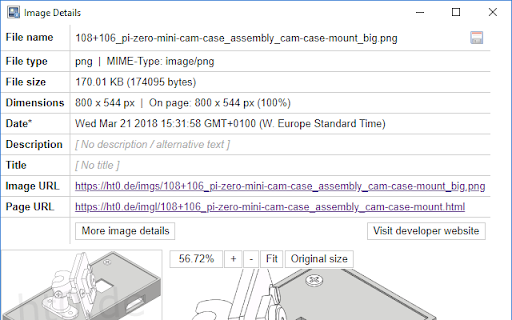
This extension adds a context menu entry that will show image details in a popup window. It will work on images that use the <img> HTML tag and on most images that are included using the CSS background-image property.

Shown details are:
- File name
- File type/extension
- MIME type
- File size
- Image dimensions (width + height on page, natural width + natural height, scaling)
- Date (if available)
- Description / Alternative text
- Title
- Image URL
- Source page URL

The image viewer lets you examine the image using its drag and zoom capability.
And you can download the image by clicking the little save icon on the right end of the file name.

If you encounter bugs or have a feature request please send me an email.
And if you like this extension please consider a donation. Thank you!

See https://ht0.de/image-details.html for more information.
Technical
- Version
- 3.0.1
- Manifest
- V3
- Size
- 23.32KiB
- Min Chrome
- 88
- Languages
- 1
- Featured
- Yes
Metadata
- ID
- aenkfgeagkbpmkbchfbfnkcefogmnboc
- Developer ID
- ucb5c69597cca9825ca21741cb6801a1f
- Developer Email
- [email protected]
- Created
- Apr 11, 2012
- Last Updated (Store)
- May 31, 2022
- Last Scraped
- Jun 2, 2026
- Website
- https://ht0.de/
- Support URL
- https://ht0.de/image-details.html
- Privacy Policy
- —
Similar extensions
Alternatives to Image-Details, ranked by description similarity.
Download Image from Context Menu
Adds a context (Right click) menu item to images which allows you to directly download them without a prompt.
1.0K
★ 4.4

View Image Properties
Right-click on any image to view its properties in a small window.
499
★ 3.6

Reload Images
Reload images in Tab/Window using context menu.
9.0K
★ 3.9

WebP / Avif image converter
Convert Webp, Avif and other types of image before saving.
100.0K
★ 3.8

Image Zoom
Image Zoom – Simple, Fast, No-Nonsense Zooming
2.0K
★ 3.8

Right Click Any Image Converter
Instantly Convert any images to any different formats (PNG, JPG, HEIC, WEBP...) with just a right-click menu.
620
★ 4.2
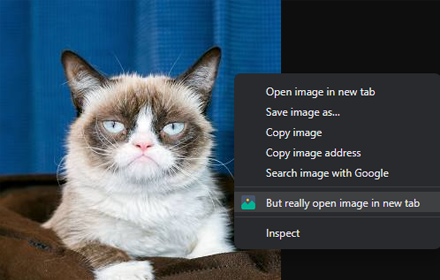
But really open image in new tab
But really open image in new tab
3.0K
★ 4.3

Save image as Type
Save images as PNG, JPG or WebP format directly from the context menu with custom size options
319
Data sourced from the Chrome Web Store · last verified Jun 2, 2026.