Web Video Speed Controller
Effortlessly control any online video speed. Easily operable via floating interface, or keyboard shortcuts, or mouse actions only.
As of June 2026, Web Video Speed Controller has 565 users and a 5.00/5 rating from 2 reviews in the Productivity category.
Usersup 20.2 percent+20.2%
565
565
Ratingno change0%
5.00
2 reviews
Reviewsno change0%
2
Version
3.1.1
Manifest V3
History
3 snapshotsTracking since Apr 1, 2026.
View as table
| Date | Users | Rating | Reviews | Version |
|---|---|---|---|---|
| Apr 1, 2026 | 470 | 5.00 | 2 | 3.1.1 |
| May 3, 2026 | 492 | 5.00 | 2 | 3.1.1 |
| Jun 2, 2026 | 556 | 5.00 | 2 | 3.1.1 |
| Now | 565 | 5.00 | 2 | 3.1.1 |
Permissions & access
- Permissions
- activeTabstorage
- Host access
- http://www.youtube.com/*, https://www.youtube.com/*, <all_urls>
Screenshots


About
**Web Video Speed Controller Extension**

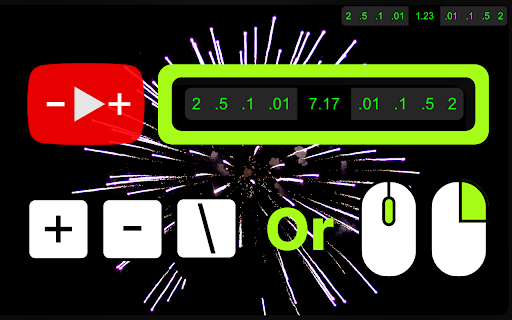
Easily control the speed of any online video. (Accurate to 0.01x speed, up to 16x speed!)
Easily operable via:
a) clicking on floating UI/interface to control speed
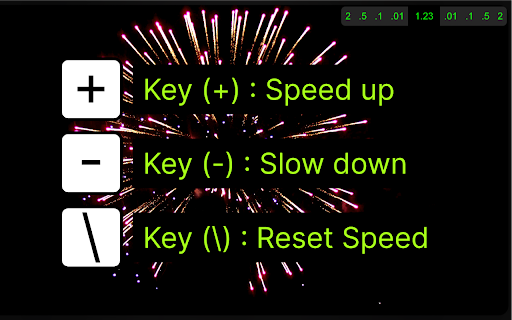
b) or using keyboard shortcuts only,
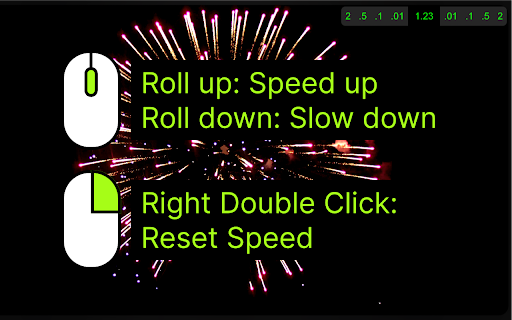
c) or by mouse only (hover mouse over video and scroll for speed control) (double right click to reset speed).

**User's Guide:**

1) Download extension.
2) PIN THE ICON for easy access. [YOU CAN TURN OFF THE MOUSE CONTROL FUNCTION FROM HERE]
3) Click on the Icon for initial personalization.
4) Visit video streaming websites and enjoy.

**Overview:**

- **Universal Compatibility:** Whether it's YouTube, Vimeo, Bilibili, Youku or any other platform that uses a standard video player, this extension has you covered.
**Precise Adjustment:** Modify playback speed with unparalleled accuracy - accurate to 0.01x, supporting up to 16x speed!
- **Completely Free:** Experience ultimate playback control without paying, and if you benefit from the fine-tuning speed plugin, feel free to donate to support the developers!

**Key Features:**

1. Adjust video playback speed: increase, decrease, or reset to standard rate.
2. Customizable keyboard shortcuts supported.
3. Convenient mouse control: hover the mouse over the video to fine-tune the speed.
4. Support customizing your own speed increment.
5. Double-click the right button to quickly return to the original speed.
6. Supports remembering your selected playback speed and applying it to all videos.
7. The on-screen control panel displays real-time playback speed.
8. Four theme colors are available.
9. The on-screen control panel has five different display styles, including hiding the entire control panel.
Technical
- Version
- 3.1.1
- Manifest
- V3
- Size
- 1.93MiB
- Min Chrome
- 88
- Languages
- 1
- Featured
- Yes
Metadata
- ID
- aehooioefgnglgpgneckhcbhefkmhlpn
- Developer ID
- u7fb5e644f5c02ca776c236c2f629c23f
- Developer Email
- [email protected]
- Created
- Nov 13, 2023
- Last Updated (Store)
- Dec 30, 2023
- Last Scraped
- Jun 2, 2026
- Website
- —
- Support URL
- —
- Privacy Policy
- —
Similar extensions
Alternatives to Web Video Speed Controller, ranked by description similarity.

Simple Video Speed Controller
Automatically adjust video speed on any website.
202
★ 5.0
Video Speed and Navigation Controller
Control video playback speed and navigation on web pages.
119
★ 5.0

Video Speeder
Adjust video playback speed with ease.
775
★ 4.0

Video Speed Controller Pro
Speed up or slow down videos on YouTube, Netflix & any site. Volume boost 400%, screenshots, A-B loop, filters & hotkeys.
106

Video Speed Controller
Compatible with almost all video and audio streaming websites, control web video playback speed and filter effects
227
★ 4.0

YouTube Speed Controller
Adds custom speed buttons to YouTube videos automatically.
—

倍速播放控制器
控制所有网页视频播放倍速,支持为特定网站设置固定播放倍速
1.0K
★ 5.0

Video Speed Controller
Simple video speed controller for adjusting playback speed
9
Data sourced from the Chrome Web Store · last verified Jun 2, 2026.