
Presentation Pacemaker
Shows a presentation pace-keeping timer on Google and Qiita slides
As of June 2026, Presentation Pacemaker has 216 users and a 5.00/5 rating from 1 reviews in the Workflow & Planning category.
Usersup 64.9 percent+64.9%
216
216
Ratingno change0%
5.00
1 reviews
Reviewsno change0%
1
Version
1.4
Manifest V3
History
3 snapshotsTracking since Apr 1, 2026.
View as table
| Date | Users | Rating | Reviews | Version |
|---|---|---|---|---|
| Apr 1, 2026 | 131 | 5.00 | 1 | 1.4 |
| May 3, 2026 | 154 | 5.00 | 1 | 1.4 |
| Jun 2, 2026 | 182 | 5.00 | 1 | 1.4 |
| Now | 216 | 5.00 | 1 | 1.4 |
Permissions & access
- Permissions
- declarativeContent
- Host access
- *://qiita.com/*, *://docs.google.com/presentation/*
Screenshots
About
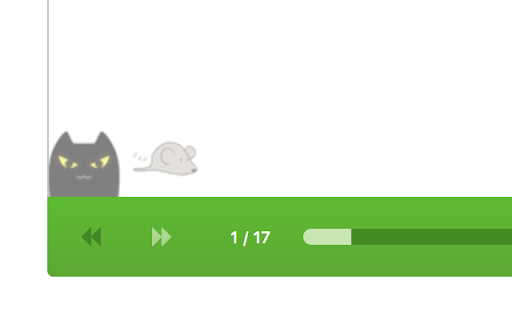
In order to keep your presentation in pace, this chrome extension shows icons one indicates the progress of time and another indicates the progress of your slide. You can easily see where your presentation is too fast or too slow.
Heavily inspired by the presentation tool 'Rabbit'(https://rabbit-shocker.org/en/).

Supported slide sites:
- Google Slides(fullscreen mode)
- Qiita(qiita.com)

Toolbar button will be activated when you're in these sites, and entering the duration of your presentation(in minutes) starts the timer.
Technical
- Version
- 1.4
- Manifest
- V3
- Size
- 25.08KiB
- Min Chrome
- 88
- Languages
- 2
- Featured
- No
Metadata
- ID
- aeejfbfmmahlmbgllbdobndmjhkgkgpb
- Developer ID
- ufeda9030621ce6acce7128e430354c6f
- Developer Email
- [email protected]
- Created
- Apr 14, 2018
- Last Updated (Store)
- Feb 18, 2025
- Last Scraped
- Jun 2, 2026
- Website
- —
- Support URL
- —
- Privacy Policy
- —
Similar extensions
Alternatives to Presentation Pacemaker, ranked by description similarity.

In-Browser Timer
Stay sharp in dailies: a sleek Scrum timer on top of your page, Jira-ready, zero distractions.
14
★ 5.0

Simple Timer
轻量倒计时(到点声音提醒)
1
★ 5.0
Toolbar Timer
Track time during screensharing in the webbrowser. Useful for use with evernote, Excel Online or a Github codereview.
15
★ 5.0
Notion Presentation
Add presentation mode to Notion.
2.0K
★ 3.7

Time Keeper
Extension to monitor and limit web browsing.
14
★ 5.0

Time Displayer
Displays your viewing time on websites.
—

Remote for Slides
Control Google Slides on any device, remotely.
100.0K
★ 4.2

GSlide Presenter
Sets Google Slide to Presentation mode while retaining chrome tabs
128
Data sourced from the Chrome Web Store · last verified Jun 2, 2026.