
Penly For PC,windows and Mac(100% Safe)
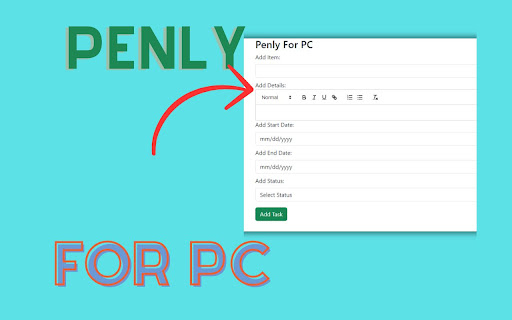
The Penly For PC allows users to input tasks with detailed descriptions using a rich text editor
As of June 2026, Penly For PC,windows and Mac(100% Safe) has 464 users in the Workflow & Planning category.
Usersup 1.5 percent+1.5%
464
464
Ratingno change0%
—
— reviews
Reviewsno change0%
—
Version
1.1
Manifest V3
History
3 snapshotsTracking since Apr 1, 2026.
View as table
| Date | Users | Rating | Reviews | Version |
|---|---|---|---|---|
| Apr 1, 2026 | 457 | — | — | 1.1 |
| May 3, 2026 | 453 | — | — | 1.1 |
| Jun 2, 2026 | 461 | — | — | 1.1 |
| Now | 464 | — | — | 1.1 |
Permissions & access
- Permissions
- None declared
- Host access
- None declared
Screenshots


About
Our"Penly for Pc" Simplify daily task reporting effortlessly. Seamlessly prepare, organize, and export task details to Excel. Enjoy a user-friendly interface for efficient task management on Windows and Mac. Get organized with Penly – your go-to solution for streamlined productivity.

Penly Extension Features:

1) Through this, you will be able to easily prepare the daily task report.

2) You can write everything here, including Task Title, Task Details, Start Date, End Date, and Status, and then alongside that, you can export it to an Excel sheet.

3) Easy To use

4) Simple Extension


✅ How To Use Penly on PC?


Step 1: Start by adding this extension to your Chrome browser by clicking "Add to Chrome."

Step 2: Next, click on the Extension icon.

Step 3: You will see :

You can effortlessly generate your daily task report here. Enter all pertinent information such as Task Title, Task Details, Start Date, End Date, and Status, and then seamlessly export it to an Excel sheet.

Step 4: Enjoy a safer browsing experience!

✅ Disclaimer:

Please note that "Penly for PC, Windows, and Mac" Chrome Extension is an independent product and is not associated, affiliated, or endorsed by the Penly Android app or its developers. We respect intellectual property rights and make no claim to any copyrights associated with the Penly Android app.
Technical
- Version
- 1.1
- Manifest
- V3
- Size
- 1.07MiB
- Min Chrome
- 88
- Languages
- 1
- Featured
- No
Metadata
- ID
- adommgbaeienhaplngophebppcjegbga
- Developer ID
- u86aaf58e35fea88987f3e16fc4b15619
- Developer Email
- [email protected]
- Created
- Mar 4, 2024
- Last Updated (Store)
- Mar 4, 2024
- Last Scraped
- Jun 2, 2026
- Website
- penlyforpcupdate.blogspot.com
Similar extensions
Alternatives to Penly For PC,windows and Mac(100% Safe), ranked by description similarity.

Mindly For PC | Organize Your To-Do List
Manage tasks easily with Mindly Task Manager for PC! Create, organize, edit, and track your to-do list effortlessly.
6

My Tasks
My Task Chrome Extension
Boost your productivity with the My Task Chrome Extension!
This simple and intuitive tool helps you…
25

Daily Task List
A Chrome extension designed to be a Daily Task List
103
★ 5.0

Daily Tasks
A simple Chrome Daily Tasks extension with local storage support
12

MoonPanda Extension
MoonPanda Extension
5

SmartTask Pro
Boost your productivity with SmartTask Pro.
2

DataPeanut: Broswer Agent
Use the AI engine automation agent to follow your task.
22
★ 5.0

Taskify: Task Management Made Easy
Designed to help you stay organized, focus on what matters, and sync tasks with Google Calendar.
59
★ 3.5
Data sourced from the Chrome Web Store · last verified Jun 2, 2026.