
DataPeanut: Broswer Agent
Use the AI engine automation agent to follow your task.
As of June 2026, DataPeanut: Broswer Agent has 22 users and a 5.00/5 rating from 1 reviews in the Workflow & Planning category.
Usersdown 8.3 percent−8.3%
22
22
Ratingno change0%
5.00
1 reviews
Reviewsno change0%
1
Version
2.2.0
Manifest V3
History
5 snapshotsTracking since Apr 1, 2026.
View as table
| Date | Users | Rating | Reviews | Version |
|---|---|---|---|---|
| Apr 1, 2026 | 24 | 5.00 | 1 | 2.2.0 |
| Apr 21, 2026 | 34 | 5.00 | 1 | 2.2.0 |
| May 6, 2026 | 32 | 5.00 | 1 | 2.2.0 |
| May 18, 2026 | 36 | 5.00 | 1 | 2.2.0 |
| Jun 1, 2026 | — | 5.00 | 1 | 2.2.0 |
| Now | 22 | 5.00 | 1 | 2.2.0 |
Permissions & access
- Permissions
- storagesidePaneltabsscriptingdebuggeractiveTabtabGroupsalarms
- Host access
- <all_urls>
Screenshots


About
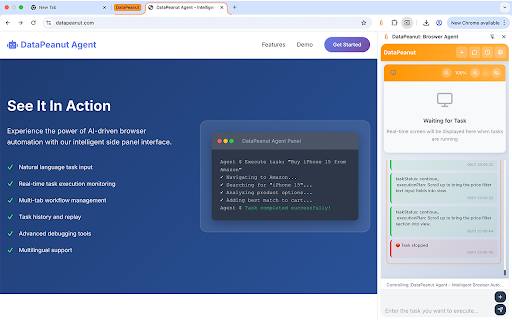
DataPeanut: Browser Agent is a powerful AI-driven browser automation extension designed to enhance your web browsing efficiency. Whether it's repetitive daily tasks or complex multi-step operations, our intelligent agent makes it easy to accomplish them all.

🌟 Core Features
🤖 AI-Powered Automation
* Natural language task instructions support
* Intelligent parsing and execution of complex web operations
* Real-time task execution status tracking
* Return analysis report

📚 Custom Memory System
* Save frequently used task templates for one-click reuse
* Edit and optimize saved tasks
* Intelligent step recording and management
* Seamless data transfer between learning and execution modes

⏰ Smart Task Scheduling
* Schedule tasks for specific times, daily, or weekly execution
* Reliable scheduling based on Chrome's native Alarms API
* Automatic recurring task management
* Background execution with status notifications

📋 Complete Task Management
* Comprehensive task history viewing
* Cross-page state synchronization
* Real-time save and restore functionality
* Persistent task data storage

🖥️ Live Screen Viewer
* High-definition real-time screen sharing
* Zoom and drag operation support
* Visual monitoring of task execution process
* Floating window with intuitive controls

🎨 Modern Interface
* Elegant side panel design
* Responsive layout adaptation
* Multi-language support (English/Chinese)
* Intuitive user experience

💡 Use Cases
* Office Automation: Form filling, data collection, email processing
* Content Management: Batch content publishing, social media operations
* Data Monitoring: Regular website updates, price change tracking
* Research & Learning: Automated information gathering and organization
* E-commerce Operations: Product uploads, order processing, customer service


🎯 Why Choose DataPeanut?
✅ Easy to Use - Intuitive interface design, no programming knowledge required
✅ Powerful Features - AI-driven intelligent task execution
✅ Secure & Reliable - Local data storage with privacy protection
✅ Highly Efficient - Dramatically improves repetitive work efficiency
✅ Continuous Updates - Regular feature improvements and optimizations
✅ Cross-Platform - Works seamlessly across different websites


🚀 Getting Started
1. Install the extension and open the side panel
2. Enter your task in natural language
3. Watch as the AI agent executes it automatically
4. Save frequently used tasks to Muscle Memory
5. Set up scheduled tasks for recurring operations
Transform your browsing experience with DataPeanut - where AI meets productivity!

🏷️ Useful
* automation
* ai assistant
* productivity tools
* task management
* browser agent
* workflow efficiency
* scheduled tasks
* web operations
* artificial intelligence
* time saver
Technical
- Version
- 2.2.0
- Manifest
- V3
- Size
- 547KiB
- Min Chrome
- 88
- Languages
- 1
- Featured
- No
Metadata
- ID
- ehcbjdokahehipibempmkfbbcodneopo
- Developer ID
- u9102833fefd0a540398bf56e3a387cfe
- Developer Email
- [email protected]
- Created
- Jun 18, 2025
- Last Updated (Store)
- Jun 25, 2025
- Last Scraped
- Jun 1, 2026
- Website
- —
- Support URL
- https://datapeanut.com
- Privacy Policy
- https://datapeanut.com/privacy
Similar extensions
Alternatives to DataPeanut: Broswer Agent, ranked by description similarity.

Agent OS - AI Browser Automation & Smart Assistant for Web Tasks
AI-powered browser automation agent. Auto-fill forms, scrape data, automate workflows with intelligent task planning & execution.
525
★ 4.1

Knapsack
An AI side panel securely connected to your data
42
★ 5.0

Geta.Team
Connect your browser to GetA.Team AI agents for automation
65
★ 5.0

Bibrowse
AI agent that automates any cross-site browser tasks for you. Why click when you can just ask?
24
★ 5.0

AutoAgent For Comet
Schedule recurring tasks for your AI Agent in Comet Browser
158
★ 3.0

RPA 流程自动化助手 Pro
录制并一键回放浏览器操作,小白也能用的自动化工具。
73
★ 5.0

web自动化巡检 (Side Panel)
基于 Vue3 + Vite 的网页自动化操作扩展
19
★ 5.0

Advanced Web Scraper
Scrape and download website content
84
★ 5.0
Data sourced from the Chrome Web Store · last verified Jun 1, 2026.