
NREGA Demand Automation
Compact draggable panel & date picker for NREGA demand_new.aspx with saved position. Safe DOM build.
As of June 2026, NREGA Demand Automation has 18 users in the Productivity category.
Usersno change0%
18
18
Ratingno change0%
—
— reviews
Reviewsno change0%
—
Version
1.0.1
Manifest V3
History
4 snapshotsTracking since Apr 1, 2026.
View as table
| Date | Users | Rating | Reviews | Version |
|---|---|---|---|---|
| Apr 1, 2026 | 18 | — | — | 1.0.1 |
| Apr 21, 2026 | 17 | — | — | 1.0.1 |
| May 6, 2026 | 16 | — | — | 1.0.1 |
| Jun 1, 2026 | 15 | — | — | 1.0.1 |
| Now | 18 | — | — | 1.0.1 |
Permissions & access
- Permissions
- None declared
- Host access
- https://nregade3.nic.in/netnrega/demand_new.aspx
Screenshots

About
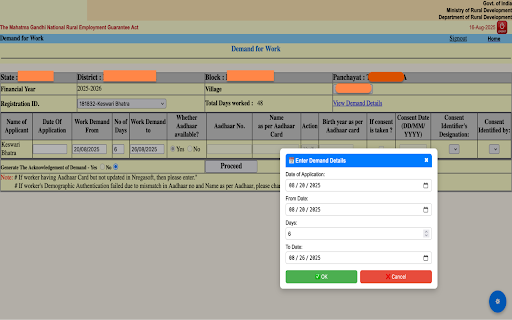
The NREGA Demand Automation addon is designed to save time and effort while filling out the official Demand for Work form on the NREGA portal.

Instead of manually typing dates and values for each worker row, this extension adds a floating ⚙️ button on the page. With a single click, you can open a compact, draggable panel that gives you shortcuts to:

📅 Modern Date Picker – Quickly select and reuse dates for demand entries.

🔄 Auto-fill Rows – Instantly fill demand details for individual rows or all rows at once.

🗑 Clear Dates – Remove application dates across all rows with one click.

💾 Save Position – Both the panel and date picker window are draggable and remember their last position even after reload.

⌨️ Keyboard Shortcuts – Use A, S, D, F, G, H, Z, Q, or Enter to trigger quick actions.

⌨️ Keyboard Shortcuts – How to Use

The addon supports quick keyboard actions so you don’t always need to click buttons:

A → Fill Row 2
Automatically fills the Date of Application, From Date, Days, and To Date in the 2nd row.
S → Fill Row 3
Same as above, but for the 3rd row.
D → Fill Row 4
Fills all demand details in the 4th row.
F → Fill Row 5
Fills the 5th row.
G → Fill Row 6
Fills the 6th row.
H → Fill Row 7
Fills the 7th row.
Z → Fill All Rows (2–7)
Instantly fills all rows at once with the saved demand details.
Q → Clear All Application Dates
Removes the Date of Application from every row, leaving them blank.
Enter → Proceed
Submits the form (same as clicking the Proceed button).

👉 Tip: Before using these shortcuts, open the ⚙️ panel → choose 📅 Date Picker → set your demand details → press OK. After that, the shortcuts will instantly fill rows with your saved values.

✅ Why use it?

Eliminates repetitive manual entry.

Reduces chances of mistakes.

Provides a cleaner, mobile-friendly date selection.

Works only on the official NREGA page (demand_new.aspx), ensuring focused and safe automation.

This addon is ideal for field staff, data entry operators, and anyone regularly entering demand requests in the NREGA system.
Technical
- Version
- 1.0.1
- Manifest
- V3
- Size
- 11.11KiB
- Min Chrome
- 88
- Languages
- 1
- Featured
- No
Metadata
- ID
- acdpkamlapginhhjdmgpfebnadnmigdc
- Developer ID
- ue52f06e7e680b11321ff169964a82a43
- Developer Email
- [email protected]
- Created
- Aug 18, 2025
- Last Updated (Store)
- Aug 18, 2025
- Last Scraped
- Jun 1, 2026
- Website
- —
- Support URL
- —
Similar extensions
Alternatives to NREGA Demand Automation, ranked by description similarity.

Quick Form Fill
Store form field values once and select them from a dropdown while filling forms. Fast, simple, and no typing needed.
34
★ 5.0

Populate form without typing with AI
Populate any form without typing. Drop website link or text. Saves time on CRM, products, invoices, real estate & more.
3
★ 5.0

Image To Form Auto Filler
Extract data from documents and automatically fill forms in the active tab using Gemini VLM. (Commercial Version)
9

Workday Filler
Automate Workday skills entry
49
★ 5.0

Smart Apply
Autofill job application forms using parsed resume data with AI.
20
★ 5.0

Form Saver 2
Save and recall form data with ease.
35

Form Saver 3
Save and recall form data as CSV rows. Import/export CSV. Select row by first column to fill form.
5

ApplyFast – NetSuite Cash Application Assistant
ApplyFast accelerates cash application in NetSuite by matching invoices and applying payments instantly.
25
★ 5.0
Data sourced from the Chrome Web Store · last verified Jun 1, 2026.