
Smart Text Expander
Expand your short text with long descriptive text quickly with help of this Smart Text Expander extension
As of June 2026, Smart Text Expander has 1,000 users and a 3.78/5 rating from 9 reviews in the Workflow & Planning category.
Usersno change0%
1.0K
1,000
Ratingno change0%
3.78
9 reviews
Reviewsno change0%
9
Version
1.0.12
Manifest V3
History
1 snapshotsTracking since Apr 19, 2026.
View as table
| Date | Users | Rating | Reviews | Version |
|---|---|---|---|---|
| Apr 19, 2026 | 1.0K | 3.78 | 9 | 1.0.12 |
| Now | 1.0K | 3.78 | 9 | 1.0.12 |
Permissions & access
- Permissions
- storageunlimitedStoragecontextMenusscriptingtabs
- Host access
- <all_urls>
Screenshots




About
Smart text expander is a tool that allows users to quickly insert long text by typing abbreviated versions of the text.

By using a text expander, users can save time and effort by avoiding the need to type out the same phrases or blocks of text repeatedly.

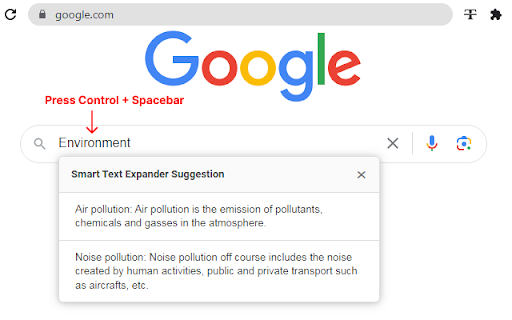
After entering sort text Press Hot key and it will be converted to large description which you set for that sort text.

Text expander can be customized to include the user's own predefined texts and settings.

Text expander are useful for a variety of purposes, such as generating filler text for documents or creating content for social media posts.

★★★  Ctrl + Space-bar  ★★★  is default hot key.  to trigger the expansion of abbreviated text into the full version.

Save your time to type large description by pressing hot key after inserting relative sort-text.

Example
brb => Be right back.
signature => John Smith, Co-Founder at Development
busy => Currently busy with few meetings, will back to you soon.


FEATURES
- Create multiple snippets
- Create multiple descriptive text to single sort-text
- Works in most of all type of text box including iframe
- Import/Export your saved settings.
- Flexible Automation: A new setting combines "On Keypress" and "Typing" for smarter auto-options.
- Auto Text Replacement: Get faster typing with instant text replacement while you type. All replacements can be customized in the settings.
- Smart Text Clipper: Now you can select text on any webpage and quickly add it to your Smart Text library.
- Improvements: Fixed various bugs and improved overall performance.

Now, with just a simple keypress or while typing, you'll experience suggestion integration. When you select "on key press," a quick Ctrl+Spacebar keystroke at the top will effortlessly trigger suggestions. And if you prefer the "on typing" mode, suggestions will elegantly appear as you type.

Creating folders and files is now easier. You can duplicate both folders and files with just one click and sorting options according to folder name, file name, and date. Also, you can delete multiple selected folders and text entries in one go.
Technical
- Version
- 1.0.12
- Manifest
- V3
- Size
- 754KiB
- Min Chrome
- 88
- Languages
- 44
- Featured
- Yes
Metadata
- ID
- ablnljkgfddcblnejlnacgeamgbjfkko
- Developer ID
- u9c6e97c367e847d8027c76114695c3e1
- Developer Email
- [email protected]
- Created
- Jun 14, 2021
- Last Updated (Store)
- Nov 20, 2025
- Last Scraped
- Jun 6, 2026
- Support URL
- —
- Privacy Policy
- —
Similar extensions
Alternatives to Smart Text Expander, ranked by description similarity.

Expandify - Text Expander & Snippet Manager
Smart text expansion tool. Type shortcuts to instantly create emails, code snippets & formatted text. Save time typing!
10

PromptEase
Your prompts, always with you. Type shortcuts, expand anywhere instantly for faster workflows. Be a PromptExpert.
9
★ 5.0

Snippet Manager PRO
Save and quickly insert frequently used text snippets
81
★ 5.0

Free Auto Text Expander
Create custom keyboard shortcuts to expand and replace text as you type!
4.0K
★ 2.8

SnapText - Free Text Expander: Shortcuts & Templates for Productivity
The ultimate text expander for Chrome. Create smart shortcuts and templates for instant productivity.
70

ProKeys
Save time and effort in emails, etc. with ProKeys! Define snippets, do math in browser, auto complete braces, and much more.
70.0K
★ 4.4

SnippetSync-AI
Save snippets, expand text with shortcuts, sync across devices. Type faster, work smarter.
4

BasiText
Your in-browser template manager
141
★ 5.0
Data sourced from the Chrome Web Store · last verified Jun 6, 2026.