Check My Links
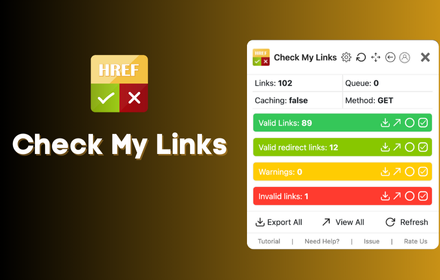
Check My Links is a link checker that crawls through your webpage and looks for broken links.
As of June 2026, Check My Links has 90,000 users and a 4.39/5 rating from 66 reviews in the Developer Tools category.
Usersno change0%
90.0K
90,000
Ratingup 0.9 percent+0.9%
4.39
66 reviews
Reviewsup 15.8 percent+15.8%
66
Version
8.0.9
Manifest V3
90-day change · In the last 90 days this extension 7 version updates.
History
12 snapshotsTracking since Apr 5, 2026.
View as table
| Date | Users | Rating | Reviews | Version |
|---|---|---|---|---|
| Apr 5, 2026 | 90.0K | 4.35 | 57 | 7.3.1 |
| Apr 16, 2026 | 90.0K | 4.36 | 58 | 7.3.1 |
| Apr 23, 2026 | 90.0K | 4.36 | 61 | 8.0.0 |
| Apr 26, 2026 | 90.0K | 4.37 | 62 | 8.0.0 |
| May 6, 2026 | 90.0K | 4.37 | 62 | 8.0.1 |
| May 8, 2026 | 90.0K | 4.38 | 63 | 8.0.1 |
| May 13, 2026 | 90.0K | 4.39 | 64 | 8.0.3 |
| May 17, 2026 | 90.0K | 4.39 | 64 | 8.0.4 |
| May 31, 2026 | 90.0K | 4.40 | 65 | 8.0.4 |
| Jun 3, 2026 | 90.0K | 4.40 | 65 | 8.0.6 |
| Jun 11, 2026 | 90.0K | 4.39 | 66 | 8.0.6 |
| Jun 23, 2026 | 90.0K | 4.39 | 66 | 8.0.7 |
| Now | 90.0K | 4.39 | 66 | 8.0.9 |
Changelog
- Jun 23, 2026description
Check My Links is a powerful link checker that scans any webpage, Google Sheet, Docs and instantly identifies broken or invalid links.

Whether you're editing a webpage, auditing content, or managing SEO, Check My Links helps you verify every link on the page with a single click.

New Feature: Now it can detect the link from Google Doc and Excel sheet too and verify them.

✅ How it works
1. Open the webpage you want to validate.
2. Click the Check My Links icon in your toolbar.
3. The extension will scan all links on the page, highlight the valid ones, and clearly mark any broken or problematic links.
4. View results instantly on the page.

🎁 Features
* One-click scan for all webpage links
* Highlights valid, broken, and redirected links
* Download or view detailed reports for broken and invalid links
* Customize highlight colors
* Option to disable color highlighting
* Faster, accurate link validation - perfect for developers, content editors, and SEO teams

🔐 Advanced Features
After a fresh install, the extension will not show product information or tutorials.
After a few days, it may display helpful product tips as info.
If you prefer a clean interface, you can hide these info using the Advanced Feature Key available here:
https://selectorshub.com/how-to-get-check-my-links-advanced-features-key/

🚫 Default Excluded URLs
To prevent unnecessary noise during scanning, the following URLs are excluded by default. If needed, you can remove these exclusions from the extension’s settings:
1. doubleclick.net
2. appliedsemantics.com

🔗 More Details
Learn more about the tool here:
https://selectorshub.com/checkmylinks/

💬 Need Help?
If you face any issues or have questions, reach out anytime at [email protected]
Check My Links is a powerful link checker that scans any webpage, Google Sheet, Docs and instantly identifies broken or invalid links.

Whether you're editing a webpage, auditing content, or managing SEO, Check My Links helps you verify every link on the page with a single click.

New Feature: Now it can detect the link from Google Doc and Excel sheet too and verify them.

✅ How it works
1. Open the webpage you want to validate.
2. Click the Check My Links icon in your toolbar.
3. The extension will scan all links on the page, highlight the valid ones, and clearly mark any broken or problematic links.
4. View results instantly on the page.

🎁 Features
* One-click scan for all webpage links
* Highlights valid, broken, and redirected links
* Exclude the section whose links not required to scan like header, footer
* Download or view detailed reports for broken and invalid links
* Customize highlight colors
* Option to disable color highlighting
* Faster, accurate link validation - perfect for developers, content editors, and SEO teams

🔐 Advanced Features
After a fresh install, the extension will not show product information or tutorials.
After a few days, it may display helpful product tips as info.
If you prefer a clean interface, you can hide these info using the Advanced Feature Key available here:
https://selectorshub.com/how-to-get-check-my-links-advanced-features-key/

🚫 Default Excluded URLs
To prevent unnecessary noise during scanning, the following URLs are excluded by default. If needed, you can remove these exclusions from the extension’s settings:
1. doubleclick.net
2. appliedsemantics.com

🔗 More Details
Learn more about the tool here:
https://selectorshub.com/checkmylinks/

💬 Need Help?
If you face any issues or have questions, reach out anytime at [email protected]
- May 8, 2026description
Check My Links is a powerful link checker that scans any webpage, Google Sheet, Docs and instantly identifies broken or invalid links.

Whether you're editing a webpage, auditing content, or managing SEO, Check My Links helps you verify every link on the page with a single click.

New Feature: Now it can detect the link from Google Doc and Excel sheet too and verify them.

✅ How it works
1. Open the webpage you want to validate.
2. Click the Check My Links icon in your toolbar.
3. The extension will scan all links on the page, highlight the valid ones, and clearly mark any broken or problematic links.
4. View results instantly on the page.

🎁 Features
* One-click scan for all webpage links
* Highlights valid, broken, and redirected links
* Download or view detailed reports for broken and invalid links
* Customize highlight colors
* Option to disable color highlighting
* Faster, accurate link validation - perfect for developers, content editors, and SEO teams

🔐 Advanced Features
After a fresh install, the extension will not show product information or tutorials.
After a few days, it may display helpful product tips as Ads.
If you prefer a clean interface, you can hide these Ads using the Advanced Feature Key available here:
https://selectorshub.com/how-to-get-check-my-links-advanced-features-key/

🚫 Default Excluded URLs
To prevent unnecessary noise during scanning, the following URLs are excluded by default. If needed, you can remove these exclusions from the extension’s settings:
1. doubleclick.net
2. appliedsemantics.com

🔗 More Details
Learn more about the tool here:
https://selectorshub.com/checkmylinks/

💬 Need Help?
If you face any issues or have questions, reach out anytime at [email protected]
Check My Links is a powerful link checker that scans any webpage, Google Sheet, Docs and instantly identifies broken or invalid links.

Whether you're editing a webpage, auditing content, or managing SEO, Check My Links helps you verify every link on the page with a single click.

New Feature: Now it can detect the link from Google Doc and Excel sheet too and verify them.

✅ How it works
1. Open the webpage you want to validate.
2. Click the Check My Links icon in your toolbar.
3. The extension will scan all links on the page, highlight the valid ones, and clearly mark any broken or problematic links.
4. View results instantly on the page.

🎁 Features
* One-click scan for all webpage links
* Highlights valid, broken, and redirected links
* Download or view detailed reports for broken and invalid links
* Customize highlight colors
* Option to disable color highlighting
* Faster, accurate link validation - perfect for developers, content editors, and SEO teams

🔐 Advanced Features
After a fresh install, the extension will not show product information or tutorials.
After a few days, it may display helpful product tips as info.
If you prefer a clean interface, you can hide these info using the Advanced Feature Key available here:
https://selectorshub.com/how-to-get-check-my-links-advanced-features-key/

🚫 Default Excluded URLs
To prevent unnecessary noise during scanning, the following URLs are excluded by default. If needed, you can remove these exclusions from the extension’s settings:
1. doubleclick.net
2. appliedsemantics.com

🔗 More Details
Learn more about the tool here:
https://selectorshub.com/checkmylinks/

💬 Need Help?
If you face any issues or have questions, reach out anytime at [email protected]
Permissions & access
- Permissions
- scriptingstoragewindowswebRequest
- Host access
- <all_urls>
Screenshots


About
Check My Links is a powerful link checker that scans any webpage, Google Sheet, Docs and instantly identifies broken or invalid links.

Whether you're editing a webpage, auditing content, or managing SEO, Check My Links helps you verify every link on the page with a single click.

New Feature: Now it can detect the link from Google Doc and Excel sheet too and verify them.

✅ How it works
1. Open the webpage you want to validate.
2. Click the Check My Links icon in your toolbar.
3. The extension will scan all links on the page, highlight the valid ones, and clearly mark any broken or problematic links.
4. View results instantly on the page.

🎁 Features
* One-click scan for all webpage links
* Highlights valid, broken, and redirected links
* Exclude the section whose links not required to scan like header, footer
* Download or view detailed reports for broken and invalid links
* Customize highlight colors
* Option to disable color highlighting
* Faster, accurate link validation - perfect for developers, content editors, and SEO teams

🔐 Advanced Features
After a fresh install, the extension will not show product information or tutorials.
After a few days, it may display helpful product tips as info.
If you prefer a clean interface, you can hide these info using the Advanced Feature Key available here:
https://selectorshub.com/how-to-get-check-my-links-advanced-features-key/

🚫 Default Excluded URLs
To prevent unnecessary noise during scanning, the following URLs are excluded by default. If needed, you can remove these exclusions from the extension’s settings:
1. doubleclick.net
2. appliedsemantics.com

🔗 More Details
Learn more about the tool here:
https://selectorshub.com/checkmylinks/

💬 Need Help?
If you face any issues or have questions, reach out anytime at [email protected]
Technical
- Version
- 8.0.9
- Manifest
- V3
- Size
- 1.35MiB
- Min Chrome
- 88
- Languages
- 1
- Featured
- Yes
Metadata
- ID
- aajoalonednamcpodaeocebfgldhcpbe
- Developer ID
- u4698647846035b295f5a657f894e32f6
- Developer Email
- [email protected]
- Created
- May 10, 2024
- Last Updated (Store)
- Jun 22, 2026
- Last Scraped
- Jun 23, 2026
- Website
- selectorshub.com
- Support URL
- https://selectorshub.com/contact-us/
- Privacy Policy
- https://selectorshub.com/privacy-policy/
Similar extensions
Alternatives to Check My Links, ranked by description similarity.

Broken Links Checker
Broken Link Checker for Chrome scans webpages to detect broken links, redirects, and HTTP status errors like 404 for fast SEO audits
70
★ 5.0

CheckLinks
Check all hyperlinks on a page for broken links.
19

Broken Links Finder
Broken Link Finder can scan entire website or a single page. Effortlessly detect dead links and optimize your site's SEO!
16

Link Checker
Link Checker: Find broken links fast
2

Broken Link Finder Pro
Find broken links on the current webpage with detailed status codes
22
★ 5.0

Website Broken Link Checker
Broken Link Checker detects 404 links and finds dead links, ensuring better SEO, site health, and smooth user experience.
775
★ 4.9
Free Link Checker by LRT
Free link checker to verify all links on a page. Finds broken, unverified, no-follow, follow, internal, external links.
20.0K
★ 4.3

Broken-Links Scanner
Check broken links on any webpage instantly. Lightweight, private, no tracking. Runs only when you ask.
31
Data sourced from the Chrome Web Store · last verified Jun 23, 2026.