
Miro: whiteboard for remote teams
The simplest visual collaboration platform for agile product teams, ux/ui designers, project leaders, marketers and creatives.
As of June 2026, Miro: whiteboard for remote teams has 308 users and a 4.17/5 rating from 12 reviews.
Usersdown 37.0 percent−37.0%
308
308
Ratingno change0%
4.17
12 reviews
Reviewsno change0%
12
Version
1.0.97.2
Manifest V2
History
3 snapshotsTracking since Apr 1, 2026.
View as table
| Date | Users | Rating | Reviews | Version |
|---|---|---|---|---|
| Apr 1, 2026 | 489 | 4.17 | 12 | 1.0.97.2 |
| May 2, 2026 | 498 | 4.17 | 12 | 1.0.97.2 |
| Jun 1, 2026 | 1.0K | 4.17 | 12 | 1.0.97.2 |
| Now | 308 | 4.17 | 12 | 1.0.97.2 |
Permissions & access
- Permissions
- clipboardReadclipboardWrite
- Host access
- None declared
Screenshots


About
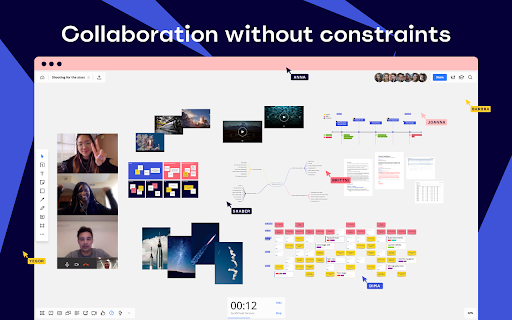
Collaborate with your distributed team in real-time — just as if you were in the same room — with Miro (formerly RealtimeBoard).
“Miro has helped us work across multiple sites around the world and has enabled us to be far more productive than before.”
 - Richard Davidson, Agile Project Manager at Skyscanner

USE CASES
Use the infinite canvas and a wide range of tools to organize your teamwork in a simple and visual way.
- Сreate agile boards (user story maps and retrospectives)
- Manage backlog
- Brainstorm and organize ideas
- Create wireframes and mockups
- Collect references
- Create flowcharts and diagrams
- Get feedback on visuals
- Work with sticky notes
- … and much more.

COLLABORATION FEATURES
Boost productivity and get things done faster across teams with these collaboration features:
- Simple sharing options
- Collaborate in real-time and see all the changes instantly
- Leave feedback directly on the item you're referring to
- Use @Mentions to notify the right people
- Talk face-to-face using Screen Sharing and Video chat
- Send comments to Slack channels to get instantly notified about updates on boards
- Link boards to your JIRA issues to visualize anything you need.

Miro integrates with Google Apps to boost your team productivity:
- Single Sign-On: Convenient and secure sign-on with your teams’ existing Google credentials
- Google Drive: Have direct access to documents and images in your Google Drive, and save boards to it
- Google Contacts: Enables auto-suggest when inviting via email.

Join thousands of businesses who use Miro to boost collaboration!
Technical
- Version
- 1.0.97.2
- Manifest
- V2
- Size
- 8.29KiB
- Min Chrome
- —
- Languages
- 1
- Featured
- No
Metadata
- ID
- aajckemmkllkflncialohndfbedphaio
- Developer ID
- uba3f74a5e5ab5d63a0030d79cdbd63da
- Developer Email
- [email protected]
- Created
- Feb 7, 2017
- Last Updated (Store)
- Apr 17, 2019
- Last Scraped
- Jun 1, 2026
- Website
- miro.com
- Support URL
- https://help.miro.com/hc/en-us
- Privacy Policy
- —
Similar extensions
Alternatives to Miro: whiteboard for remote teams, ranked by description similarity.

Miro: Whiteboard for Collaboration
Visual project management tool. Develop your ideas and projects with online whiteboard.
100.0K
★ 4.0

Miro for Education
Enrich school or corporate education process with endless whiteboards in the web.
50.0K
★ 4.3

MindMeister
Create, edit and share mind maps online. Also works with Google Drive!
900.0K
★ 3.5

MaxU
MaxU chrome插件
—

Conceptboard
Visual Collaboration Platform for Marketing & Remote Teams
20.0K
★ 4.3

Collaborative Whiteboard
Free online whiteboard for real-time collaboration, lets you easily sketch diagrams that have a hand-drawn feel to them.
10.0K
★ 3.8

Sketchboard.io
Sketch diagrams quickly on an infinite whiteboard together with your team.
30.0K
★ 3.6

Bubbles - AI Meeting Notes & Screen Recorder
Bubbles is a free screen recorder and AI meeting notetaker to help turn conversations into actions.
30.0K
★ 4.8
Data sourced from the Chrome Web Store · last verified Jun 1, 2026.