
ClickTornado
ClickTornado Clicks an element in a given time interval continuously. Just enter element's Xpath & time to auto click.
As of June 2026, ClickTornado has 35 users and a 5.00/5 rating from 2 reviews in the Workflow & Planning category.
Usersdown 7.9 percent−7.9%
35
35
Ratingno change0%
5.00
2 reviews
Reviewsno change0%
2
Version
1.0
Manifest V3
History
3 snapshotsTracking since Apr 1, 2026.
View as table
| Date | Users | Rating | Reviews | Version |
|---|---|---|---|---|
| Apr 1, 2026 | 38 | 5.00 | 2 | 1.0 |
| May 2, 2026 | 37 | 5.00 | 2 | 1.0 |
| Jun 1, 2026 | 42 | 5.00 | 2 | 1.0 |
| Now | 35 | 5.00 | 2 | 1.0 |
Permissions & access
- Permissions
- activeTabstorage
- Host access
- None declared
Screenshots
About
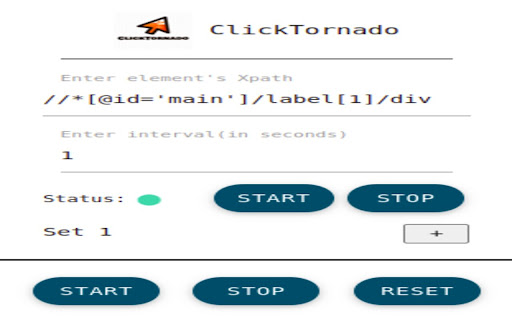
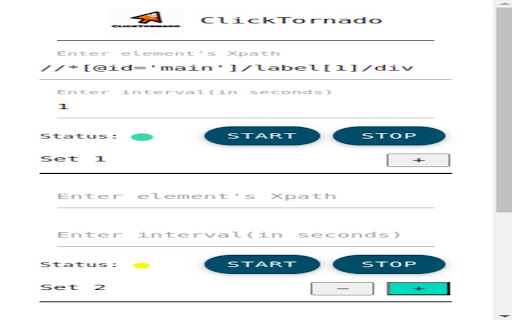
The ClickTornado gives you freedom to continue click on up-to 10 different individual elements. You get the individual control for all the sets including Group Control Button like START, STOP and RESET. Which allows you to perform action on all the active sets in just one click.
The ClickTornado works even you refresh the page OR change the tab.
So just provide the input as Xpath of the element you want to click on and the time interval for that click(second/milliseconds).
You can see the status of each set if it is running OR Paused.

You can check the video How to get the Xpath of an element here: https://www.youtube.com/watch?v=7MElEBgfwVg
Technical
- Version
- 1.0
- Manifest
- V3
- Size
- 785KiB
- Min Chrome
- 88
- Languages
- 1
- Featured
- No
Metadata
- ID
- aacmbhogpgmfmafdpgmibhpgngbiijfn
- Developer ID
- uc21d894a95f340ae168ebdde24068b93
- Developer Email
- [email protected]
- Created
- Apr 19, 2022
- Last Updated (Store)
- Apr 19, 2022
- Last Scraped
- Jun 1, 2026
- Website
- —
- Support URL
- —
- Privacy Policy
- —
Similar extensions
Alternatives to ClickTornado, ranked by description similarity.

Click Booster
Choose the button and let us do the job instead you
55
★ 5.0

TickTockFocus - Advanced Timer
Powerful time management tool with customizable multi-stage timer presets. Perfect for Pomodoro technique and structured workflows.
37
★ 5.0
Auto Click Scheduler - FoxyClick
Just right click on any element and set a timer. Easy, fast and accurate.
9.0K
★ 3.5

click
Click on frequently used hard-to-reach DOM elements fast without a single mouse click
59

Simple Reload - Tab Auto Refresh
Simply right click anywhere in the page, and set your refresh time for that tab.
Works with multiple tabs
Works in the…
250
★ 5.0

ClickUp: Tasks, Screenshots, Email, Time
ClickUp is a productivity platform that makes your personal and work lives more productive, saving you time.
200.0K
★ 2.6

ClickUp Time Tracker
Start timers from any browser tab, track time against ClickUp projects and customers.
11

Tab Player
An astonishing way of managing tabs.
96
★ 5.0
Data sourced from the Chrome Web Store · last verified Jun 1, 2026.