
Language Annotator
Highlight, save, translate, review words, auto-collect examples, use dictionary support, and practice while browsing.
As of June 2026, Language Annotator has 52 users and a 5.00/5 rating from 12 reviews in the Education category.
Usersup 30.0 percent+30.0%
52
52
Ratingno change0%
5.00
12 reviews
Reviewsno change0%
12
Version
1.5.3
Manifest V3
90-day change · In the last 90 days this extension 5 version updates, changed permissions.
History
12 snapshotsTracking since Apr 5, 2026.
View as table
| Date | Users | Rating | Reviews | Version |
|---|---|---|---|---|
| Apr 5, 2026 | 40 | 5.00 | 12 | 1.4.4 |
| Apr 18, 2026 | 36 | 5.00 | 12 | 1.4.7 |
| Apr 23, 2026 | 42 | 5.00 | 12 | 1.4.9 |
| Apr 28, 2026 | 43 | 5.00 | 12 | 1.4.10 |
| May 8, 2026 | 40 | 5.00 | 12 | 1.4.10 |
| May 12, 2026 | 42 | 5.00 | 12 | 1.4.10 |
| May 15, 2026 | 45 | 5.00 | 12 | 1.4.10 |
| May 20, 2026 | 40 | 5.00 | 12 | 1.4.10 |
| May 24, 2026 | 43 | 5.00 | 12 | 1.4.10 |
| May 29, 2026 | 47 | 5.00 | 12 | 1.5.2 |
| Jun 3, 2026 | 47 | 5.00 | 12 | 1.5.3 |
| Jun 7, 2026 | 48 | 5.00 | 12 | 1.5.3 |
| Now | 52 | 5.00 | 12 | 1.5.3 |
Changelog
- May 24, 2026description
[Not just another translator, but a reading-based learning system]

You do not need another translation tool.
You need a reading system that can turn what you read today into vocabulary you will actually remember later.

Language Annotator is not a traditional flashcard or word list app.
It works directly inside the pages you already read, so while you are reading news, articles, forums, or documents, you can understand the content and build your own vocabulary library at the same time. Then, through repeated highlighting, saved examples, and review mode, unfamiliar words gradually become familiar ones.

It does not pull you away from reading.
It turns reading itself into the place where learning happens.

[Why it works]

Most people forget words right after looking them up. The problem is not access to translation. The problem is that lookup and memory are disconnected.

Language Annotator connects them into one continuous flow:

• Translate text directly on the page when you do not understand it
• Save important words the moment you encounter them
• Keep examples and useful word information together
• See saved words highlighted again the next time you read
• Return later in the word manager or practice mode for real review

This is not a one-time answer.
It is a personal vocabulary system that becomes more valuable the more you read.

[How you can use it]

Instant translation while reading

Select text on any page to view a translation directly in place, without switching tabs or breaking your reading flow.

Add new words with the right-click menu

When you see a word you want to remember, the process is simple:

→ Select the word on the page
→ Right-click
→ Choose Add Word to Annotator Vocabulary
→ Confirm or enter the meaning in the popup
→ Click Save

That way, the word you just truly encountered goes straight into your own vocabulary library instead of being forgotten later.

See saved words appear again in future reading

As you continue browsing foreign-language websites, saved words are automatically highlighted on the page.
You do not see them only once. You meet them again in new articles and new contexts.

This kind of repeated exposure is more natural, and often more effective, than isolated memorization.

Collect real examples automatically

Language Annotator collects example sentences from the pages you read, keeping the real context in which a word appears.
You do not only learn what a word means. You also learn how it is actually used.

Return to your word library for review

Beyond on-page learning, you can return to the full word manager to search, edit, and organize saved words, then move into practice mode for deeper review.

[Core experience]

◆ Instant translation inside web pages
◆ Fast word saving from the right-click menu
◆ Automatic highlighting of saved words
◆ Automatic example collection
◆ Dictionary support
◆ Lemma and related word-form recognition
◆ Word manager and review mode
◆ Multilingual interface
◆ Domain exclusion for sites you do not want to process

[Who it is for]

This extension is especially useful if you:

• Learn languages by reading news, articles, and forums
• Want the words you look up to become part of your own vocabulary system
• Do not want to keep switching between translation sites, note apps, and flashcard tools
• Want to learn words in real context instead of isolated word cards

[Getting started is simple]

1. Install the extension
2. Open Options and set your source language and interface language
3. Open the foreign-language websites you normally read
4. Select text to view translations
5. Right-click and save the words worth learning
6. Meet them again naturally in future reading
7. Return to the word manager and practice mode for review
Language Annotator: Your Immersive Reading-Based Learning System

Forget traditional translation tools and fragmented vocabulary memorization. Language Annotator is an innovative reading system that transforms your everyday reading experience into an efficient vocabulary acquisition process, helping you truly remember new words.

Now, Language Annotator fully supports e-book readers, allowing you to seamlessly learn and manage vocabulary while reading e-books in PDF, EPUB, or MOBI formats.

Why Language Annotator Works

Most people forget words immediately after looking them up because lookup and memory are disconnected. Language Annotator uniquely integrates them into one continuous flow, making learning happen naturally within your reading:

Instant Translation & Vocabulary Saving: Select text on any webpage or e-book to translate it directly in place, without switching tabs or breaking your reading flow. Encounter a word you want to remember? Save it instantly, preserving its original context.

Contextual Learning: The system automatically collects example sentences from the pages you read, providing the real context in which a word appears. You don't just learn what a word means; you learn how it's actually used.

Repeated Exposure & Memory Reinforcement: Saved words are automatically highlighted in your future reading. You won't see them only once; you'll encounter them again in new articles and contexts. This natural, repeated exposure is often more effective than isolated memorization.
Personalized Vocabulary Management: Through the word manager, you can search, edit, and organize all your saved words, then enter practice mode for deeper review.

Language Annotator is not just a translation tool; it's a personal vocabulary system that becomes more valuable the more you read, turning reading itself into the place where learning happens.

How to Use It: Basic Operations

1. Instant Translation While Reading:
*   Simply select any text on a webpage or within a supported e-book (PDF, EPUB, MOBI).
*   A translation will appear directly on the page, allowing you to understand the content without interruption.

2. Adding New Words to Your Vocabulary:
*   When you encounter a word you wish to remember:
*   Select the word on the page.
*   Right-click (or long-press on touch devices).
*   Choose "Add Word to Annotator Vocabulary" from the context menu.
*   A popup will appear. Confirm or enter the meaning of the word.
*   Click "Save".
*   The word, along with its context, is now saved directly into your personal vocabulary library.

3. Seeing Saved Words Highlighted in Future Reading:
*   As you continue browsing foreign-language websites or reading e-books, any words you've previously saved will be automatically highlighted on the page.
*   This repeated exposure in new contexts helps reinforce your memory.

4. Collecting Real Examples Automatically:
*   Language Annotator automatically saves the sentence where you encountered and saved a word, providing you with real-world examples of its usage.

5. Reviewing Your Word Library:
*   Access the full word manager to search, edit, and organize your saved vocabulary.
*   Utilize the practice mode for in-depth review and memory consolidation of your collected words.
- Apr 5, 2026description
Language Annotator turns everyday browsing into real language learning.

Save words as you read, see them highlighted again on real webpages, collect useful example sentences automatically, and review them through active practice. Instead of isolated flashcards, it helps you build vocabulary through repeated encounters in real context.

Main features:
Highlight saved words and related word-family forms on webpages.
Add words quickly with translation, lemma, and dictionary support.
Translate words, phrases, and sentences without leaving the page.
Automatically collect and manage real example sentences.
Review vocabulary in the popup, fullscreen manager, and Practice Mode.
Sync your learning progress across devices.

How to use:

Open Settings and choose your source language.
While reading, select text to view translation directly on the page.
Right-click a word to save it to your vocabulary list.
Keep browsing. Saved words will appear highlighted again, and useful example sentences will be collected automatically.
Review your words later in the popup, the fullscreen manager, or Practice Mode.
Language Annotator is designed for serious learners who want vocabulary to grow through context, repetition, and active recall.
[Not just another translator, but a reading-based learning system]

You do not need another translation tool.
You need a reading system that can turn what you read today into vocabulary you will actually remember later.

Language Annotator is not a traditional flashcard or word list app.
It works directly inside the pages you already read, so while you are reading news, articles, forums, or documents, you can understand the content and build your own vocabulary library at the same time. Then, through repeated highlighting, saved examples, and review mode, unfamiliar words gradually become familiar ones.

It does not pull you away from reading.
It turns reading itself into the place where learning happens.

[Why it works]

Most people forget words right after looking them up. The problem is not access to translation. The problem is that lookup and memory are disconnected.

Language Annotator connects them into one continuous flow:

• Translate text directly on the page when you do not understand it
• Save important words the moment you encounter them
• Keep examples and useful word information together
• See saved words highlighted again the next time you read
• Return later in the word manager or practice mode for real review

This is not a one-time answer.
It is a personal vocabulary system that becomes more valuable the more you read.

[How you can use it]

Instant translation while reading

Select text on any page to view a translation directly in place, without switching tabs or breaking your reading flow.

Add new words with the right-click menu

When you see a word you want to remember, the process is simple:

→ Select the word on the page
→ Right-click
→ Choose Add Word to Annotator Vocabulary
→ Confirm or enter the meaning in the popup
→ Click Save

That way, the word you just truly encountered goes straight into your own vocabulary library instead of being forgotten later.

See saved words appear again in future reading

As you continue browsing foreign-language websites, saved words are automatically highlighted on the page.
You do not see them only once. You meet them again in new articles and new contexts.

This kind of repeated exposure is more natural, and often more effective, than isolated memorization.

Collect real examples automatically

Language Annotator collects example sentences from the pages you read, keeping the real context in which a word appears.
You do not only learn what a word means. You also learn how it is actually used.

Return to your word library for review

Beyond on-page learning, you can return to the full word manager to search, edit, and organize saved words, then move into practice mode for deeper review.

[Core experience]

◆ Instant translation inside web pages
◆ Fast word saving from the right-click menu
◆ Automatic highlighting of saved words
◆ Automatic example collection
◆ Dictionary support
◆ Lemma and related word-form recognition
◆ Word manager and review mode
◆ Multilingual interface
◆ Domain exclusion for sites you do not want to process

[Who it is for]

This extension is especially useful if you:

• Learn languages by reading news, articles, and forums
• Want the words you look up to become part of your own vocabulary system
• Do not want to keep switching between translation sites, note apps, and flashcard tools
• Want to learn words in real context instead of isolated word cards

[Getting started is simple]

1. Install the extension
2. Open Options and set your source language and interface language
3. Open the foreign-language websites you normally read
4. Select text to view translations
5. Right-click and save the words worth learning
6. Meet them again naturally in future reading
7. Return to the word manager and practice mode for review
- Apr 5, 2026host_permissions
https://translate.googleapis.com/*, https://kateglo.lostfocus.org/*, https://freedictionaryapi.com/*, https://jotoba.de/*, https://media.githubusercontent.com/*
https://translate.googleapis.com/*, https://kateglo.lostfocus.org/*, https://freedictionaryapi.com/*, https://jotoba.de/*, https://media.githubusercontent.com/*, https://raw.githubusercontent.com/*
Permissions & access
- Permissions
- activeTabstorageunlimitedStoragecontextMenus
- Host access
- https://translate.googleapis.com/*, https://kateglo.lostfocus.org/*, https://freedictionaryapi.com/*, https://jotoba.de/*, https://media.githubusercontent.com/*, https://raw.githubusercontent.com/*
Screenshots


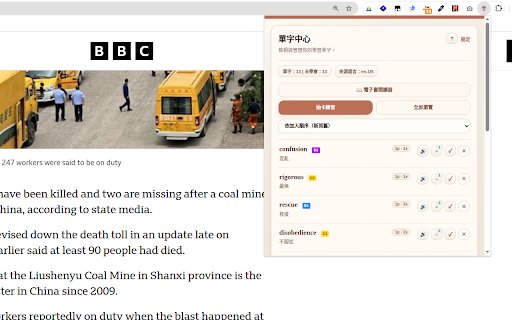

About
Language Annotator: Your Immersive Reading-Based Learning System

Forget traditional translation tools and fragmented vocabulary memorization. Language Annotator is an innovative reading system that transforms your everyday reading experience into an efficient vocabulary acquisition process, helping you truly remember new words.

Now, Language Annotator fully supports e-book readers, allowing you to seamlessly learn and manage vocabulary while reading e-books in PDF, EPUB, or MOBI formats.

Why Language Annotator Works

Most people forget words immediately after looking them up because lookup and memory are disconnected. Language Annotator uniquely integrates them into one continuous flow, making learning happen naturally within your reading:

Instant Translation & Vocabulary Saving: Select text on any webpage or e-book to translate it directly in place, without switching tabs or breaking your reading flow. Encounter a word you want to remember? Save it instantly, preserving its original context.

Contextual Learning: The system automatically collects example sentences from the pages you read, providing the real context in which a word appears. You don't just learn what a word means; you learn how it's actually used.

Repeated Exposure & Memory Reinforcement: Saved words are automatically highlighted in your future reading. You won't see them only once; you'll encounter them again in new articles and contexts. This natural, repeated exposure is often more effective than isolated memorization.
Personalized Vocabulary Management: Through the word manager, you can search, edit, and organize all your saved words, then enter practice mode for deeper review.

Language Annotator is not just a translation tool; it's a personal vocabulary system that becomes more valuable the more you read, turning reading itself into the place where learning happens.

How to Use It: Basic Operations

1. Instant Translation While Reading:
*   Simply select any text on a webpage or within a supported e-book (PDF, EPUB, MOBI).
*   A translation will appear directly on the page, allowing you to understand the content without interruption.

2. Adding New Words to Your Vocabulary:
*   When you encounter a word you wish to remember:
*   Select the word on the page.
*   Right-click (or long-press on touch devices).
*   Choose "Add Word to Annotator Vocabulary" from the context menu.
*   A popup will appear. Confirm or enter the meaning of the word.
*   Click "Save".
*   The word, along with its context, is now saved directly into your personal vocabulary library.

3. Seeing Saved Words Highlighted in Future Reading:
*   As you continue browsing foreign-language websites or reading e-books, any words you've previously saved will be automatically highlighted on the page.
*   This repeated exposure in new contexts helps reinforce your memory.

4. Collecting Real Examples Automatically:
*   Language Annotator automatically saves the sentence where you encountered and saved a word, providing you with real-world examples of its usage.

5. Reviewing Your Word Library:
*   Access the full word manager to search, edit, and organize your saved vocabulary.
*   Utilize the practice mode for in-depth review and memory consolidation of your collected words.
Technical
- Version
- 1.5.3
- Manifest
- V3
- Size
- 5.57MiB
- Min Chrome
- 88
- Languages
- 11
- Featured
- Yes
Metadata
- ID
- pplocadbndpadfenglgleehcfjaciobg
- Developer ID
- u10f942ea7caa50deb2f2c3f41dc6ef8d
- Developer Email
- [email protected]
- Created
- Feb 22, 2024
- Last Updated (Store)
- May 25, 2026
- Last Scraped
- Jun 13, 2026
- Website
- —
- Privacy Policy
- —
Similar extensions
Alternatives to Language Annotator, ranked by description similarity.

LangLearn
Highlight words, set learning status, and track your vocabulary visually while browsing any website.
82
★ 5.0

LiveLang - Language Learning made easy
Learn languages while you browse with no extra effort.
20
★ 5.0

WordLens - Translate and Learn Words
WordLens helps you learn any language while you browse. Simply select text on any webpage, and WordLens will analyze it with AI to…
3

StudyLang
Chrome extension for studying languages!
14
★ 5.0

Highlight Translator
Highlight any text to translate instantly and save for flashcards.
72
★ 5.0

LexiVocab
Master new languages while browsing. Easily save, highlight, and translate vocabulary.
24
★ 5.0

Wordsy
Our extension is your personal dictionary assistant that allows you to add unfamiliar words to your own dictionary.
6

Synapse - Language Learning
Learn words while browsing. Click any word to see pronunciation, definition, and save to your personal dictionary.
—
Data sourced from the Chrome Web Store · last verified Jun 13, 2026.