
ChatGPT Shortcut - Open from the Address Bar
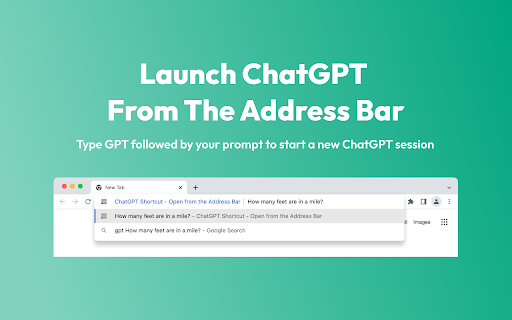
Start a new ChatGPT conversation from the address bar. Type 'GPT' followed by your prompt in the address bar to open a new ChatGPT…
As of May 2026, ChatGPT Shortcut - Open from the Address Bar has 1,000 users and a 3.45/5 rating from 11 reviews in the Workflow & Planning category.
Usersno change0%
1.0K
1,000
Ratingno change0%
3.45
11 reviews
Reviewsno change0%
11
Version
1.4
Manifest V3
History
1 snapshotsTracking since Apr 25, 2026.
View as table
| Date | Users | Rating | Reviews | Version |
|---|---|---|---|---|
| Apr 25, 2026 | 1.0K | 3.45 | 11 | 1.4 |
| Now | 1.0K | 3.45 | 11 | 1.4 |
Permissions & access
- Permissions
- scriptingactiveTabstorage
- Host access
- https://chat.openai.com/, https://chatgpt.com/
Screenshots
About
Start a new ChatGPT conversation from the address bar.

Type 'GPT' followed by your prompt in the address bar to open a new ChatGPT session.

Use this shortcut to access ChatGPT easier and quicker from anywhere in the browser.

HOW TO GUIDE:

1. Install ChatGPT Shortcut - Open from the Address Bar Extension

2. Log into ChatGPT with your browser (or create a free account)

3. In any tab, type 'GPT' in the address bar followed by your prompt

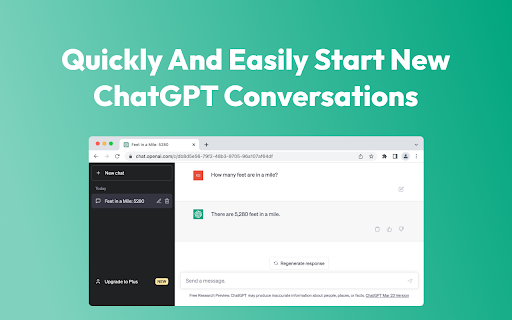
4. Press enter to open a new tab with ChatGPT and your prompt automatically filled in

Free tool with no account or sign in required. This extension does not store any data.
Technical
- Version
- 1.4
- Manifest
- V3
- Size
- 4.18MiB
- Min Chrome
- 88
- Languages
- 1
- Featured
- Yes
Metadata
- ID
- ppjhahkjaabkjgaoelbokpgleaoeeboa
- Developer ID
- u0d4ea4a715b5a88f11bbaa15d1e1557c
- Developer Email
- [email protected]
- Created
- May 9, 2023
- Last Updated (Store)
- Oct 21, 2024
- Last Scraped
- May 21, 2026
- Website
- hugesoftware.com
- Support URL
- https://hugesoftware.com
- Privacy Policy
- —
Similar extensions
Alternatives to ChatGPT Shortcut - Open from the Address Bar, ranked by description similarity.

BrowserGPT
A ChatGPT agent directly in your browser
866
★ 4.0

ChatGPT Voice Shortcut
Quickly access ChatGPT voice mode using a shortcut.
2.0K
★ 4.8

ChatGPT Assitant
Use ChatGPT Everywhere
7

ChatGPT Extension
This extension loads ChatGPT in the current tab, allowing you to use ChatGPT along your working session.
494
★ 1.0

Superpowers for Chatgpt
The ultimate browser extension for accessing Chatgpt
20.0K
★ 4.4

Chat2GPT
Talk with ChatGPT as if you were talking to a real person. Simply talk to it and hear its responses spoken back to you.
9
★ 5.0

PromptGPT
Easily save and load templates into ChatGPT. Copy pasting is outdated
40

ChatGenie for Chatgpt
The ultimate browser extension for accessing Chatgpt
70.0K
★ 4.1
Data sourced from the Chrome Web Store · last verified May 21, 2026.