
Yellow Notes for the Cloud
Yellow Stickynotes for The Web
As of June 2026, Yellow Notes for the Cloud has 8 users and a 5.00/5 rating from 1 reviews in the Communication category.
Usersdown 38.5 percent−38.5%
8
8
Ratingno change0%
5.00
1 reviews
Reviewsno change0%
1
Version
2.2.3
Manifest V3
90-day change · In the last 90 days this extension 1 version update, changed permissions.
History
8 snapshotsTracking since Apr 5, 2026.
View as table
| Date | Users | Rating | Reviews | Version |
|---|---|---|---|---|
| Apr 5, 2026 | 13 | 5.00 | 1 | 2.2.2 |
| Apr 18, 2026 | 9 | 5.00 | 1 | 2.2.2 |
| Apr 23, 2026 | 10 | 5.00 | 1 | 2.2.3 |
| Apr 30, 2026 | 11 | 5.00 | 1 | 2.2.3 |
| May 7, 2026 | 9 | 5.00 | 1 | 2.2.3 |
| May 17, 2026 | 7 | 5.00 | 1 | 2.2.3 |
| May 24, 2026 | 8 | 5.00 | 1 | 2.2.3 |
| May 30, 2026 | 7 | 5.00 | 1 | 2.2.3 |
| Now | 8 | 5.00 | 1 | 2.2.3 |
Changelog
- Apr 18, 2026permissions
activeTab, alarms, contextMenus, cookies, scripting, storage, tabs, unlimitedStorage, webNavigation, webRequest
activeTab, alarms, contextMenus, cookies, declarativeNetRequest, scripting, storage, tabs, unlimitedStorage, webNavigation, webRequest
Permissions & access
- Permissions
- activeTabalarmscontextMenuscookiesdeclarativeNetRequestscriptingstoragetabsunlimitedStoragewebNavigationwebRequest
- Host access
- *://www.yellownotes.cloud/*
Screenshots

About
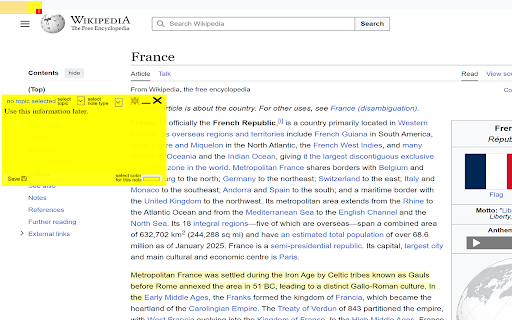
YellowNotes provides a way to attach small notices to content of the web. Much like Post-it notes did for paper documents, YellowNotes does for web pages.

Stick a note on a web page and it is there when you come back later. Highlight a selection of text; attach a note. When you come back, that section will still be highlighted.

These notes can also be shared with others. Copy a note and paste a link to it into a email or chat message. If the recipient also has YellowNotes installed, they will see the yellow note in their browser when they use the link.

Notes are not limited to just typed text. You can draw in them, or write by hand using you mouse, finger or stylus.

A whole web page can be linked into a note: A YellowNote can displayed one web page inside another. The note can be set zoom into a portion of the web page it "carrries" in order to display only a selected part.

The notes come with a call-home feature. An icon in the upper-right which when clicked takes to user to the location where the note was attached. To the exact same location of the page. And if the note was attached to a highlighted section of text, that section will also be highlighted. A portable bookmark that takes you to the exact location.

You can ask someone about a paragraph by highlighting it, write a remark in the note, paste the note in a chat message to them. They open the note and click to get to the location. They can answer back in the same way.
Creating a sharing note in the this way, requires no account with Yellownotes.
But you also subscribe to the notes others have created.
With sharing on social media we can certainly provide commentary, but it is not clear what we are talking about. Context has been lost.
Yellownotes is for placing notes directly in the context where they are relevant and optionally sharing these notes with friends and subscribers.

Two people can have a discussion “directly” on a webpage. And the word directly is in quotes here because it does not physically take place on the remote web page, in a form such as a commentary field or similar, but rather just between themselves on the YellowNotes for the Cloud infrastructure. The web page in question is simply the visual background.

YellowNotes does not require the webpage to even be accessible. This allows YellowNotes to be used to communicate with site visitors even when the site is off-line. It also allows users to design their own community websites using entirely made-up domain names.

The most recent feature of YellowNotes for the Cloud is an AI chatbot where you can use your notes, which really are annotations on the content you see, as a learning source. As the basis for the "smarts" of a bot. You can then chat with yourself. And others, if you allow it, can chat with a virtual representation of you. This currently (Oct-25) in mid-stage development and core features are available to subscribers


We call it Augmented Reality for the Web, AR4W


The product is currently (Feb.26) in beta testing.
Technical
- Version
- 2.2.3
- Manifest
- V3
- Size
- 6.1MiB
- Min Chrome
- 88
- Languages
- 1
- Featured
- No
Metadata
- ID
- ppjbgeogmedohcebndpecoiphbkdddkl
- Developer ID
- ub03edd684e951b88c7499b2b08b352ee
- Developer Email
- [email protected]
- Created
- Mar 23, 2024
- Last Updated (Store)
- Apr 10, 2026
- Last Scraped
- Jun 14, 2026
- Website
- —
- Support URL
- —
- Privacy Policy
- https://www.yellownotes.cloud/privacy
Similar extensions
Alternatives to Yellow Notes for the Cloud, ranked by description similarity.

Stickon
Attach private or shared annotations to any site and collaborate with people you add.
8
★ 5.0

Sidenote
An extension to discuss a site, on the site.
253
★ 5.0

WhatsApp Note Master
Take notes directly in WhatsApp Web
9
★ 5.0

CommentAnywhere
Free speech comments section anywhere on the web.
7

Browser Buddies
Browsing made social
7

Basement
Browse the web together. Chat, sticker, and vibe on any website.
11

NoteGo - Screen Recorder & AI Summarizer
Advanced screen recording with AI-powered vision that ensures feedback is understood the first time
444

Atmos
Atmos
86
★ 5.0
Data sourced from the Chrome Web Store · last verified Jun 14, 2026.