
Applitools Eyes browser extension SDK
Applitools Eyes browser extension SDK
As of June 2026, Applitools Eyes browser extension SDK has 33 users in the Developer Tools category.
Usersno change0%
33
33
Ratingno change0%
—
— reviews
Reviewsno change0%
—
Version
0.10.33
Manifest V3
90-day change · In the last 90 days this extension changed permissions.
History
7 snapshotsTracking since Apr 4, 2026.
View as table
| Date | Users | Rating | Reviews | Version |
|---|---|---|---|---|
| Apr 4, 2026 | — | — | — | 0.10.33 |
| Apr 17, 2026 | — | — | — | 0.10.33 |
| Apr 23, 2026 | 12 | — | — | 0.10.33 |
| Apr 28, 2026 | 15 | — | — | 0.10.33 |
| May 24, 2026 | — | — | — | — |
| May 31, 2026 | 27 | — | — | 0.10.33 |
| Jun 6, 2026 | 31 | — | — | 0.10.33 |
| Now | 33 | — | — | 0.10.33 |
Changelog
- May 24, 2026description
(empty)
Applitools Eyes Browser Extension : Use Applitools Eyes SDK from within the browser.

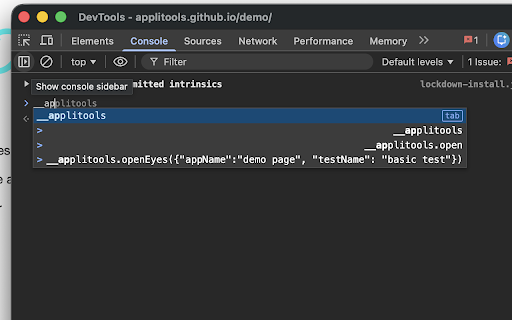
The Applitools Eyes Chrome Extension provides the Applitools Eyes JS SDK directly within your browser environment. You can manually access it by opening Chrome DevTools,  using the SDK to execute visual tests and verify images using Applitools’ industry-leading Visual AI.

This extension streamlines the testing workflow by allowing developers and QA engineers to run visual validations directly from the browser console, eliminating the need for complex external setups for quick checks and image verification.

Key Capabilities:
* Integrated SDK: Access the Applitools Eyes JS SDK inside the browser context.
* DevTools Access: Use the SDK directly from the Chrome DevTools panel.
* Visual Verification: Run tests and verify images using Visual AI without leaving the page.
- May 24, 2026short_description
(empty)
Applitools Eyes browser extension SDK
- May 24, 2026name
Unknown
Applitools Eyes browser extension SDK
- May 24, 2026category
(empty)
productivity/developer
- May 24, 2026host_permissions
(empty)
<all_urls>
- May 24, 2026permissions
(empty)
scripting, tabs, activeTab, webNavigation, cookies
- Apr 28, 2026description
Applitools Eyes Browser Extension : Use Applitools Eyes SDK from within the browser.

The Applitools Eyes Chrome Extension provides the Applitools Eyes JS SDK directly within your browser environment. You can manually access it by opening Chrome DevTools,  using the SDK to execute visual tests and verify images using Applitools’ industry-leading Visual AI.

This extension streamlines the testing workflow by allowing developers and QA engineers to run visual validations directly from the browser console, eliminating the need for complex external setups for quick checks and image verification.

Key Capabilities:
* Integrated SDK: Access the Applitools Eyes JS SDK inside the browser context.
* DevTools Access: Use the SDK directly from the Chrome DevTools panel.
* Visual Verification: Run tests and verify images using Visual AI without leaving the page.
(empty)
- Apr 28, 2026permissions
scripting, tabs, activeTab, webNavigation, cookies
(empty)
- Apr 28, 2026short_description
Applitools Eyes browser extension SDK
(empty)
- Apr 28, 2026name
Applitools Eyes browser extension SDK
Unknown
- Apr 28, 2026category
productivity/developer
(empty)
- Apr 28, 2026host_permissions
<all_urls>
(empty)
Permissions & access
- Permissions
- scriptingtabsactiveTabwebNavigationcookies
- Host access
- <all_urls>
Screenshots
About
Applitools Eyes Browser Extension : Use Applitools Eyes SDK from within the browser.

The Applitools Eyes Chrome Extension provides the Applitools Eyes JS SDK directly within your browser environment. You can manually access it by opening Chrome DevTools,  using the SDK to execute visual tests and verify images using Applitools’ industry-leading Visual AI.

This extension streamlines the testing workflow by allowing developers and QA engineers to run visual validations directly from the browser console, eliminating the need for complex external setups for quick checks and image verification.

Key Capabilities:
* Integrated SDK: Access the Applitools Eyes JS SDK inside the browser context.
* DevTools Access: Use the SDK directly from the Chrome DevTools panel.
* Visual Verification: Run tests and verify images using Visual AI without leaving the page.
Technical
- Version
- 0.10.33
- Manifest
- V3
- Size
- 1.03MiB
- Min Chrome
- 88
- Languages
- 1
- Featured
- No
Metadata
- ID
- ppgmklijnkdmodnbkjmaagkmojonkinn
- Developer ID
- u12c041925b1cd02dbc97d86904f9017b
- Developer Email
- [email protected]
- Created
- Apr 3, 2026
- Last Updated (Store)
- Apr 3, 2026
- Last Scraped
- Jun 6, 2026
- Website
- —
- Support URL
- https://help.applitools.com/hc/en-us
- Privacy Policy
- —
Data sourced from the Chrome Web Store · last verified Jun 6, 2026.