
World Time Clock
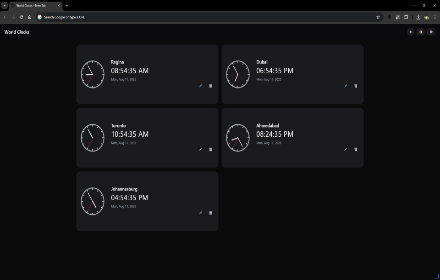
Side‑panel world clock for up to five cities.
As of June 2026, World Time Clock has 124 users in the Productivity category.
Usersup 7.8 percent+7.8%
124
124
Ratingno change0%
—
— reviews
Reviewsno change0%
—
Version
0.2.0
Manifest V3
History
5 snapshotsTracking since Apr 1, 2026.
View as table
| Date | Users | Rating | Reviews | Version |
|---|---|---|---|---|
| Apr 1, 2026 | 115 | — | — | 0.2.0 |
| Apr 21, 2026 | 120 | — | — | 0.2.0 |
| May 6, 2026 | 120 | — | — | 0.2.0 |
| May 18, 2026 | 122 | — | — | 0.2.0 |
| Jun 1, 2026 | 127 | — | — | 0.2.0 |
| Now | 124 | — | — | 0.2.0 |
Permissions & access
- Permissions
- sidePanelstorage
- Host access
- None declared
Screenshots

About
If your day involves juggling meeting invites from San Francisco, answering a teammate in Berlin, and checking when the Nikkei opens in Tokyo, you know the mental gymnastics of time-zone math. World Time Clock solves that headache in a single browser click. Built for remote professionals, frequent travelers, and anyone with friends or family abroad, the extension plants a miniature, always-accurate world-clock dashboard inside Browser’s Side Panel—no new tabs, no external websites, and no manual math required.

The problem it eliminates
Modern work is global by default, but our browsers still show only local time. That forces you to:

Google “current time in X” ten times a day.

Open OS-level clock apps that clutter the taskbar or sit buried behind other windows.

Rely on memory—and inevitably schedule calls at 2 a.m. for someone on your team.

Those tiny frictions add up: wasted minutes, botched deadlines, missed stand-ups, and awkward “Sorry, I thought it was your morning” emails. World Time Clock collapses those tasks into a tidy panel that’s literally anchored to the page you’re viewing. The information lives where you work, so context-switching disappears.

Key benefits at a glance
One-click visibility, zero disruption
Click the toolbar icon and the panel slides in alongside your current tab. Because it leverages native Side Panel API, you keep your workspace intact—no pop-ups hiding behind windows or full-screen takeovers.

Up to five cities—mix and match freely
You can track New York, London, Singapore, Sydney, and São Paulo simultaneously. Your current zone auto-loads; the rest are added from a searchable dropdown that filters more than 400 IANA locations down to a clean, readable list.

Analog + digital at a glance
Each city shows a crisp 40-pixel clock dial and a bold HH:MM readout. Analog hands help your brain gauge differences intuitively (“Berlin is about four hours ahead”), while the digital display nails precision down to the minute.

Always in sync, always stored
The extension runs entirely client-side and syncs with your system clock, updating every minute without pinging external servers. Selected zones save to storage.local, so your custom lineup comes back every time browser restarts.

Lightning-fast remove & reorder
A red X button deletes any city instantly, and drag-and-drop reorders the list (great for surfacing priority markets). You’re never locked into the order you added them.
Technical
- Version
- 0.2.0
- Manifest
- V3
- Size
- 78.14KiB
- Min Chrome
- 88
- Languages
- 40
- Featured
- No
Metadata
- ID
- ppepapcofihnhmihlbcgfcjpengjjmjh
- Developer ID
- ue4d7df33e15be95b5bbbb3712bf13a45
- Developer Email
- [email protected]
- Created
- Jun 5, 2025
- Last Updated (Store)
- Jun 5, 2025
- Last Scraped
- Jun 1, 2026
- Website
- —
- Support URL
- —
- Privacy Policy
- —
Similar extensions
Alternatives to World Time Clock, ranked by description similarity.

World Time Zone
A Chrome extension to display world time zones based on selected cities.
709
★ 4.8

Time Zone Converter & World Clock
manifest.json description
201
★ 5.0

Timezone Freedom
View multiple timezones simultaneously in a convenient side panel
26
★ 5.0

World Clock
Shows the current time in different major cities around the world.
8
★ 3.0

Free Timezone Converter
Instantly convert times between any two time zones, even offline.
33

World Clock Toolbar 2.0
EASY to access on your toolbar with a list of country that you visit often at a glance.
110
★ 5.0

Timewise
See the time in every city at a glance. Know who's working, awake, or sleeping — find the best time for your call.
4
World Clocks Pro
Multi-timezone clocks with digital & analog views, themes, layout options, and customizable icons.
11
Data sourced from the Chrome Web Store · last verified Jun 1, 2026.