
Visual Timer
A visual timer to help you focus on your current task.
As of June 2026, Visual Timer has 20,000 users and a 4.61/5 rating from 41 reviews in the Productivity category.
Usersno change0%
20.0K
20,000
Ratingup 0.7 percent+0.7%
4.61
41 reviews
Reviewsup 7.9 percent+7.9%
41
Version
1.5.0
Manifest V3
History
2 snapshotsTracking since Apr 18, 2026.
View as table
| Date | Users | Rating | Reviews | Version |
|---|---|---|---|---|
| Apr 18, 2026 | 20.0K | 4.58 | 38 | 1.5.0 |
| Jun 2, 2026 | 20.0K | 4.60 | 40 | 1.5.0 |
| Now | 20.0K | 4.61 | 41 | 1.5.0 |
Permissions & access
- Permissions
- None declared
- Host access
- None declared
Screenshots

About
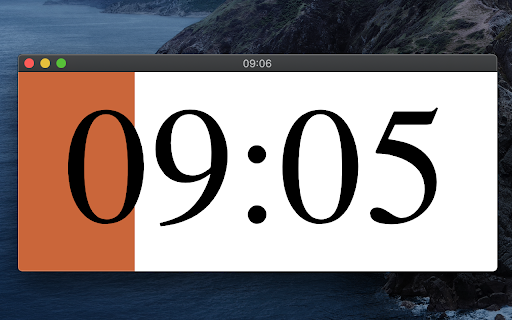
This timer is designed to help you be more productive by keeping your fingers on the keyboard.  Click the extension icon from your browser to pop a new timer (or bring the existing one into the foreground).  Then just type the number of minutes you want the timer to run for and hit Enter.  The timer will start as a countdown, filling up as the timer runs so you'll know roughly how much time you have left without breaking your concentration.  Once the timer completes, it begins flashing so you know it's complete.  If you need to pause the timer, just select the timer popup and hit Space.  Space again to resume.  If you want to reset the timer (for the previously selected duration) just select the timer popup and hit "R" and it will start over.

Cheatsheet for keyboard shortcuts:
- 1-999 : Start a timer for that many minutes
- R : Reset the timer
- Space : Pause/resume the timer
- ? : Toggle config mode (where you can set the background color, toggle the "ding")
- T : Toggle task mode where you can list your tasks and start a timer for each
- > (right angle bracket) : Mark current task done (delete it) and begin next task

New in this version (1.5.0):
* Removed default timer controls that show on hover (you can still toggle these back on)
* Improved styling on settings and tasks view

New in version 1.4.0 (Sep 12, 2025):
* Gamification! Under settings you can opt in to setting a target number of minutes working on tasks (timers must be started from the tasks list) and track your streak.  Feel the productivity points as you make a daily habit for spending at least an hour working on tasks.
* More icons for those that aren't used to keyboard shortcuts: start/pause toggle icon, restart icon, task list icon

Thanks to everyone who has commented on the Youtube instructional video to provide feedback and request new features!
Technical
- Version
- 1.5.0
- Manifest
- V3
- Size
- 164KiB
- Min Chrome
- 88
- Languages
- 1
- Featured
- Yes
Metadata
- ID
- ppdaimjdegannlbdhdlcehjlcngcboog
- Developer ID
- uc3660ff6ecc183a664eb271990f3e617
- Developer Email
- [email protected]
- Created
- May 1, 2020
- Last Updated (Store)
- Dec 28, 2025
- Last Scraped
- Jun 11, 2026
- Website
- —
- Support URL
- —
- Privacy Policy
- —
Similar extensions
Alternatives to Visual Timer, ranked by description similarity.

Stopwatch & Timer – Precision, Themes, Offline
A dual-purpose time tracker with stopwatch and countdown timer — featuring keyboard support, themes, and offline mode
20

Pomodoro Timer
A Pomodoro timer with task scheduling to boost your productivity
11

Floating Timer
Stopwatch & Countdown Timer in Always-on-Top PiP Window
895
★ 3.0

Smart Timer
Smart Timer: Floating Countdown & Stopwatch
56
★ 5.0

New Countdown Timer
Powerful browser countdown timer
412
★ 5.0

Pomodoro Timer
A simple Pomodoro Timer that shows remaining time on hover when pinned.
10
★ 5.0

Pomodoro Timer
A Pomodoro timer with work/break cycles, long breaks, and a GitHub-style focus calendar
139
★ 5.0

Timer App
A Chrome Extension named Timer App - a versatile time clock app with a timer function, ideal for efficient time management.
215
★ 3.0
Data sourced from the Chrome Web Store · last verified Jun 11, 2026.