
Fasterize Status
See detailed information on a fasterized page
As of June 2026, Fasterize Status has 1,000 users and a 5.00/5 rating from 1 reviews in the Developer Tools category.
Usersno change0%
1.0K
1,000
Ratingno change0%
5.00
1 reviews
Reviewsno change0%
1
Version
4.5.2
Manifest V3
90-day change · In the last 90 days this extension 2 version updates, changed permissions.
History
2 snapshotsTracking since Apr 18, 2026.
View as table
| Date | Users | Rating | Reviews | Version |
|---|---|---|---|---|
| Apr 18, 2026 | 1.0K | 5.00 | 1 | 4.3.1 |
| Apr 28, 2026 | 1.0K | 5.00 | 1 | 4.4.3 |
| Now | 1.0K | 5.00 | 1 | 4.5.2 |
Changelog
- Apr 18, 2026permissions
webRequest, tabs, cookies, storage, declarativeNetRequest
webRequest, tabs, cookies, storage, declarativeNetRequest, scripting, webNavigation
Permissions & access
- Permissions
- webRequesttabscookiesstoragedeclarativeNetRequestscriptingwebNavigation
- Host access
- http://*/*, https://*/*
Screenshots

About
The Fasterize browser extension is your essential companion to quickly diagnose the state of a page served by Fasterize. In this article we tell you everything about this must-have for all Fasterize users.

This extension allows to obtain several informations:

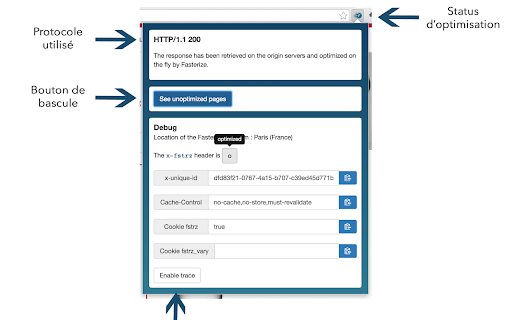
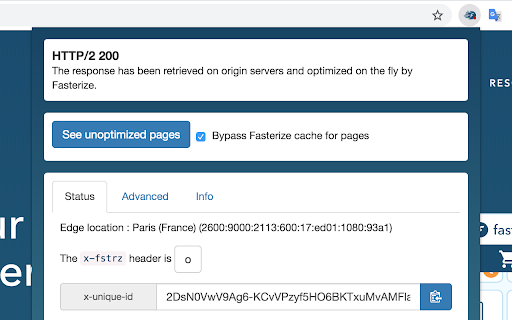
The protocol used to serve the page: HTTP / 1.1 or HTTP / 2.0

The toggle button: it allows to switch from the optimized version to the non-optimized version and thus to check if a page is broken by Fasterize.

The Debug section: it is particularly useful for the Fasterize team (when configuring client sites for example). It gives key information when opening a ticket to support.

The X-fstrz field: it gives details on the status of the optimization by Fasterize. The exact meaning of each letter is indicated on the flyby. The full list is available here (see the Header section).

The X-unique-id field: this one is a reference number. It allows the support team to easily find the logs associated with the optimization and reproduce the bugs faster.

The Fstrz cookie: particularly useful during an A / B test, it allows to know if the session is optimized or not (true: optimized, false: not optimized).

The cookie fstrz_vary: At Fasterize, we apply a segmentation of the hidden pages. Thus, each cached page has different hidden versions: according to the browsers, the terminals or according to a specific cookie (we use the value of a cookie in our cache key).
Thanks to this "cookie fstrz_vary" field, we know if the page is hidden according to a particular segment.

The "enable trace" button is used to trace more debug information in the logs.
Technical
- Version
- 4.5.2
- Manifest
- V3
- Size
- 215KiB
- Min Chrome
- 88
- Languages
- 1
- Featured
- Yes
Metadata
- ID
- pophpmnchlcddhhilmnopbahlaohdfig
- Developer ID
- u335ab2241b9606fa0ac0f53a14470d7e
- Developer Email
- [email protected]
- Created
- Apr 7, 2015
- Last Updated (Store)
- Apr 28, 2026
- Last Scraped
- Jun 13, 2026
- Website
- https://www.fasterize.com/
- Privacy Policy
- https://www.fasterize.com/en/privacy-policy/
Similar extensions
Alternatives to Fasterize Status, ranked by description similarity.

SpeedVitals
Perform Web Vitals & TTFB Test on Multiple Locations & Devices
1.0K
★ 4.6

Page Speed Checker - Load Time Analyzer
Detailed page load breakdown with color indicators. Tracks 12+ metrics including DNS, response time, DOM processing.
100
★ 5.0

Core Web Vitals Test
Check Core Web Vitals and compare metrics for desktop and mobile devices. Check pagespeed insights using our Chrome extension.
8.0K
★ 4.9

Website Load Time Checker
Displays the load time of the current webpage and provides performance tips.
54

TTFB Checker
Quickly check Time To First Byte (TTFB) for any webpage.
2.0K
★ 4.6

SEO Page Speed Test
Analyze any webpage's loading speed and get SEO optimization recommendations to improve your Google rankings.
12

Clear Cache Extension 🔄
Extension to clear browser cache and refresh page in real time for all your necessary needs ♻️
126
★ 5.0

Site Speed by DebugBear
View Web Vitals metrics for the websites you visit and quickly navigate to external web performance testing tools.
9.0K
★ 4.8
Data sourced from the Chrome Web Store · last verified Jun 13, 2026.