
Word Counter
Word counter & reading time estimator. See word count, character count, and text stats for any page or selection.
As of June 2026, Word Counter has 4 users in the Workflow & Planning category.
Usersno change0%
4
4
Ratingno change0%
—
— reviews
Reviewsno change0%
—
Version
1.0
Manifest V3
History
7 snapshotsTracking since Apr 7, 2026.
View as table
| Date | Users | Rating | Reviews | Version |
|---|---|---|---|---|
| Apr 7, 2026 | — | — | — | 1.0 |
| Apr 19, 2026 | — | — | — | 1.0 |
| Apr 26, 2026 | 2 | — | — | 1.0 |
| May 9, 2026 | 3 | — | — | 1.0 |
| May 27, 2026 | 2 | — | — | 1.0 |
| Jun 3, 2026 | 3 | — | — | 1.0 |
| Jun 8, 2026 | 2 | — | — | 1.0 |
| Now | 4 | — | — | 1.0 |
Permissions & access
- Permissions
- storageactiveTab
- Host access
- <all_urls>
Screenshots

About
**Know your words. Track your reading. Instantly.**

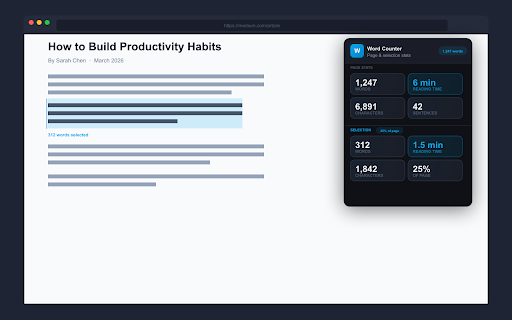
Word Counter is a clean, fast Chrome extension that gives you real-time word count, reading time, character count, and sentence count for any webpage — or just the text you've selected. No sign-up. No permissions abuse. Just the numbers you need, right when you need them.

---

### What It Does

Open the popup on any page and instantly see:

- **Word Count** — total words on the page, updated in real time
- **Reading Time** — estimated time to read, based on your personal reading speed (adjustable WPM)
- **Character Count** — total characters on the page
- **Sentence Count** — number of sentences in the visible content

**Select any text** and the Selection panel activates automatically — showing word count, reading time, character count, and what percentage of the full page you've selected. Perfect for checking how long a paragraph or article section is before quoting it.

---

### Who It's For

- **Writers & bloggers** checking article length before publishing
- **Students** analyzing reading assignments or tracking essay progress
- **Content marketers** auditing competitor pages for word count and content depth
- **SEO professionals** measuring on-page text volume and content density
- **Researchers** quickly gauging how long a source document is
- **Anyone** who wants to know how long it will take to read a page

---

### Key Features

- Real-time word count badge on the extension icon — glance at word count without opening the popup
- Adjustable reading speed (50–1000 WPM) — calibrate to your actual pace
- Selection stats — instant word count & reading time for highlighted text
- Works on articles, blogs, documentation, Google Docs, and most websites
- Lightweight and fast — no background data collection, no external servers
- 100% local — your text never leaves your browser

---

### Privacy First

Word Counter operates entirely in your browser. It reads page text only to calculate statistics — nothing is stored, logged, or transmitted. No accounts, no tracking, no nonsense.

---

### Permissions

- **storage** — saves your WPM preference and badge toggle setting locally
- **activeTab + scripting** — reads the current page's visible text to calculate statistics
- **tabs** — identifies the active tab to display the badge count

---

Word Counter is built by Patrick Bushe, a digital product designer from Los Angeles. It's part of a suite of focused, privacy-respecting browser tools at bushe.co.

---

word counter, reading time estimator, character count, word count tool, text statistics, webpage word counter, reading time chrome extension, word count extension
Technical
- Version
- 1.0
- Manifest
- V3
- Size
- 203KiB
- Min Chrome
- 88
- Languages
- 1
- Featured
- No
Metadata
- ID
- pohkgnbinppekeilclikfgjbdopkkdah
- Developer ID
- ue205c0015032a992a8cdc67600cc4e46
- Developer Email
- [email protected]
- Created
- Apr 7, 2026
- Last Updated (Store)
- Apr 7, 2026
- Last Scraped
- Jun 8, 2026
- Website
- bushe.co
- Support URL
- https://bushe.co/?view=contact
- Privacy Policy
- https://bushe.co/word-counter/privacy-policy.html
Data sourced from the Chrome Web Store · last verified Jun 8, 2026.