Display #Anchors
Displays anchors for all content in the current web page without breaking the layout.
As of May 2026, Display #Anchors has 10,000 users and a 4.88/5 rating from 60 reviews in the Workflow & Planning category.
Usersno change0%
10.0K
10,000
Ratingno change0%
4.88
60 reviews
Reviewsno change0%
60
Version
1.5
Manifest V3
History
1 snapshotsTracking since Apr 26, 2026.
View as table
| Date | Users | Rating | Reviews | Version |
|---|---|---|---|---|
| Apr 26, 2026 | 10.0K | 4.88 | 60 | 1.5 |
| Now | 10.0K | 4.88 | 60 | 1.5 |
Permissions & access
- Permissions
- scriptingstoragenotificationscontextMenusactiveTab
- Host access
- None declared
Screenshots
About
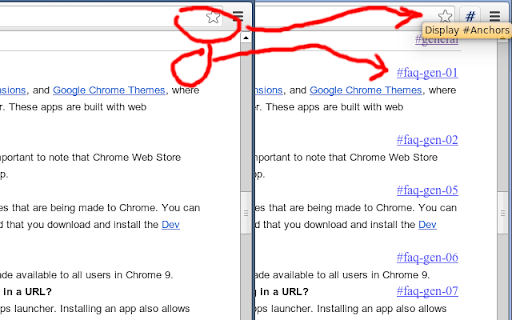
Display #Anchors offers an easy way to see
all (invisible) anchors in a page, to make it easier to link to a specific part of a webpage.

【  FEATURES  】

- Finds all anchors in a page and shows a marker next to it.
- Does not alter the layout; so no jumpy pages or expensive repaints.
- The anchored content is highlighted on Hover over the marker.
- The marker is highlighted on hover over the anchored content.
- Click on the toolbar button to remove all markers.
- The extension consumes no memory until it's actually used.
- Optional option to display anchors in cross-origin frames.

【  Customization  】
- You can set a custom shortcut to toggle the extension (Alt + Shift + A by default).
- You can customize the label of the displayed anchor.
- You can optionally grant access to all sites, to display anchors in cross-origin frames.

Detailed instructions are available at https://github.com/Rob--W/display-anchors#customization

【  HISTORY  】

Before creating this extension, I've been using the "Display Anchors" feature of Chris Pederick's
"Web Developer" extension for Chrome.
An unfortunate "feature" of this implementation is that the markers cause changes to the layout, resulting in some
loss of time to find the position of the page before activating the anchors (and a broken layout looks ugly).
Besides that, the extension had too much overhead (it activates on every page, and consumes memory even when I did
not use it). This encouraged me to develop a new extension that offers the desired feature in an optimal way.

【  SUPPORT  】
Source code: https://github.com/Rob--W/display-anchors
Report a bug: https://github.com/Rob--W/display-anchors/issues
Contact: [email protected]
Technical
- Version
- 1.5
- Manifest
- V3
- Size
- 32.65KiB
- Min Chrome
- 121
- Languages
- 1
- Featured
- Yes
Metadata
- ID
- poahndpaaanbpbeafbkploiobpiiieko
- Developer ID
- u336687fa160e58e37c25213d6e79c1b9
- Developer Email
- [email protected]
- Created
- Sep 30, 2013
- Last Updated (Store)
- Jun 3, 2024
- Last Scraped
- May 23, 2026
- Website
- —
- Privacy Policy
- https://robwu.nl/privacy/cws/
Similar extensions
Alternatives to Display #Anchors, ranked by description similarity.

Anchorly
Anchorly: Free anchor saver with simple text anchoring—no trial or PDF annotation.
37
★ 5.0

ConvoAnchor
ConvoAnchor helps you save and organize key parts of conversations in ChatGPT, Claude, and Gemini.
10
★ 5.0

anchor
Tab switcher for Google Chrome.
233
★ 5.0
Mark Location
Mark a location on a page and scroll to it.
1.0K
★ 3.6

Anchor
Save the thought. Close the tab.
8

PageMark Navigator
Mark your position on the page and jump between marks using F2 key
223
★ 1.8
Generate Links for Headers
Automatically generates links for all headers on the page, to make it easier to share specific sections of the page.
449
★ 4.9

AnchorPages
A browser extension to add links to specific locations on a web page with features including search, add, edit and delete.
—
Data sourced from the Chrome Web Store · last verified May 23, 2026.