
Auto hide next up card for Amazon Prime Video
Hides next up card and other obtrusive elements of Amazon Prime Video.
As of June 2026, Auto hide next up card for Amazon Prime Video has 20,000 users and a 4.92/5 rating from 65 reviews in the Accessibility category.
Usersup 100.0 percent+100.0%
20.0K
20,000
Ratingup 0.2 percent+0.2%
4.92
65 reviews
Reviewsup 12.1 percent+12.1%
65
Version
2.17.4
Manifest V3
90-day change · In the last 90 days this extension gained 10.0K users, 3 version updates.
History
6 snapshotsTracking since Apr 4, 2026.
View as table
| Date | Users | Rating | Reviews | Version |
|---|---|---|---|---|
| Apr 4, 2026 | 10.0K | 4.91 | 58 | 2.16.2 |
| Apr 16, 2026 | 10.0K | 4.92 | 59 | 2.17.1 |
| May 7, 2026 | 10.0K | 4.92 | 61 | 2.17.1 |
| May 14, 2026 | 10.0K | 4.92 | 63 | 2.17.1 |
| May 27, 2026 | 10.0K | 4.92 | 63 | 2.17.2 |
| Jun 20, 2026 | 10.0K | 4.92 | 65 | 2.17.2 |
| Now | 20.0K | 4.92 | 65 | 2.17.4 |
Changelog
- Apr 4, 2026description
The following features are implemented:
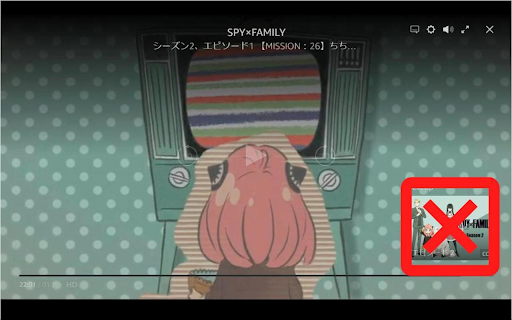
◆Hide next up card
  - Disable overlay display for 5 seconds when auto-clicking the hide button
  - Prevents darkening in conjunction with next up appears
  - You can also make the next up card appear only when the overlay display is enabled
◆Skip ads
◆Hide reactions (like/not for me)
  - You can also make the reactions appear only when the overlay display is enabled
◆Hide featured items
◆Hide skip intro button
  - You can also make the intro skip button appear only when the overlay display is enabled
◆Hide rating
◆Prevents darkening when overlay display is enabled
  - You can also add black outlines for texts and icons
◆Move the center buttons(Play/Pause, Back and Forward) to the bottom
◆Hide X-Ray
◆Hide various text and buttons
  - (While holding down the show key and operating the mouse, it will become temporarily visible)
  - title
  - episode title
  - various buttons in the top right
  - seek bar
  - playback time
  - center buttons
  - next episode button
◆Monitor and modify network activity
  - Force playback at highest resolution
  - Remove ad related data
  - Change autoplay flag to true
  - Disable featured items
  - Disable reactions (like/not for me)
  - Play the next episode if the video is automatically closed at the end of the video

An options icon will be added in the upper right corner of the video that allows you to open the options dialog.
(It is also possible to open the options dialog from the context menu.)
The options dialog allows you to enable/disable the above features.
The options dialog can also be opened by pressing `Alt + P / Option + P`. (Shortcut keys can be changed)
If you change the options, please reload the page.

This extension runs on primevideo.com and on Amazon in all countries.
However, it has only been tested on amazon.co.jp.
The following features are implemented:
◆Hide next up card
◆Skip ads
◆Hide reactions (like/not for me)
◆Hide featured items
◆Hide skip intro button
◆Hide rating
◆Prevents darkening when overlay display is enabled
  - You can also add black outlines for texts and icons
◆Hide X-Ray
◆Hide various text and buttons
  - (While holding down the show key and operating the mouse, it will become temporarily visible)
  - title
  - episode title
  - close button
  - various buttons in the top right
  - seek bar
  - playback time
  - control buttons in the bottom center
  - next episode button
◆Monitor and modify network activity
  - Force playback at highest resolution
  - Remove ad related data
  - Change autoplay flag to true
  - Disable featured items
  - Disable reactions (like/not for me)
  - Play the next episode if the video is automatically closed at the end of the video

An options icon will be added in the upper right corner of the video that allows you to open the options dialog.
(It is also possible to open the options dialog from the context menu.)
The options dialog allows you to enable/disable the above features.
The options dialog can also be opened by pressing `Alt + P / Option + P`. (Shortcut keys can be changed)
If you change the options, please reload the page.

This extension runs on primevideo.com and on Amazon in all countries.
However, it has only been tested on amazon.co.jp.
Permissions & access
- Permissions
- contextMenusstorage
- Host access
- None declared
Screenshots
About
The following features are implemented:
◆Hide next up card
◆Skip ads
◆Hide reactions (like/not for me)
◆Hide featured items
◆Hide skip intro button
◆Hide rating
◆Prevents darkening when overlay display is enabled
  - You can also add black outlines for texts and icons
◆Hide X-Ray
◆Hide various text and buttons
  - (While holding down the show key and operating the mouse, it will become temporarily visible)
  - title
  - episode title
  - close button
  - various buttons in the top right
  - seek bar
  - playback time
  - control buttons in the bottom center
  - next episode button
◆Monitor and modify network activity
  - Force playback at highest resolution
  - Remove ad related data
  - Change autoplay flag to true
  - Disable featured items
  - Disable reactions (like/not for me)
  - Play the next episode if the video is automatically closed at the end of the video

An options icon will be added in the upper right corner of the video that allows you to open the options dialog.
(It is also possible to open the options dialog from the context menu.)
The options dialog allows you to enable/disable the above features.
The options dialog can also be opened by pressing `Alt + P / Option + P`. (Shortcut keys can be changed)
If you change the options, please reload the page.

This extension runs on primevideo.com and on Amazon in all countries.
However, it has only been tested on amazon.co.jp.
Technical
- Version
- 2.17.4
- Manifest
- V3
- Size
- 67.21KiB
- Min Chrome
- 88
- Languages
- 2
- Featured
- Yes
Metadata
- ID
- pnpkddhaeadgjpmmcahamnicmplobkci
- Developer ID
- u7c64fb907fab8bf369b1a4c711d628c1
- Developer Email
- [email protected]
- Created
- Oct 24, 2023
- Last Updated (Store)
- Jun 12, 2026
- Last Scraped
- Jun 20, 2026
- Website
- https://ryo-fujinone.net/
- Privacy Policy
- —
Similar extensions
Alternatives to Auto hide next up card for Amazon Prime Video, ranked by description similarity.

Prime+
Skips Prime intros & ads. It also includes a autoplay function to play the next episode.
16

Skip Video Ads
A Chrome extension that skips video ads on Video platforms.
2.0K
★ 4.6

Pure motion
The video ad remover
20.0K
★ 4.4

Ad Speedrunner
Skip Prime Video ads at 16x speed automatically
6

TVer非表示フィルター
TVerの番組、エピソードを非表示にするフィルター機能を追加します。
22

Outside YouTube Player Bar
Display YouTube's player bar outside the video.
10.0K
★ 4.3

Netflix AutoSkip
Autoclicker for Netflix intros, recaps, credits and continue watching prompts
3.0K
★ 4.4

Netflixやアマプラなどでfilmarksレーティング表示など追加
NetflixやアマプラやU-NEXTなどの動画配信サイトで、映画レビューサイト「filmarks」のレーティングを表示したり、ショートカットーによる動画検索など出来るようになります
255
★ 4.5
Data sourced from the Chrome Web Store · last verified Jun 20, 2026.