
Diff Checker
Shows line-based differences between two texts. Toolbar: new tab or popup. Storage: local open-mode preference only.
As of June 2026, Diff Checker has 8 users and a 5.00/5 rating from 1 reviews in the Productivity category.
Usersno change0%
8
8
Ratingno change0%
5.00
1 reviews
Reviewsno change0%
1
Version
1.1.2
Manifest V3
90-day change · In the last 90 days this extension 1 version update, changed permissions.
History
9 snapshotsTracking since Apr 11, 2026.
View as table
| Date | Users | Rating | Reviews | Version |
|---|---|---|---|---|
| Apr 11, 2026 | — | — | — | 1.0.0 |
| Apr 21, 2026 | — | — | — | 1.0.0 |
| Apr 25, 2026 | 4 | 5.00 | 1 | 1.1.2 |
| May 3, 2026 | 5 | 5.00 | 1 | 1.1.2 |
| May 9, 2026 | 6 | 5.00 | 1 | 1.1.2 |
| May 14, 2026 | 5 | 5.00 | 1 | 1.1.2 |
| May 20, 2026 | 7 | 5.00 | 1 | 1.1.2 |
| May 26, 2026 | 6 | 5.00 | 1 | 1.1.2 |
| Jun 8, 2026 | 7 | 5.00 | 1 | 1.1.2 |
| Now | 8 | 5.00 | 1 | 1.1.2 |
Changelog
- Apr 21, 2026description
Diff Checker helps you compare two text blocks quickly and clearly.

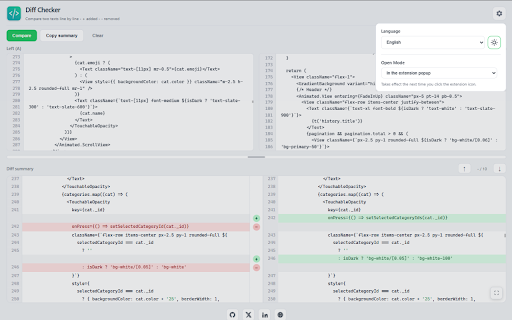
Paste your texts into the left and right editors, then run comparison to see:
- Added lines (+)
- Removed lines (-)
- Unchanged lines

Key features:
- Clean line-by-line diff view
- Built-in line numbers in both editors
- Difference navigation (next/previous)
- Copy diff summary with one click
- Full-page mode for larger comparisons
- English and Turkish interface support

Privacy:
All comparisons run locally in your browser. Your text is not sent to external servers.
Diff Checker allows you to quickly and clearly compare two texts line by line.

Paste the texts into the left and right editor, then run the comparison:

Added lines (+)
Deleted rows (-)
Rows that remain the same
Highlights:

Clean line based diff; side by side (Text 1 / Text 2) view in summary area
Line numbers in both editors
Swap left and right with one click
Same/added/deleted numbers in the toolbar after comparison
Navigate forward/backward between differences
Copy diff summary with one click
Height adjustment with separator between editor and summary
Full screen for summary (Esc to exit)
Light and dark theme
Settings: language (Automatic / English / Turkish) and opening in new tab or popup when clicking on the icon
Full page usage for widescreen when opened in tab

What's New (v1.1.2)
Added language support for 50+ Languages.

What's New (v1.1.1)
Added inline diff support: Text changes on the same line are highlighted with precision.

What's New (v1.1.0)
Added settings panel for side-by-side summary columns, switching columns, live stats, draggable size setting, fullscreen for summary, dark theme and language, and tab/popup selection.

Privacy:
All comparisons are done locally, within the browser. Your texts are not sent to external servers.
- Apr 21, 2026short_description
Shows line-based differences between two texts. Toolbar icon opens in a new tab.
Shows line-based differences between two texts. Toolbar: new tab or popup. Storage: local open-mode preference only.
- Apr 21, 2026permissions
(empty)
storage
Permissions & access
- Permissions
- storage
- Host access
- None declared
Screenshots



About
Diff Checker allows you to quickly and clearly compare two texts line by line.

Paste the texts into the left and right editor, then run the comparison:

Added lines (+)
Deleted rows (-)
Rows that remain the same
Highlights:

Clean line based diff; side by side (Text 1 / Text 2) view in summary area
Line numbers in both editors
Swap left and right with one click
Same/added/deleted numbers in the toolbar after comparison
Navigate forward/backward between differences
Copy diff summary with one click
Height adjustment with separator between editor and summary
Full screen for summary (Esc to exit)
Light and dark theme
Settings: language (Automatic / English / Turkish) and opening in new tab or popup when clicking on the icon
Full page usage for widescreen when opened in tab

What's New (v1.1.2)
Added language support for 50+ Languages.

What's New (v1.1.1)
Added inline diff support: Text changes on the same line are highlighted with precision.

What's New (v1.1.0)
Added settings panel for side-by-side summary columns, switching columns, live stats, draggable size setting, fullscreen for summary, dark theme and language, and tab/popup selection.

Privacy:
All comparisons are done locally, within the browser. Your texts are not sent to external servers.
Technical
- Version
- 1.1.2
- Manifest
- V3
- Size
- 1.47MiB
- Min Chrome
- 88
- Languages
- 50
- Featured
- No
Metadata
- ID
- pmplpkjjpmdlebegljblfhnaciogbenp
- Developer ID
- ue0a4253c20ec098650e199d24ad22817
- Developer Email
- [email protected]
- Created
- Apr 10, 2026
- Last Updated (Store)
- Apr 17, 2026
- Last Scraped
- Jun 8, 2026
- Website
- halituzan.com
- Support URL
- https://halituzan.com
- Privacy Policy
- —
Data sourced from the Chrome Web Store · last verified Jun 8, 2026.