
Connected Mind
Draw unique and memorable mind maps, store them in the cloud for free and access them anywhere
As of May 2026, Connected Mind has 200,000 users and a 3.42/5 rating from 259 reviews.
Usersno change0%
200.0K
200,000
Ratingno change0%
3.42
259 reviews
Reviewsno change0%
259
Version
1.2
Manifest V2
History
2 snapshotsTracking since Apr 26, 2026.
View as table
| Date | Users | Rating | Reviews | Version |
|---|---|---|---|---|
| Apr 26, 2026 | 200.0K | 3.42 | 259 | 1.2 |
| May 23, 2026 | 300.0K | 3.42 | 259 | 1.2 |
| Now | 200.0K | 3.42 | 259 | 1.2 |
Permissions & access
- Permissions
- unlimitedStoragenotifications
- Host access
- None declared
Screenshots



About
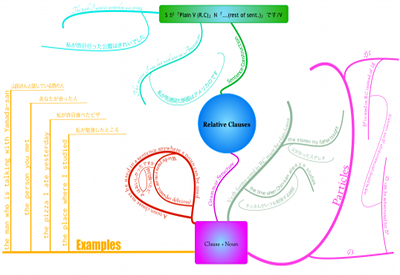
At last it is possible to create a mind map as individual and easy to imprint on your mind as one drawn by hand on paper. The mind maps you create with Connected Mind are even better as you can easily include images and shapes and you have a whole rainbow of colors and a selection of fonts at your disposal.

There is no limit to the number of maps you can create and you can store them in the free cloud storage provided. There is no need to create an account. Simply sign in with your Google or GMail credentials and your maps can be stored in the cloud on a google database.

Once stored in the cloud, you can access your mind maps from any computer that has Google Chrome installed.

You can also take you mind maps with you wherever you go with the Connected Mind Android app available from the Android Play (http://goo.gl/7oBhK) and the iPad app available from the App Store (https://itunes.apple.com/us/app/connected-mind/id659803223). You can open and edit any of your maps created in Chrome on Android or iOS, and vice versa.

Features
✓ Complete control over map layout
✓ Unlimited undo/redo
✓ Shortcut keys for common operations
✓ Speech recognition - speak the text of your branches
✓ Free cloud storage for every user (no need to create an account)
✓ Choice of over 60 fonts that don't need to be installed
✓ Add rich format notes, including images and links, to any map item
✓ Notes displayed as you move your mouse over items
✓ Choice of 27 shapes, with beautiful color gradient fills
✓ Images added to your maps can be sized and clipped to any supported shape
✓ Autosaves after every change
✓ Have multiple maps open, with thumbnail images of each for selection
✓ Copy & paste between maps
✓ Import maps created in Freemind

See the examples in the slideshow above for a taste of what is possible with Connected Mind.

If you experience problems with this App, please report them to [email protected].
Technical
- Version
- 1.2
- Manifest
- V2
- Size
- 19.72KiB
- Min Chrome
- —
- Languages
- 1
- Featured
- No
Metadata
- ID
- pmkffmgahaepmhkhkblhopnpleeikokc
- Developer ID
- u1cb0f70519c0654ca9974405b683e15e
- Developer Email
- —
- Created
- Sep 17, 2010
- Last Updated (Store)
- May 27, 2014
- Last Scraped
- May 23, 2026
- Support URL
- http://connected-mind.appspot.com/FAQ.html
- Privacy Policy
- —
Similar extensions
Alternatives to Connected Mind, ranked by description similarity.

Mind Map
You can create your Mind Map diagrams
20.0K
★ 4.1

Cloud MindMap
The Mind mapping tool that enables you to create and edit mind maps. You can open and save a mindmap file with your Google Drive.
2.0K
★ 3.6

MindMup 2.0 - Free Mind Map web site
Zero-friction, collaborative, free online mind mapping integrated with Google Drive and Google Photos.
100.0K
★ 4.0

MindMeister
Create, edit and share mind maps online. Also works with Google Drive!
900.0K
★ 3.5

AI Mind Maps Maker - Create Mind Map with AI
AI-powered Mind Mapping tool based on AI, can quickly generate a mind map, and you can continue to edit it in a WYSIWYG way.
10.0K
★ 4.2

QuickMap
Create and edit flowcharts seamlessly.
168
★ 5.0

MindMap
MindMaps or Map your Mind! Represent your words, ideas, tasks, or other items. With cloud support and Google Drive.
1.0K
★ 4.1

Mindomo - Mind Map Maker with AI
Create collaborative mind maps, concept maps, outlines, and Gantt charts. Includes AI generator, multiple export formats.
100.0K
★ 3.8
Data sourced from the Chrome Web Store · last verified May 23, 2026.