
Batch Link Extractor
Intelligently extract links from documentation websites and YouTube channels, batch add to NotebookLM and other knowledge bases
As of June 2026, Batch Link Extractor has 89 users in the Productivity category.
Usersdown 2.2 percent−2.2%
89
89
Ratingno change0%
—
— reviews
Reviewsno change0%
—
Version
1.2.1
Manifest V3
History
5 snapshotsTracking since Apr 19, 2026.
View as table
| Date | Users | Rating | Reviews | Version |
|---|---|---|---|---|
| Apr 19, 2026 | 91 | — | — | 1.2.1 |
| May 4, 2026 | 89 | — | — | 1.2.1 |
| May 14, 2026 | 86 | — | — | 1.2.1 |
| May 26, 2026 | 88 | — | — | 1.2.1 |
| Jun 7, 2026 | 83 | — | — | 1.2.1 |
| Now | 89 | — | — | 1.2.1 |
Permissions & access
- Permissions
- activeTabscriptingclipboardWritestoragetabs
- Host access
- https://*/*, http://*/*
Screenshots
About
════════════════════════════════════════════════════

🔗 NotebookLM Batch Link Extractor 🔗

A simple and efficient web link extraction tool, that perfectly integrates with NotebookLM and other knowledge management platforms.


✨ FEATURES ✨
─────────────────
🎯 Core Features
▸ Smart Link Extraction: Automatically identify and extract relevant links from pages.
▸ Multiple Display Modes: Text mode and preview mode to meet different needs.
▸ Batch Operations: One-click copy all links, supports processing large quantities of links.
▸ Real-time Editing: Directly edit link URLs and titles, supports undo operations.

🚀 Advanced Features
▸ Multi-format Export: Supports plain text, CSV, JSON, and Markdown formats.
▸ Link Management: Preview, edit, and delete individual links.
▸ Smart Titles: Automatically fetches the titles of linked pages.
▸ History: Auto-save extraction history, supports data recovery.

🎨 User Experience
▸ Clean Interface: Focuses on core functions with simple, intuitive operation.
▸ Network Status: Real-time display of network connection status.
▸ Quick Operations: One-click extract, one-click copy, one-click clear.
▸ Cross-platform Compatible: Works with any knowledge management tool that supports batch import.


📦 INSTALLATION 📦
─────────────────
▸ Method 1: Chrome Web Store (Recommended)
1. Visit the extension page on the Chrome Web Store (Please replace this with your store link)
2. Click "Add to Chrome"
3. Confirm the installation permissions

▸ Method 2: Developer Mode Installation
1. Download the latest .zip file from the releases page.
2. Extract it to a local folder.
3. Open Chrome browser, go to `chrome://extensions/`
4. Enable "Developer mode" in the top right corner.
5. Click "Load unpacked".
6. Select the extracted folder.


🎮 USAGE GUIDE 🎮
─────────────────
【Simplified Workflow (Recommended)】
1. Extract Links from the Source Page
   ● Open a YouTube channel, GitHub repository, documentation site, etc.
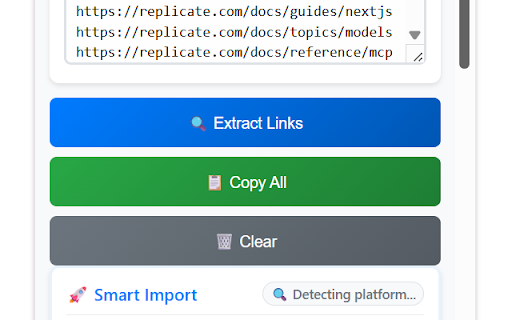
   ● Click the extension icon 🔗, then click "🔍 Extract Links" and wait for it to complete.

2. Choose the Appropriate Format to Copy
   ● Plain text: Suitable for most cases.
   ● CSV format: Includes titles and links.

3. Batch Import to Your Target Tool
   ● NotebookLM: Directly paste URLs for batch import.
   ● Obsidian: Paste as a link list.
   ● Notion: Import as a database or page.

【Interface Overview】
┌─────────────────────────────────┐
│  🔗 NotebookLM Link Extractor   │
│  Smart link extraction, batch   │
│  import to knowledge base       │
├─────────────────────────────────┤
│  Extracted Links (Found 25)     │
│  ┌─ 📝 Text ─ 👁️ Preview ─┐    │
│  │ https://example.com/doc1   │
│  │ https://example.com/doc2   │
│  │ ...                        │
│  └─────────────────────────────┘ │
├─────────────────────────────────┤
│ 📋 Copy Format                  │
│ [Plain] [CSV] [JSON] [Markdown] │
│ [🔍 Extract] [📁 Export] [🗑️ Clear] │
│                [⚙️ Settings]     │
└─────────────────────────────────┘

【NotebookLM Usage Tips】
⭐ Important Discovery: NotebookLM supports importing batches of YouTube links as website URLs!
1. Use the extension on a YouTube channel page to extract all video links.
2. Copy the links as "Plain Text".
3. In NotebookLM, select the "Website" source type (NOT the "YouTube" type).
4. Paste all the links. NotebookLM will process each one, allowing for a batch import.


🌐 SUPPORTED WEBSITES 🌐
─────────────────
● Docs & Knowledge Bases: GitBook, Notion, ReadTheDocs, GitLab/GitHub Pages, Confluence
● Video & Media: YouTube (Channels, Playlists), Vimeo, Bilibili
● Dev Platforms: GitHub, GitLab, Stack Overflow
● Blogs & Articles: Medium, Dev.to, Hashnode, WordPress
● And many more general websites!


⚙️ SETTINGS ⚙️
─────────────────
Click the "⚙️ Settings" button to configure:
● Maximum Links: Control the upper limit of extracted links.
● Extraction Timeout: Set a timeout for the extraction process.
● Sort Method: By URL length, alphabetical order, discovery order, etc.
● Filter Settings: Include/exclude link types, use regex patterns to filter, whitelist domains.


❓ FAQ ❓
─────────────────
Q: Why was the automation functionality removed?
A: We found that a simple copy-paste is more reliable and often faster than complex automation, especially since tools like NotebookLM now support batch URL pasting.

Q: How do I batch import YouTube links to NotebookLM?
A: The key is to select the "Website" source type instead of "YouTube". This treats the YouTube links as standard URLs, enabling batch import.

Q: Does it support other browsers?
A: It is currently developed for Chrome, but it should also work on Edge and other Chromium-based browsers.

Q: What if the extracted links are not accurate enough?
A: You can manually edit or delete unwanted links in the preview mode before copying.


📋 CHANGELOG 📋
─────────────────
▸ v1.2.0 (2025-06-19)
  🔥 Major Simplification: Removed all automation features to focus on link extraction and copying.
  ✨ Enhanced Experience: Simplified interface and improved stability.
  📖 Updated Documentation: Rewritten usage guide to emphasize the simple workflow.

(Previous versions can be listed here if desired)


📄 LICENSE 📄
─────────────────
MIT License


🤝 CONTRIBUTING 🤝
─────────────────
We welcome contributions! Please feel free to submit issues and pull requests.

---
Last updated: June 19, 2025
Technical
- Version
- 1.2.1
- Manifest
- V3
- Size
- 80.77KiB
- Min Chrome
- 88
- Languages
- 1
- Featured
- No
Metadata
- ID
- pmdfjeagklhggaicjalbmdopmikghppo
- Developer ID
- ub8080f06215d8e2cdbc447b5e7b3434e
- Developer Email
- [email protected]
- Created
- Jun 23, 2025
- Last Updated (Store)
- Aug 22, 2025
- Last Scraped
- Jun 7, 2026
- Website
- —
- Support URL
- —
- Privacy Policy
- —
Similar extensions
Alternatives to Batch Link Extractor, ranked by description similarity.

NotebookLM - Youtube Link (Source) Automator
Extracts YouTube video lists/links and automates adding them to NotebookLM.
8.0K
★ 4.2

NotebookLM Extension - ExtendLM
NotebookLM extension: folders, tags, custom prompts, bulk notebook and source management, exports, merging, bulk imports and more.
20.0K
★ 4.6

NotebookLM Importer - Web & YouTube
One-click import web pages & YouTube to NotebookLM. Bulk import from RSS, tabs, playlists. Manage notebooks & Audio Overview.
78

YouTube Link Extractor
Extract video links from YouTube playlists or pages for research, learning, and NotebookLM.
81

Web Clipper for NotebookLM
Save web pages, PDFs, and YouTube videos to NotebookLM instantly
20.0K
★ 4.9

NotebookLM
NotebookLM lets you import multiple tabs and YouTube videos at once. Use notebooklm for bulk imports easily
10.0K
★ 5.0

NotebookLM Fast Importer
One-click import web pages and YouTube videos to NotebookLM. Features floating button, batch import, and keyboard shortcuts.
72
★ 5.0

NotebookLM YouTube Importer
Process multiple URLs on NotebookLM with enhanced features
110
★ 3.5
Data sourced from the Chrome Web Store · last verified Jun 7, 2026.