
OmniTab - Intelligent Command Center
Find, manage, and automate your browser with the speed of thought. A workflow designed for focus.
As of June 2026, OmniTab - Intelligent Command Center has 24 users and a 5.00/5 rating from 4 reviews in the Functionality & UI category.
Usersdown 4.0 percent−4.0%
24
24
Ratingno change0%
5.00
4 reviews
Reviewsno change0%
4
Version
0.10.0
Manifest V3
History
4 snapshotsTracking since Apr 19, 2026.
View as table
| Date | Users | Rating | Reviews | Version |
|---|---|---|---|---|
| Apr 19, 2026 | 25 | 5.00 | 4 | 0.10.0 |
| May 4, 2026 | 23 | 5.00 | 4 | 0.10.0 |
| May 14, 2026 | 27 | 5.00 | 4 | 0.10.0 |
| Jun 7, 2026 | 23 | 5.00 | 4 | 0.10.0 |
| Now | 24 | 5.00 | 4 | 0.10.0 |
Permissions & access
- Permissions
- tabshistorybookmarksfavicontopSitesstoragetabGroups
- Host access
- None declared
Screenshots


About
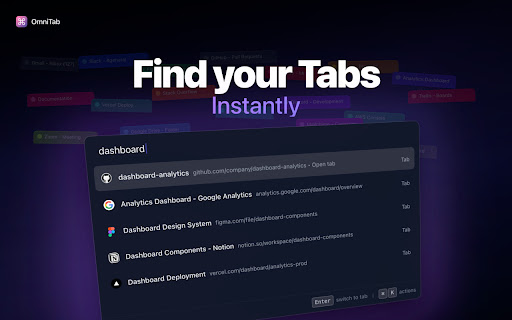
🚀 Your browser's command center. Find anything, do everything, never leave the keyboard.

  ━━━━━━━━━━━━━━━━━━━━━━━━━━━━━━━━━━━━━━━━━━━━━━━━━━━━━━━━━━━━

  ✨ WHAT IT DOES

  • Instant search across tabs, history, and bookmarks
  • Smart commands: close duplicates, group tabs, clear history
  • Keyboard-first: Cmd+Shift+K opens, Escape closes
  • Lightning fast: 50ms response, zero lag

  ⚡ WHY YOU NEED IT

  Stop hunting through 100+ tabs. Stop losing important pages. Stop breaking your flow.
  One shortcut. Every tab. Every bookmark. Every command. Instantly.

  🎯 KEY FEATURES

  ► Universal Search - Find anything with fuzzy, typo-tolerant search
  ► Power Commands - Execute actions like "close duplicates" without touching the mouse
  ► Smart Prefixes - Use 't' for tabs, 'h' for history, 'b' for bookmarks
  ► Privacy First - 100% local, zero data collection
  ► Blazing Fast - Instant results as you type

  💡 PERFECT FOR

  • Developers with documentation overflow
  • Researchers managing resources
  • Power users who live in the keyboard
  • Anyone with too many tabs

  ⌨️ HOW TO USE

  1️⃣ Press Ctrl+Shift+K (Cmd+Shift+K on Mac)
  2️⃣ Type what you're looking for
  3️⃣ Press Enter to go
  4️⃣ Press Escape to close

  That's it. No setup. No account. No tracking.

  ━━━━━━━━━━━━━━━━━━━━━━━━━━━━━━━━━━━━━━━━━━━━━━━━━━━━━━━━━━━━

  🔒 100% Privacy • ⚡ 50ms Speed • 🎯 0 Configuration

  Built for professionals who demand speed.
Technical
- Version
- 0.10.0
- Manifest
- V3
- Size
- 2.4MiB
- Min Chrome
- 90
- Languages
- 1
- Featured
- No
Metadata
- ID
- pmacoccfllmbipbafagehnjgccegaaag
- Developer ID
- u2c0cc9f9e4756a0133b673d0f2a5a45a
- Developer Email
- [email protected]
- Created
- Jul 22, 2025
- Last Updated (Store)
- Aug 13, 2025
- Last Scraped
- Jun 7, 2026
- Website
- omnitab.app
- Support URL
- —
- Privacy Policy
- https://omnitab.app/privacy/
Similar extensions
Alternatives to OmniTab - Intelligent Command Center, ranked by description similarity.

QuickPeek - Spotlight & Alfred like Search but for Browsers
Spotlight and Alfred like Search for Browsers
14
★ 4.0

Omni Search - Spotlight Tab Search & Tab Manager
The fastest tab manager for Chrome. Search tabs, bookmarks, history & page content. Sort by recent, snooze, find duplicates.
367
★ 4.9

Selection Command – Instantly search, use AI, or launch tools.
Search, use AI, or run tools with selected text in one click, and speed up your browsing.
2.0K
★ 4.5

Tab Switch with Search
Quickly switch between tabs using Ctrl+Q and a search function
4

Pinner
An extension to easy pin/unpin tabs and close all unpinned at lightning speed
2

Tab Seeker
Find tabs that match your search keyword
15
★ 5.0

Yami - Bookmark Launcher
A fast and lightweight extension that helps you find and open bookmarks instantly - right from your keyboard.
40
★ 5.0

Minimalistic Smart New Tab
A minimalistic, secure new tab experience with smart features and offline support.
65
★ 5.0
Data sourced from the Chrome Web Store · last verified Jun 7, 2026.