
Copy X
Copy is collection, and there are words and links
As of June 2026, Copy X has 183 users and a 5.00/5 rating from 1 reviews in the Workflow & Planning category.
Usersup 10.2 percent+10.2%
183
183
Ratingno change0%
5.00
1 reviews
Reviewsno change0%
1
Version
1.1.5
Manifest V3
90-day change · In the last 90 days this extension 1 version update.
History
5 snapshotsTracking since Apr 26, 2026.
View as table
| Date | Users | Rating | Reviews | Version |
|---|---|---|---|---|
| Apr 26, 2026 | 166 | 5.00 | 1 | 1.1.4 |
| May 23, 2026 | 182 | 5.00 | 1 | 1.1.4 |
| May 30, 2026 | 161 | 5.00 | 1 | 1.1.5 |
| Jun 5, 2026 | 165 | 5.00 | 1 | 1.1.5 |
| Jun 13, 2026 | 174 | 5.00 | 1 | 1.1.5 |
| Now | 183 | 5.00 | 1 | 1.1.5 |
Permissions & access
- Permissions
- faviconclipboardWriteclipboardReadstorageunlimitedStoragecontextMenusnotificationsdownloads
- Host access
- *://aa-zz.cn/*
Screenshots


About
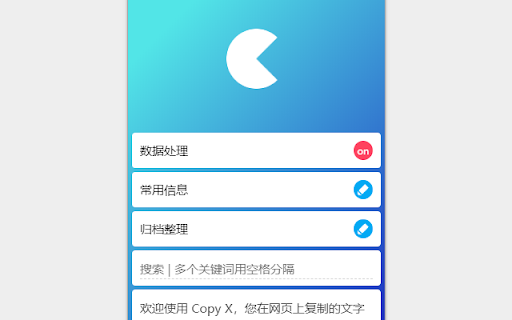
Copy X is a clipboard application that can process data and keep the text information you copied for a long time.  The functions are roughly as follows:

 「Keep more information」

 When you copy text in a web page, Copy X not only saves the selected text, but also saves the web address of the current web page.  In addition, click to copy, drag the mouse to the input box to automatically fill.  Copy X only saves the contents copied on the current browser webpage by default. If you need to save the contents copied elsewhere, please turn on " Global Mode" in the settings.

「Data preprocessing」

 After the copy behavior is detected, operations such as character replacement and character addition can be automatically performed, and the processed result can be copied to the system clipboard again (please open in the processing option). Paste is different content.

 「Different editing ability」

 When editing the content saved in Copy X, besides the conventional character editing frame, it also supports cutting and extracting the text, and then merging it to make a new text.

 「Custom merge」

 Select multiple texts and click Merge. At this time, you can replace and add characters to each text first, and then select the connection method between the texts (such as line feed, space or other characters) to finally merge multiple texts into one.

 「Common information」

 It is inevitable that we need to fill in some commonly used information such as e-mail in web pages or other software. Copy X has a special section for storing such information. You can use it at any time, click it to copy it, right click it to edit and delete it, and also drag the mouse to the input box to automatically fill it in.

 「data transfer」

 The data in Copy X can be exported as a local file or saved to the cloud. Even if you change your browser or computer, your data can be imported to a new client.

 「Picture processing」

 Copy X has a certain image processing ability. Right click on the webpage to see the function menu:

 1. Get picture links (support preprocessing): You can find pictures and get links at the current position of the mouse. In particular, you can also get links to some pictures loaded in the form of background through this menu (usually right-click on such pictures, the menu provided by the browser by default does not have options about pictures, so you cannot save them as they are or copy them);

 2. Crop and shrink: You can directly crop and shrink the pictures in the webpage, display the cropped size in real time and specify the width or height to shrink;

 3. Search for pictures: You can search for pictures and identify people in the pictures.

 「Find more」

 More features to be discovered.
Technical
- Version
- 1.1.5
- Manifest
- V3
- Size
- 1.7MiB
- Min Chrome
- 88
- Languages
- 2
- Featured
- No
Metadata
- ID
- pljacoeopccbcpnkgpbjmcckfehjjpbb
- Developer ID
- u04a2bbd5e986690009227bcd14283981
- Developer Email
- [email protected]
- Created
- Apr 6, 2019
- Last Updated (Store)
- May 16, 2026
- Last Scraped
- Jun 13, 2026
- Website
- http://aa-zz.cn/apps/
- Support URL
- —
- Privacy Policy
- http://aa-zz.cn/apps/privacy_policy.html
Similar extensions
Alternatives to Copy X, ranked by description similarity.

Smart Copy Link
Copy tabs and web page links. Support analysis text link, open links, add to bookmark, and export in various formats
10.0K
★ 4.5

Smart Copy – Clean Copy Text from Any Website
Clean copy text, remove formatting, keep source and date, and access clipboard history.
299
★ 5.0

Pure Copy
Smart clipboard manager: Save text snippets, copy without formatting, track history. Perfect for productivity.
21

Copy and Paste more
Copy and Paste more
30.0K
★ 4.4

Clipper
Easy click to copy & pase text clips from extension, dedicated 'Email' button. Create notes, bookmarks, email templates, etc.
5.0K
★ 4.2

Touclip - A new way to bookmark
A new way to bookmark.
68
★ 5.0

Copy It All
Hover-to-copy text, tables, images, and charts. Capture full pages as LLM-friendly bundles.
515

Clipboard History + Smart Paste
Never lose what you copied. Searchable clipboard history with smart paste options.
14
Data sourced from the Chrome Web Store · last verified Jun 13, 2026.