
Minesweeper
The original Minesweeper recreated as a Chrome App.
As of May 2026, Minesweeper has 7,000 users and a 3.21/5 rating from 33 reviews.
Usersno change0%
7.0K
7,000
Ratingno change0%
3.21
33 reviews
Reviewsno change0%
33
Version
1.1.1
Manifest V2
History
1 snapshotsTracking since Apr 26, 2026.
View as table
| Date | Users | Rating | Reviews | Version |
|---|---|---|---|---|
| Apr 26, 2026 | 7.0K | 3.21 | 33 | 1.1.1 |
| Now | 7.0K | 3.21 | 33 | 1.1.1 |
Permissions & access
- Permissions
- storage
- Host access
- None declared
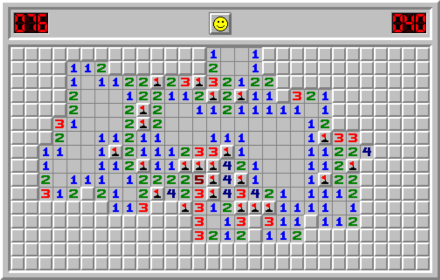
Screenshots


About
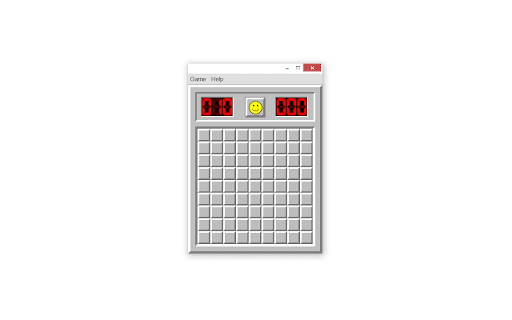
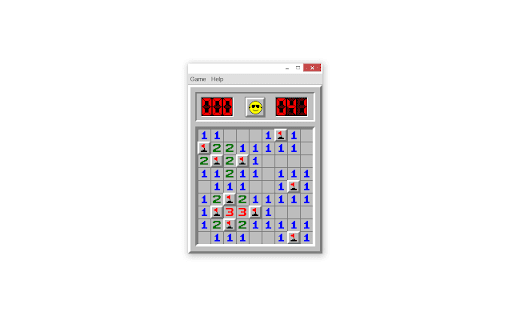
Play the classic Minesweeper as a Chrome App!  The game has been recreated as true to the original as possible.  This nostalgic game is still a fun challenge to play today.  See how fast you can clear the board and win.  Be sure to share this app with your friends and see who's the best!

Gameplay:
The goal of the game is to uncover every square without a mine under it.  By uncovering a mine, you lose.  Don't worry though; the first square you uncover will never be a mine!  When you uncover a square, it will display a number that describes how many mines are in the surrounding eight squares.  You can place a flag on a square to signify that it has a mine under it.  You do not need to place flags to win, but they sure are helpful!  If you have marks selected, you can flag the square once more to mark it as a possible mine.  You cannot uncover flagged squares, but you can uncover marked squares, so be careful.  To unflag or unmark a square, flag or mark it again.  If you get too frustrated, you can start a new game and try again!  Sometimes you may run out of squares you know do not have mines under them.  At this point, you'd have to make a random guess, so don't feel bad if luck wasn't on your side.  There's always the next game!  And if you decide you've played enough for the day, your settings are automatically backed up and synced to your Chrome account.

GUI:
The smiley face at the top of the screen represents the state of the game and can be clicked to start another game.  The number to the left of the smiley face starts off as the number of mines on the board.  As you flag squares, the number decreases; as you unflag squares, it increases.  The number to the right of the smiley records how long you've been playing the current game.  The tile doesn't start until you uncover your first square.

Menu:
Opening the menu does not pause an existing game.  The Game tab has different settings you can change for the game at any time.  Selecting "New game" will unsurprisingly start a new game.  The "Difficulty" option let's you change the difficulty, and it will automatically start a new game for you.  The three levels of difficulty are Beginner, Intermediate, and Expert.  The Beginner difficulty creates a 9×9 board with 10 hidden mines.  The Intermediate difficulty creates a 16×16 board with 40 hidden mines.  The Expert difficulty creates a 30×16 board with 99 hidden mines.  The next option let's you enable or disable marks.  You can read about what marks are in the Gameplay section above.  The last option gives you the ability to control the physical size of the game.  In the years since the original game's release, computer monitor pixel density has practically doubled.  This means that the original size of the game is very small.  By default, the game is displayed at a 200% scale.  You can change this to the original size if you prefer.
The Help tab's Wikipedia option opens the Wikipedia page for Minesweeper if you want a better articulated explanation of the game.  The About option displays a popup with the name of the game and the developer of this app along with a tip.

Controls:
Left mouse click the squares to uncover them.  Right mouse click the squares to flag or mark them.  When marks are disabled, right clicking a square toggles it between flagged and unflagged.  When marks are enabled, the square cycles through flagged, marked, and unflagged/unmarked.  Holding down the Control key while hovering the mouse over a square let's you take the fun out of the game by exposing the mines; the square will show up as red.
Technical
- Version
- 1.1.1
- Manifest
- V2
- Size
- 101KiB
- Min Chrome
- 23
- Languages
- 1
- Featured
- No
Metadata
- ID
- pkpifnggkgjkiblinjghkaoggafjiodf
- Developer ID
- u3638e40a76ceda9ce7ba4c775f43ffbb
- Developer Email
- —
- Created
- May 29, 2016
- Last Updated (Store)
- Dec 28, 2016
- Last Scraped
- May 23, 2026
- Website
- —
- Support URL
- —
- Privacy Policy
- —
Similar extensions
Alternatives to Minesweeper, ranked by description similarity.
Classic Minesweeper Offline Game
Bring Minesweeper game to your Google Chrome!
4.0K
★ 4.9

Minesweeper
A Chrome extension popup version of the existing Minesweeper game.
5

Tactical Mines
Classic minesweeper game. Reveal safe cells, flag mines, beat the timer. By AIO.com.ai
—
MineSweeper - Logic Adventures Game
Minesweeper Game – uncover hidden mines, challenge your logic skills, and enjoy a timeless classic!
1.0K
★ 4.1

Minesweeper Game
Classic Minesweeper game with a modern minimalist style
196
Minesweeper Unblocked & Free
Play Minesweeper Unblocked & Free as a Chrome extension - Also can Play without Internet, try it now!
2.0K
★ 4.3

Minesweeper game
Play the classic Minesweeper puzzle game!
6
Minesweeper Mania Game
Play Minesweeper Mania Game as a Chrome extension - Also can Play without Internet, try it now!
339
★ 5.0
Data sourced from the Chrome Web Store · last verified May 23, 2026.