PI Prompts · Prompt Library for LLM platforms
The 'PI Prompts' Chrome extension is a powerful tool designed to enhance your experience with LLM platforms like ChatGPT, Gemini…
As of June 2026, PI Prompts · Prompt Library for LLM platforms has 821 users and a 4.00/5 rating from 7 reviews in the Productivity category.
Usersup 52.6 percent+52.6%
821
821
Ratingno change0%
4.00
7 reviews
Reviewsno change0%
7
Version
1.8.2
Manifest V3
90-day change · In the last 90 days this extension 1 version update, changed permissions.
History
10 snapshotsTracking since Apr 4, 2026.
View as table
| Date | Users | Rating | Reviews | Version |
|---|---|---|---|---|
| Apr 4, 2026 | 538 | 4.00 | 7 | 1.7.1 |
| Apr 18, 2026 | 700 | 4.00 | 7 | 1.8.2 |
| Apr 23, 2026 | 840 | 4.00 | 7 | 1.8.2 |
| Apr 28, 2026 | 874 | 4.00 | 7 | 1.8.2 |
| May 5, 2026 | 877 | 4.00 | 7 | 1.8.2 |
| May 11, 2026 | 839 | 4.00 | 7 | 1.8.2 |
| May 23, 2026 | 851 | 4.00 | 7 | 1.8.2 |
| May 29, 2026 | 845 | 4.00 | 7 | 1.8.2 |
| Jun 5, 2026 | 826 | 4.00 | 7 | 1.8.2 |
| Jun 12, 2026 | 829 | 4.00 | 7 | 1.8.2 |
| Now | 821 | 4.00 | 7 | 1.8.2 |
Changelog
- Apr 4, 2026description
The 'PI Prompts' Chrome extension is a powerful tool designed to enhance your experience with LLM platforms like ChatGPT, Gemini etc. The extension simplifies your workflow by eliminating the need for constant copy-pasting of prompts. It comes with convenient options to download and upload prompts in JSON format, so you can share your collection with your friends or even create task specific collections.

PI Prompts work across a wide range of major AI platforms (including OpenAI GPT-5🆕, Gemini and Grok 🆕), including both well-established and newer ones.

Main Features Of PI Prompts:
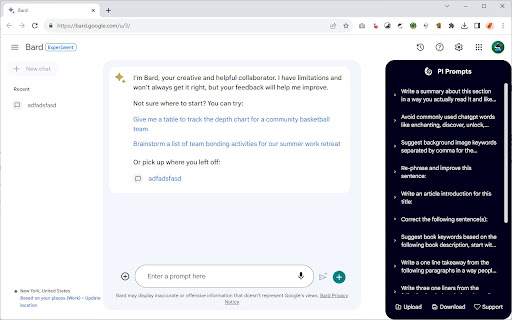
✅ As you start writing your prompt in the input box (as normally), this extensions quickly filters your right panel by showing the connected prompts
✅ If you click one of the prompts on the PI Prompt panel, it inserts the text into input box, alternatively if you quickly want to insert the top prompt in the panel, just click the "Tab"
✅ You can download and upload your prompt list anytime, even adding external prompt lists in JSON format
✅ You can edit and delete prompts directly on the panel
✅ Your prompts will be synced between your devices, where you use Chrome
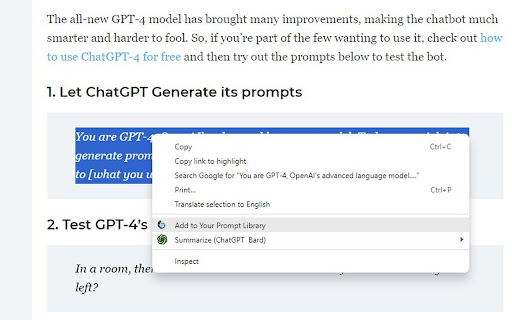
✅ If you highlight a prompt on any website, with a right-click you could add it instantly to your Prompt Library
✅ Now works with multiple Chrome browser profiles (Nov. 2025 updated)

How This Extension Will Alter The LLM Interfaces?
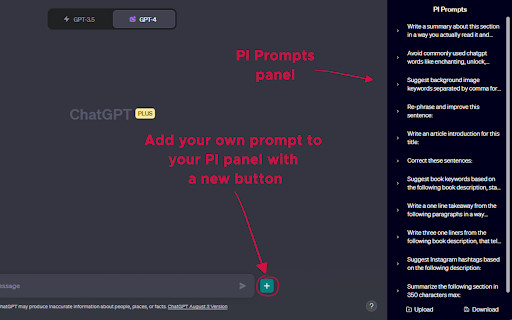
➕ An "Add button" next to the Submit at the bottom bar, so you can add new prompts to your panel anytime
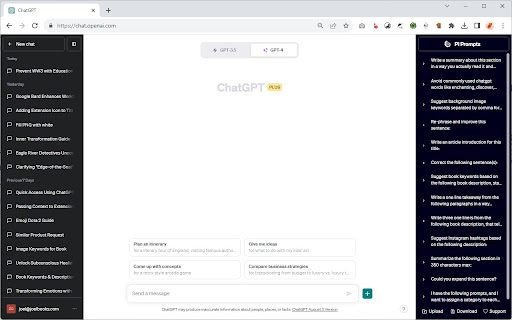
➕ A PI Panel that appears on the right hand side of the websites

Why Is This Prompt Extension Better Than Others?
💪 It's intuitive and seamlessly integrates with all platforms
💪 Easy to use both for newcomers and professionals
💪 Created with ❤️
The 'PI Prompts' Chrome extension is a powerful tool designed to enhance your experience with LLM platforms like ChatGPT, Gemini etc. The extension simplifies your workflow by eliminating the need for constant copy-pasting of prompts. It comes with convenient options to download and upload prompts in JSON format, so you can share your collection with your friends or even create task specific collections.

PI Prompts work across a wide range of major AI platforms (including OpenAI ChatGPT, Gemini and Grok), including both well-established and newer ones.

Main Features of PI Prompts:
✅🆕You can now login to you Google account and backup your prompts, so you could reach them by logging in on your other devices
✅🆕Close button added: you could hide the panel anytime
✅🆕More Easy to setup for first timer users. Just download the linked prompts.json (free) and drop it to the showed area
✅ As you start writing your prompt in the input box (as normally), this extensions quickly filters your right panel by showing the connected prompts
✅ If you click one of the prompts on the PI Prompt panel, it inserts the text into input box, alternatively if you quickly want to insert the top prompt in the panel, just click the "Tab"
✅ You can download and upload your prompt list anytime, even adding external prompt lists in JSON format
✅ You can edit and delete prompts directly on the panel
✅ Your prompts will be synced between your devices, where you use Chrome
✅ If you highlight a prompt on any website, with a right-click you could add it instantly to your Prompt Library
✅ Now works with multiple Chrome browser profiles (Nov. 2025 updated)

How This Extension Will Alter The LLM Interfaces?
➕ An "Add button" next to the Submit at the bottom bar, so you can add new prompts to your panel anytime
➕ A PI Panel that appears on the right hand side of the websites

Why Is This Prompt Extension Better Than Others?
💪 It's intuitive and seamlessly integrates with all platforms
💪 Easy to use both for newcomers and professionals
💪 Created with ❤️
- Apr 4, 2026host_permissions
<all_urls>
<all_urls>, https://www.googleapis.com/*
- Apr 4, 2026permissions
activeTab, scripting, tabs, storage, contextMenus
activeTab, scripting, tabs, storage, contextMenus, identity
Permissions & access
- Permissions
- activeTabscriptingtabsstoragecontextMenusidentity
- Host access
- <all_urls>, https://www.googleapis.com/*
Screenshots

About
The 'PI Prompts' Chrome extension is a powerful tool designed to enhance your experience with LLM platforms like ChatGPT, Gemini etc. The extension simplifies your workflow by eliminating the need for constant copy-pasting of prompts. It comes with convenient options to download and upload prompts in JSON format, so you can share your collection with your friends or even create task specific collections.

PI Prompts work across a wide range of major AI platforms (including OpenAI ChatGPT, Gemini and Grok), including both well-established and newer ones.

Main Features of PI Prompts:
✅🆕You can now login to you Google account and backup your prompts, so you could reach them by logging in on your other devices
✅🆕Close button added: you could hide the panel anytime
✅🆕More Easy to setup for first timer users. Just download the linked prompts.json (free) and drop it to the showed area
✅ As you start writing your prompt in the input box (as normally), this extensions quickly filters your right panel by showing the connected prompts
✅ If you click one of the prompts on the PI Prompt panel, it inserts the text into input box, alternatively if you quickly want to insert the top prompt in the panel, just click the "Tab"
✅ You can download and upload your prompt list anytime, even adding external prompt lists in JSON format
✅ You can edit and delete prompts directly on the panel
✅ Your prompts will be synced between your devices, where you use Chrome
✅ If you highlight a prompt on any website, with a right-click you could add it instantly to your Prompt Library
✅ Now works with multiple Chrome browser profiles (Nov. 2025 updated)

How This Extension Will Alter The LLM Interfaces?
➕ An "Add button" next to the Submit at the bottom bar, so you can add new prompts to your panel anytime
➕ A PI Panel that appears on the right hand side of the websites

Why Is This Prompt Extension Better Than Others?
💪 It's intuitive and seamlessly integrates with all platforms
💪 Easy to use both for newcomers and professionals
💪 Created with ❤️
Technical
- Version
- 1.8.2
- Manifest
- V3
- Size
- 46.36KiB
- Min Chrome
- 88
- Languages
- 1
- Featured
- No
Metadata
- ID
- pkpcekmmpgpaiedfchfdmcimogogbeje
- Developer ID
- u55a1e78c4dd41e2d8d288220da8e90b6
- Developer Email
- [email protected]
- Created
- Jul 29, 2023
- Last Updated (Store)
- Apr 2, 2026
- Last Scraped
- Jun 12, 2026
- Website
- https://joelbooks.com/
- Support URL
- https://joelbooks.com/contact/
- Privacy Policy
- https://joelbooks.com/privacy-policy/
Similar extensions
Alternatives to PI Prompts · Prompt Library for LLM platforms, ranked by description similarity.

AI Prompt Lab
Chrome Extension for AI Tool Prompts: Enhanced Interaction with AI
Creating, editing, storing, and organizing prompts has never…
319
★ 5.0

Prompt Suite
A powerful Chrome extension for managing and improving prompts
1
★ 5.0

LazyPrompt: One-Click Prompt Optimization
Maximize Your AI Creativity with Effortless High-Quality Prompts
2

FindMyPrompt
AI-powered prompt generator. Create, save, and organize AI prompts for ChatGPT and other AI assistants.
11
★ 4.0

Promptify
Enhance your prompt with a single click.
3
★ 5.0

Prime Prompt
Improve & refine your AI prompts instantly. One-click enhancement for ChatGPT, Claude, Gemini, Perplexity & more.
23
★ 5.0

MagicPrompt - AI Prompt Generator
The ultimate AI prompt generator for ChatGPT, Claude, Gemini, and MidJourney. Save, optimize, and launch prompts in one click.
1.0K
★ 4.9

AI Prompt Manager
A browser extension to manage and insert AI prompts using shortcuts.
7
★ 5.0
Data sourced from the Chrome Web Store · last verified Jun 12, 2026.