
growl
Automatically flags and neutralizes suspicious webpages, helping protect users from phishing, fraud, and other digital scams.
As of May 2026, growl has 8 users in the Privacy & Security category.
Usersno change0%
8
8
Ratingno change0%
—
— reviews
Reviewsno change0%
—
Version
0.1.0
Manifest V3
History
2 snapshotsTracking since Apr 26, 2026.
View as table
| Date | Users | Rating | Reviews | Version |
|---|---|---|---|---|
| Apr 26, 2026 | 8 | — | — | 0.1.0 |
| May 23, 2026 | 10 | — | — | 0.1.0 |
| Now | 8 | — | — | 0.1.0 |
Permissions & access
- Permissions
- activeTabtabsstorage
- Host access
- None declared
Screenshots


About
Online safety through programmatic vigilance. ❌ 💻 👤 ⚠️ 🌐 🛡️ 🚨

growl is a scam-prevention tool. It automatically sniffs out and defangs suspicious webpages, helping prevent phishing, fraud, and other digital scams.

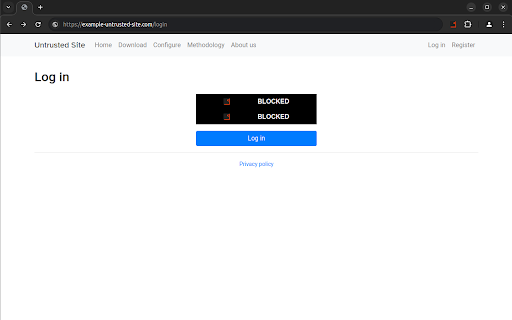
When a webpage is flagged as potentially suspicious, users must "opt in" in order to interact in certain ways with the site, like inputting credit-card data, personal information, or otherwise sensitive content.

As such, growl complements built-in browser security measures such as Google Chrome's Safe Browsing feature, providing additional content-filtering protections to enhance digital security.

growl is lightweight (and minimally obtrusive) -- but always has your back. It functions like a digital guardian or shoulder angel: As you browse, the extension is working hard in the background to detect threats and swinging into action to preempt them. Moreover, growl acts as a cybersecurity conscience of sorts, reminding users to stay vigilant with pop-out warnings upon detection of a suspicious site.

The computer security principles of "zero-trust" and "security by default" inspired growl's core functionality, along with the simple adage "better safe than sorry".

Features 🚀
`````````````````
⭐ Input Blocking and Warning
On page load, if the following two conditions are both met, automatically
block input elements (with stylized growl placeholders), removing the user's
ability to interact with them, and display a popup notification (in which the
user has controls to turn this behavior on or off).
    1. The page is classified as potentially untrusted.
    2. There are input elements on the page.

Exception: If user has previously whitelisted the site (either temporarily or persistently), the above behavior is overridden. The popup is still displayed, however, to remind the user the domain was initially classified as potentially suspicious, and to give them the opportunity to toggle back the controls.

⭐ Disable Blocking and Whitelist
The extension's popup UI gives the user the opportunity to control growl's  behavior on the site now and in the future (that is, to remember the user's choice in future browsing sessions) through interactive buttons.

Detection Algorithm 🔎
`````````````````````````````````
For our prototype (major version zero) releases, a "dumb" -- but effective -- detection algorithm is used to identify potentially unsafe websites. In particular, *any* webpage will be flagged if it meets both of the following criteria:
    1. It resides on a very unpopular website.
    2. It contains interactive text content such as form input fields.

A **very unpopular website** is defined as one whose popularity rank is outside the top 1-million domain names on the internet, according to Tranco (https://tranco-list.eu/), an independent open-source project that ranks sites using a robust formula to combine data aggregated from several sources. Read more about their methodology at https://tranco-list.eu/methodology.

This bare-bones detection algorithm is fundamentally ***heuristic***. It provides a simple yet highly effective way to combat digital fraud and scams, given that most occur on sites that receive little traffic. False alarms (false positives) are rare, as normal users don't visit highly unpopular sites very often. And when such false alarms occur, they're of little consequence -- the user can easily dismiss them if they're confident there's no threat, while the notification serves as a reminder to remain vigilant. (Note that false negatives are, of course, possible. This occurs when the algorithm fails to classify a malicious site as such---consequently, growl would fail to block content and fail to warn the user. But no security product or detection algorithm is perfect, and in the field of cybersecurity, we can never expect to fully eliminate all risk. Still, security practitioners strive to reduce risk to an acceptable level by adopting defensive tools, policies, and behaviors. growl is intended to be used as *one of many* defensive security mechanisms to achieve the goal of risk reduction---not as the only defense!)

Future releases will hone the detection algorithm. A major enhancement we have planned on the horizon is "smart" detection -- leveraging machine-learning techniques and artificial intelligence to assess site trustworthiness.

See the growl docs at https://canine-cyber.github.io/growl-docs/overview for more information.
Technical
- Version
- 0.1.0
- Manifest
- V3
- Size
- 34.87KiB
- Min Chrome
- 88
- Languages
- 1
- Featured
- Yes
Metadata
- ID
- pkojeiconnflehbhkcphookllfpgnjdj
- Developer ID
- u7a0b6c282679b751990373fc8d8991cc
- Developer Email
- [email protected]
- Created
- Nov 4, 2024
- Last Updated (Store)
- Dec 13, 2024
- Last Scraped
- May 23, 2026
- Website
- canine-cyber.com
- Support URL
- https://github.com/Canine-Cyber/growl-docs
- Privacy Policy
- —
Similar extensions
Alternatives to growl, ranked by description similarity.

PhishSignal
Spot phishing emails with AI-powered analysis. Panther paws alert you to suspicious senders, risky links & emotional manipulation.
10
★ 5.0

GhostGuard by Ghostly Solutions
Advanced phishing detection and automatic link security analysis
394
★ 5.0

Vigilant
Phishing and malware detection extension
11
★ 5.0

threatxtension
Real-time OSINT & threat-intel overlay with URL analysis
5

Cyben Ares
Browser security extension with domain verification, phishing detection, and sensitive data protection
4

URLGuard - AI-Powered Phishing Protection
AI-powered URL security monitoring and phishing detection
—

Safe Browsing Guard
Protects you from suspicious domains and potentially harmful downloads.
437
★ 5.0

Trust Guard AI
Analyzes web content for safety concerns
11
★ 5.0
Data sourced from the Chrome Web Store · last verified May 23, 2026.