
Luscinia
Luscinia: AI-Powered Sidekick for Product Teams
As of June 2026, Luscinia has 8 users and a 5.00/5 rating from 1 reviews in the Developer Tools category.
Usersup 33.3 percent+33.3%
8
8
Ratingno change0%
5.00
1 reviews
Reviewsno change0%
1
Version
1.0.9
Manifest V3
History
7 snapshotsTracking since Apr 17, 2026.
View as table
| Date | Users | Rating | Reviews | Version |
|---|---|---|---|---|
| Apr 17, 2026 | 6 | 5.00 | 1 | 1.0.9 |
| Apr 22, 2026 | 9 | 5.00 | 1 | 1.0.9 |
| Apr 27, 2026 | 7 | 5.00 | 1 | 1.0.9 |
| May 10, 2026 | 7 | 5.00 | 1 | 1.0.9 |
| May 21, 2026 | 9 | 5.00 | 1 | 1.0.9 |
| May 28, 2026 | 8 | 5.00 | 1 | 1.0.9 |
| Jun 4, 2026 | 6 | 5.00 | 1 | 1.0.9 |
| Now | 8 | 5.00 | 1 | 1.0.9 |
Permissions & access
- Permissions
- storagetabsscripting
- Host access
- <all_urls>, https://luscinia.saribulbul.com/*
Screenshots




About
What it does
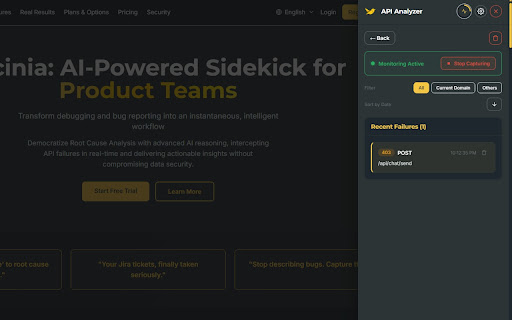
API Analyzer – Captures API failures (failed requests, error responses) from your browsing session and runs instant root cause analysis using AI (Gemini). You get likely causes and fix directions, plus Jira-ready tickets with editable content, full cURL commands, and optional test credentials—all stored locally and encrypted.
Responsiveness Analyzer – Tests the active page at desktop, tablet, and mobile viewports, then uses AI to report layout issues, overflow, touch targets, and other responsiveness problems, with Jira-ready tickets.
Issue Companion – Records screen activity and creates Jira tickets with AI assistance. Capture screen recordings, DOM activity, and screenshots, then use AI to enhance summaries and descriptions before one-click ticket creation.
Surfaces clear, actionable explanations—so developers and QA spend less time triaging and more time fixing.
Fits into your workflow as a lightweight sidekick: no heavy setup, works where you already work.
Who it’s for
Developers debugging APIs and integrations
QA engineers investigating test failures and responsiveness
Product and business analysts who need to understand technical failures and layout issues quickly
Why Luscinia
Luscinia turns “something broke” into “here’s what went wrong and how to fix it,” and “does it work on mobile?” into “here’s what’s broken and how to improve it.” It’s built to be fast, clear, and focused on product teams—so you get from failure to fix with less guesswork.
Technical
- Version
- 1.0.9
- Manifest
- V3
- Size
- 582KiB
- Min Chrome
- 88
- Languages
- 9
- Featured
- No
Metadata
- ID
- pkmnpnmbdoogaobkkgjmgeplmoojghia
- Developer ID
- ue9a6b09ac611f7e65e12ade8120c1794
- Developer Email
- [email protected]
- Created
- Feb 15, 2026
- Last Updated (Store)
- Mar 20, 2026
- Last Scraped
- Jun 9, 2026
- Website
- saribulbul.com
- Support URL
- https://luscinia.saribulbul.com/support
- Privacy Policy
- https://luscinia.saribulbul.com/legal
Similar extensions
Alternatives to Luscinia, ranked by description similarity.

API Lens – Smart HTTP Inspector
Real-time HTTP monitoring with analytics, performance scoring, replay functionality, and API insights for developers.
64

SaaS API Inspector
Analyze and categorize APIs used by the active page. Developer productivity and debugging tool.
7
★ 5.0

Page Issues Finder
AI-powered analyzer for software development issues: builds, tests, pipelines, errors, and more
5
★ 5.0

API Sentinel Pro
Live API error radar, slow-call detection, replay, export, and AI-assisted debugging.
6

FlowLens - AI-Powered Bug Reporter
Debug 10x faster with AI. Generate bug reports with full context that AI agents and developers can analyze instantly.
172
★ 5.0

API Watchtower
Track API calls during UI workflows and generate a local HTML report.
2

JSON Lens AI
Blazing-fast JSON viewer with built-in AI that summarises, queries & explains your data — 100 % open source.
10

AI Website Analyzer
Analyze websites for tech stack, SEO, performance, security, and recommendations — client-side. Copy or download report as JSON.
25
★ 5.0
Data sourced from the Chrome Web Store · last verified Jun 9, 2026.