
Varterm TTS - Text to Speech
Read any web page aloud with natural AI voices. Select text and listen instantly.
As of June 2026, Varterm TTS - Text to Speech has 8 users in the Communication category.
Usersno change0%
8
8
Ratingno change0%
—
— reviews
Reviewsno change0%
—
Version
1.0.0
Manifest V3
History
4 snapshotsTracking since May 13, 2026.
View as table
| Date | Users | Rating | Reviews | Version |
|---|---|---|---|---|
| May 13, 2026 | — | — | — | 1.0.0 |
| May 25, 2026 | — | — | — | 1.0.0 |
| Jun 1, 2026 | 6 | — | — | 1.0.0 |
| Jun 7, 2026 | 7 | — | — | 1.0.0 |
| Now | 8 | — | — | 1.0.0 |
Permissions & access
- Permissions
- activeTabscriptingcontextMenusstorage
- Host access
- https://varterm.com/*, https://www.varterm.com/*
Screenshots
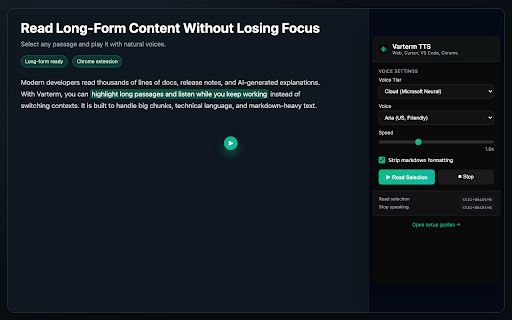


About
Varterm TTS helps you listen instead of reading walls of text.

Use it to read selected text, full web pages, long-form articles, docs, and markdown-heavy AI output directly in Chrome.

Why users install Varterm: • Long-form friendly playback for large passages and full pages • Markdown-friendly reading for cleaner speech output • Natural cloud voices plus browser built-in voice support • One-click selection reading with floating button and context menu • Keyboard shortcuts for fast read/stop workflows

Core features: • Read selected text aloud instantly • Read full page content • Context menu action: "Read with Varterm" • Keyboard shortcuts for read + stop • Adjustable speaking speed • Markdown stripping for cleaner audio

Best for: • ChatGPT and AI answer playback • Docs and technical articles • Accessibility and focus workflows • Hands-free review while multitasking.
Technical
- Version
- 1.0.0
- Manifest
- V3
- Size
- 19.43KiB
- Min Chrome
- 88
- Languages
- 1
- Featured
- No
Metadata
- ID
- pkkjobhienoafmepeonafhgiooacjbdk
- Developer ID
- u7805b3d4004604cfc5ea6a87aa7951bd
- Developer Email
- [email protected]
- Created
- May 12, 2026
- Last Updated (Store)
- May 12, 2026
- Last Scraped
- Jun 7, 2026
- Website
- —
- Support URL
- https://varterm.com/support
- Privacy Policy
- https://varterm.com/privacy
Data sourced from the Chrome Web Store · last verified Jun 7, 2026.