
Amazon Pharmacy Assistant
Translate selected text on Amazon Pharmacy detail pages using Gemini 1.5 Flash.
As of May 2026, Amazon Pharmacy Assistant has 7 users in the Productivity category.
Usersup 40.0 percent+40.0%
7
7
Ratingno change0%
—
— reviews
Reviewsno change0%
—
Version
1.1
Manifest V3
History
1 snapshotsTracking since Apr 26, 2026.
View as table
| Date | Users | Rating | Reviews | Version |
|---|---|---|---|---|
| Apr 26, 2026 | 5 | — | — | 1.1 |
| Now | 7 | — | — | 1.1 |
Permissions & access
- Permissions
- activeTabstorage
- Host access
- *://pharmacy.amazon.com/*, https://generativelanguage.googleapis.com/*
Screenshots



About
What Does It Do?
The Amazon Pharmacy Assistant is your ultimate companion for navigating Amazon Pharmacy like a pro. Here’s what it brings to the table:

1. Text Explanation:
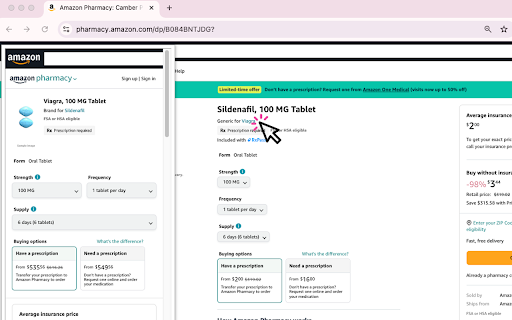
   - Highlight any text on the page, and the extension will instantly provide a clear, AI-generated explanation. Perfect for understanding complex medical terms or product details.

2. Market Reviews:
   - Get a summarized overview of customer reviews for any medication. The extension compares the product with similar drugs, helping you make informed decisions.

3. Floating Window:
   - Hover over product links to open a floating preview window. No more clicking back and forth—just quick, seamless browsing.

4. Customizable Settings:
   - Toggle features on or off based on your preferences. Choose your preferred language and enable only the tools you need.

How to Use It:
1. Install the Extension:
   - Add the Amazon Pharmacy Assistant to your Chrome browser from the Chrome Web Store.

2. Navigate to Amazon Pharmacy:
   - Visit any product page on Amazon Pharmacy (e.g., https://pharmacy.amazon.com/dp/B084BNTJDG?).

3. Use the Features:
   - Text Explanation: Highlight any text, and a pop-up will appear with an explanation.
   - Market Reviews: Scroll down to the "Market Reviews" section for AI-generated insights.
   - Floating Window: Hover over product links to see a preview.

4. Customize Settings:
   - Click the extension icon in your toolbar to open the popup. Adjust your language preference and toggle features on or off.

Why You’ll Love It:
- Save Time: No more digging through endless reviews or confusing medical jargon.
- Stay Informed: Get AI-powered insights to make smarter decisions about your health.
- Seamless Experience: The floating window and instant explanations make browsing effortless.

Got Questions or Issues?
If you run into any problems or have suggestions for improvement, feel free to reach out to us at [email protected]. We’re here to help!
Technical
- Version
- 1.1
- Manifest
- V3
- Size
- 22.51KiB
- Min Chrome
- 88
- Languages
- 1
- Featured
- No
Metadata
- ID
- pkhpnbhadolfdiickpicjdbbeebaajla
- Developer ID
- ud94d2ff41cd3af95b4dfdf34aa6fc54a
- Developer Email
- [email protected]
- Created
- Jan 9, 2025
- Last Updated (Store)
- Jan 22, 2025
- Last Scraped
- May 24, 2026
- Website
- —
- Support URL
- —
- Privacy Policy
- https://www.counttoday.com/privacy-policy.html
Similar extensions
Alternatives to Amazon Pharmacy Assistant, ranked by description similarity.

AI Medical Help & Search 2025/2026
🩺 AI Medical Assistant – Search, Summarise & Generate Medical Content
Transform your clinical workflow with AI-driven tools.
The…
17

ChatGPT for Amazon from ProductScope AI
All-in-One ChatGPT for Amazon Brands & Marketers by ProductScopeAI
1.0K
★ 5.0

Sort By Reviews for Amazon
Activate this extension to sort amazon product reviews and easily compare prices with just one click
3
★ 1.0

Techy Seniors AI Helper
Smart AI assistant that understands any webpage and provides contextual help for seniors
—

Search by image on Amazon
Search for any product in one click on amazon.
10.0K
★ 4.2

Amazon Review Analyzer Pro
Analyze and summarize Amazon product reviews with AI
361
★ 5.0

Amazon BSR Viewer
Displays the Best Sellers Rank (BSR) under each product on Amazon search result pages.
674
★ 5.0

AI Amazon Affiliate Powered With Chat GPT
Powerful Chrome extension that streamlines your Amazon Affiliate marketing tasks.
644
★ 4.3
Data sourced from the Chrome Web Store · last verified May 24, 2026.