
Ad Jump Guard
Blocks suspicious ad redirects, forced tab opens, and redirect traps only on sites you enable.
As of June 2026, Ad Jump Guard has 4 users in the Productivity category.
Usersno change0%
4
4
Ratingno change0%
—
— reviews
Reviewsno change0%
—
Version
0.1.6
Manifest V3
90-day change · In the last 90 days this extension 1 version update.
History
2 snapshotsTracking since Jun 3, 2026.
Not enough history yet for this metric — the chart fills in as we collect more snapshots.
View as table
| Date | Users | Rating | Reviews | Version |
|---|---|---|---|---|
| Jun 3, 2026 | — | — | — | 0.1.0 |
| Jun 8, 2026 | — | — | — | 0.1.0 |
| Now | 4 | — | — | 0.1.6 |
Changelog
- Jun 8, 2026description
Ad Jump Guard is a conservative Chrome extension designed to help block suspicious ad redirects, forced tab opens, and back-button redirect traps on sites you choose to protect.

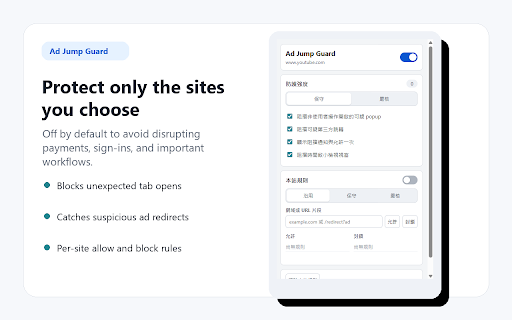
To avoid interfering with payments, sign-ins, banking, credit card verification, checkout pages, or other sensitive workflows, Ad Jump Guard is off by default. You can enable protection only for specific sites and manage per-site allow or block rules.

Key features:
- Off by default; enable only on sites you choose
- Blocks suspicious popups opened without a clear user action
- Blocks forced ad tabs from aggressive websites
- Detects suspicious back-button redirect traps
- Supports per-site allow and block rules
- Shows a notice when a redirect is blocked
- Lets you allow a target once or allow its domain for the current site
- Stores settings and per-site rules in Chrome
- Stores block statistics using source domain, target domain, reason, and time only
- Does not persist full source or target URLs

Privacy:
Ad Jump Guard does not collect, sell, or transmit your browsing data. Full URLs are used only locally and temporarily for real-time redirect decisions and immediate review actions. Full URLs are not persistently stored. Persistently stored data is limited to user settings, per-site rules, source domain, target domain, block reason, and time.

Recommended use:
Enable Ad Jump Guard only on sites with aggressive ads, forced tab opens, or redirect traps. Keep it disabled on payment, banking, sign-in, checkout, and credit card verification pages.
Ad Jump Guard is a conservative Chrome extension designed to help block suspicious ad redirects, forced tab opens, and back-button redirect traps on sites you choose to protect.

To avoid interfering with payments, sign-ins, banking, credit card verification, checkout pages, or other sensitive workflows, Ad Jump Guard is off by default. You can enable protection only for specific sites and manage per-site allow or block rules. The toolbar icon shows the current site status: gray means disabled, and blue means enabled.

Key features:
- Off by default; enable only on sites you choose
- Blocks suspicious popups opened without a clear user action
- Blocks forced ad tabs from aggressive websites
- Blocks suspicious ad popups triggered by card, carousel arrow, or control clicks
- Detects suspicious back-button redirect traps
- Supports per-site allow and block rules
- Shows a notice when a redirect is blocked
- Lets you allow a target once or allow its domain for the current site
- Stores settings and per-site rules in Chrome
- Stores block statistics using source domain, target domain, reason, and time only
- Does not persist full source or target URLs

Privacy:
Ad Jump Guard does not collect, sell, or transmit your browsing data. Full URLs are used only locally and temporarily for real-time redirect decisions and immediate review actions. Full URLs are not persistently stored. Persistently stored data is limited to user settings, per-site rules, source domain, target domain, block reason, and time.

Recommended use:
Enable Ad Jump Guard only on sites with aggressive ads, forced tab opens, or redirect traps. Keep it disabled on payment, banking, sign-in, checkout, and credit card verification pages.
Permissions & access
- Permissions
- storagetabswebNavigation
- Host access
- <all_urls>
Screenshots
About
Ad Jump Guard is a conservative Chrome extension designed to help block suspicious ad redirects, forced tab opens, and back-button redirect traps on sites you choose to protect.

To avoid interfering with payments, sign-ins, banking, credit card verification, checkout pages, or other sensitive workflows, Ad Jump Guard is off by default. You can enable protection only for specific sites and manage per-site allow or block rules. The toolbar icon shows the current site status: gray means disabled, and blue means enabled.

Key features:
- Off by default; enable only on sites you choose
- Blocks suspicious popups opened without a clear user action
- Blocks forced ad tabs from aggressive websites
- Blocks suspicious ad popups triggered by card, carousel arrow, or control clicks
- Detects suspicious back-button redirect traps
- Supports per-site allow and block rules
- Shows a notice when a redirect is blocked
- Lets you allow a target once or allow its domain for the current site
- Stores settings and per-site rules in Chrome
- Stores block statistics using source domain, target domain, reason, and time only
- Does not persist full source or target URLs

Privacy:
Ad Jump Guard does not collect, sell, or transmit your browsing data. Full URLs are used only locally and temporarily for real-time redirect decisions and immediate review actions. Full URLs are not persistently stored. Persistently stored data is limited to user settings, per-site rules, source domain, target domain, block reason, and time.

Recommended use:
Enable Ad Jump Guard only on sites with aggressive ads, forced tab opens, or redirect traps. Keep it disabled on payment, banking, sign-in, checkout, and credit card verification pages.
Technical
- Version
- 0.1.6
- Manifest
- V3
- Size
- 49.78KiB
- Min Chrome
- 88
- Languages
- 2
- Featured
- No
Metadata
- ID
- pkbdjdcbbjicbfknebjofbgdkegbdkia
- Developer ID
- u69591d6215e41a90ed45189f8f72648b
- Developer Email
- [email protected]
- Created
- Jun 2, 2026
- Last Updated (Store)
- Jun 8, 2026
- Last Scraped
- Jun 8, 2026
- Website
- —
- Support URL
- —
Data sourced from the Chrome Web Store · last verified Jun 8, 2026.