
Pusheen Cursor - Custom Kawaii Cursor for Chrome
Add a dash of cuteness with the Pusheen cursor. Perfect for fans of cozy cats!
As of June 2026, Pusheen Cursor - Custom Kawaii Cursor for Chrome has 1,000 users and a 4.75/5 rating from 4 reviews in the Entertainment category.
Usersno change0%
1.0K
1,000
Ratingno change0%
4.75
4 reviews
Reviewsno change0%
4
Version
1.0.5
Manifest V3
90-day change · In the last 90 days this extension 2 version updates.
History
3 snapshotsTracking since Apr 19, 2026.
View as table
| Date | Users | Rating | Reviews | Version |
|---|---|---|---|---|
| Apr 19, 2026 | 1.0K | 4.75 | 4 | 1.0.3 |
| May 4, 2026 | 1.0K | 4.75 | 4 | 1.0.3 |
| May 15, 2026 | 1.0K | 4.75 | 4 | 1.0.4 |
| Now | 1.0K | 4.75 | 4 | 1.0.5 |
Changelog
- May 4, 2026description
Add a Dash of Cuteness with the Pusheen Cursor – Custom Kawaii Cursor for Chrome!
Bring the adorable world of Pusheen to your browser with our charming new extension! The Pusheen Cursor replaces your standard mouse pointer with irresistibly cute cursor designs featuring everyone’s favorite chubby gray cat, perfect for fans of kawaii culture and all things sweet and snuggly.
Whether you're browsing, shopping, or working online, this fun and lightweight Chrome extension adds a playful touch of cuteness to every click. Let Pusheen guide your way through the web with her iconic smile and lovable expressions!
________________________________________
✅ Features:
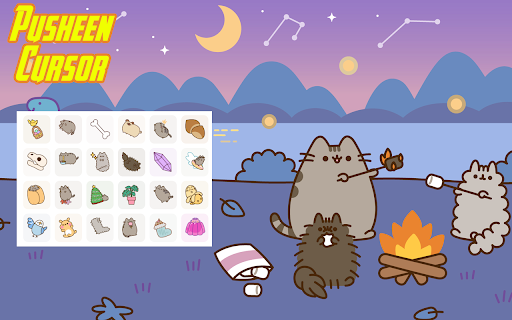
•	Cute Pusheen Cursors – Choose from a variety of adorable cursor styles featuring Pusheen in different poses and outfits
•	High-Quality Kawaii Graphics – Crisp, colorful cursor art that captures Pusheen's signature charm
•	Customizable Cursor Size – Resize your cursor to suit your style or visibility needs
•	Save Your Favorites – Easily switch between your most-loved Pusheen cursor designs
•	Lightweight & Smooth – No lag, no slowdown — just pure cute performance
•	Toggle On/Off Anytime – Quickly switch back to your default cursor when needed
________________________________________
🔧 How to Use:
1.	Install the extension from the Chrome Web Store
2.	Click the Pusheen Cursor icon in your browser toolbar
3.	Browse through the available Pusheen-themed cursor options
4.	Select your favorite design for daily use
5.	Adjust cursor size using the built-in slider (optional)
6.	Enjoy a super-cute browsing experience powered by Pusheen!
________________________________________
Perfect for kawaii lovers , Pusheen fans, anime enthusiasts, and anyone who wants to add a little joy and cuteness to their everyday Chrome browsing. Whether you're into pastel aesthetics, Sanrio characters, or just love a good kitty, the Pusheen Cursor is the purr-fect addition to your browser!
🐾 Download now and let Pusheen make every click even more adorable!
Add a Dash of Cuteness with the Pusheen Cursor – Custom Kawaii Cursor for Chrome!
Bring the adorable world of Pusheen to your browser with our charming new extension! The Pusheen Cursor replaces your standard mouse pointer with irresistibly cute cursor designs featuring everyone’s favorite chubby gray cat, perfect for fans of kawaii culture and all things sweet and snuggly.
Whether you're browsing, shopping, or working online, this fun and lightweight Chrome extension adds a playful touch of cuteness to every click. Let Pusheen guide your way through the web with her iconic smile and lovable expressions!
________________________________________
✅ Features:
•	Cute Pusheen Cursors – Choose from a variety of adorable cursor styles featuring Pusheen in different poses and outfits
•	High-Quality Kawaii Graphics – Crisp, colorful cursor art that captures Pusheen's signature charm
•	Customizable Cursor Size – Resize your cursor to suit your style or visibility needs
•	Save Your Favorites – Easily switch between your most-loved Pusheen cursor designs
•	Lightweight & Smooth – No lag, no slowdown — just pure cute performance
•	Toggle On/Off Anytime – Quickly switch back to your default cursor when needed
________________________________________
🔧 How to Use:
1.	Install the extension from the Chrome Web Store
2.	Click the Pusheen Cursor icon in your browser toolbar
3.	Browse through the available Pusheen-themed cursor options
4.	Select your favorite design for daily use
5.	Adjust cursor size using the built-in slider (optional)
6.	Enjoy a super-cute browsing experience powered by Pusheen!
________________________________________
Perfect for kawaii lovers , Pusheen fans, anime enthusiasts, and anyone who wants to add a little joy and cuteness to their everyday Chrome browsing. Whether you're into pastel aesthetics, Sanrio characters, or just love a good kitty, the Pusheen Cursor is the purr-fect addition to your browser!
🐾 Download now and let Pusheen make every click even more adorable!

change-log:
new cursor Added
Permissions & access
- Permissions
- storageunlimitedStoragescripting
- Host access
- *://*/*
Screenshots
About
Add a Dash of Cuteness with the Pusheen Cursor – Custom Kawaii Cursor for Chrome!
Bring the adorable world of Pusheen to your browser with our charming new extension! The Pusheen Cursor replaces your standard mouse pointer with irresistibly cute cursor designs featuring everyone’s favorite chubby gray cat, perfect for fans of kawaii culture and all things sweet and snuggly.
Whether you're browsing, shopping, or working online, this fun and lightweight Chrome extension adds a playful touch of cuteness to every click. Let Pusheen guide your way through the web with her iconic smile and lovable expressions!
________________________________________
✅ Features:
•	Cute Pusheen Cursors – Choose from a variety of adorable cursor styles featuring Pusheen in different poses and outfits
•	High-Quality Kawaii Graphics – Crisp, colorful cursor art that captures Pusheen's signature charm
•	Customizable Cursor Size – Resize your cursor to suit your style or visibility needs
•	Save Your Favorites – Easily switch between your most-loved Pusheen cursor designs
•	Lightweight & Smooth – No lag, no slowdown — just pure cute performance
•	Toggle On/Off Anytime – Quickly switch back to your default cursor when needed
________________________________________
🔧 How to Use:
1.	Install the extension from the Chrome Web Store
2.	Click the Pusheen Cursor icon in your browser toolbar
3.	Browse through the available Pusheen-themed cursor options
4.	Select your favorite design for daily use
5.	Adjust cursor size using the built-in slider (optional)
6.	Enjoy a super-cute browsing experience powered by Pusheen!
________________________________________
Perfect for kawaii lovers , Pusheen fans, anime enthusiasts, and anyone who wants to add a little joy and cuteness to their everyday Chrome browsing. Whether you're into pastel aesthetics, Sanrio characters, or just love a good kitty, the Pusheen Cursor is the purr-fect addition to your browser!
🐾 Download now and let Pusheen make every click even more adorable!

change-log:
new cursor Added
Technical
- Version
- 1.0.5
- Manifest
- V3
- Size
- 10.77MiB
- Min Chrome
- 88
- Languages
- 29
- Featured
- No
Metadata
- ID
- pjfjconkopcckeanlhklghfogkdhnegk
- Developer ID
- u65f8b6cb5cb8e76cc1487185c00e6f5f
- Developer Email
- [email protected]
- Created
- May 27, 2025
- Last Updated (Store)
- May 15, 2026
- Last Scraped
- Jun 9, 2026
- Website
- —
- Support URL
- —
- Privacy Policy
- —
Similar extensions
Alternatives to Pusheen Cursor - Custom Kawaii Cursor for Chrome, ranked by description similarity.

Hello Kitty Cursor - Custom Kawaii Cursor for Chrome
Add a touch of cuteness with the Hello Kitty cursor. Perfect for fans of Sanrio and adorable designs!
9.0K
★ 4.0

Pusheen Cat Wallpapers HD New Tab - Cute Kawaii Backgrounds
Transform your new tab with adorable Pusheen HD wallpapers. Featuring cute gray cat, kawaii food themes & cozy scenes for cat lovers
4.0K
★ 5.0

Cinnamoroll Cursor - Custom Sanrio Cursor for Chrome
Navigate through the internet with Cinnamoroll cursors. Perfect for fans of kawaii puppies, Sanrio & pastel vibes!
2.0K
★ 4.5

Dogs Cursor - Custom Dog Cursor for Chrome
Adorable dog-themed cursor for Dog lovers. Perfect for adding a playful touch to your browsing experience!
865
★ 5.0

Hello Kitty Live Wallpaper - Cute & Kawaii Wallpaper
Brighten up your new tab with Hello Kitty! Enjoy adorable live wallpapers of the iconic Sanrio character on your browser.
4.0K
★ 4.8

Pac-Man Cursor - Custom Retro Cursor for Chrome
Chase dots and ghosts with the Pac-Man cursor. Perfect for fans of classic arcade gaming nostalgia!
109
★ 3.0

Animal Crossing Cursor - Custom Nintendo Game Cursor for Chrome
Navigate through the digital world with Animal Crossing cursors. Perfect for fans of Tom Nook, Isabelle & island life fun!
316
★ 2.0

Mouse Cursor - Custom Cursor
Rock your custom cursor into a world of dreams! Explore a new galaxy of stylish and cool cursors!
20.0K
★ 3.9
Data sourced from the Chrome Web Store · last verified Jun 9, 2026.