
Check
Verify breaking news online
As of June 2026, Check has 354 users and a 5.00/5 rating from 2 reviews in the Workflow & Planning category.
Usersup 5.7 percent+5.7%
354
354
Ratingno change0%
5.00
2 reviews
Reviewsno change0%
2
Version
4.0.0
Manifest V3
History
4 snapshotsTracking since Apr 19, 2026.
View as table
| Date | Users | Rating | Reviews | Version |
|---|---|---|---|---|
| Apr 19, 2026 | 335 | 5.00 | 2 | 4.0.0 |
| May 4, 2026 | 345 | 5.00 | 2 | 4.0.0 |
| May 27, 2026 | 355 | 5.00 | 2 | 4.0.0 |
| Jun 8, 2026 | 350 | 5.00 | 2 | 4.0.0 |
| Now | 354 | 5.00 | 2 | 4.0.0 |
Permissions & access
- Permissions
- activeTabcontextMenusscripting
- Host access
- None declared
Screenshots


About
Verify breaking news online

Chrome will ask you for permission to read your browsing history. This allows the browser extension to add your current tab to Check when you click on the browser icon. Meedan does not log any other data on our servers.

Check, developed by Meedan, is a platform for collaborative verification of digital media. The Check project builds online tools to improve the investigative quality of citizen journalism and help limit the rapid spread of rumors and misinformation online. Using Check you can quickly build a team, add social media links to fact-check them, set key questions for investigating news items gathered amongst your team.

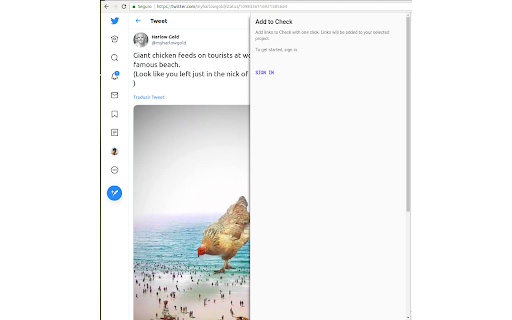
Check’s browser extension allows you to quickly add media items that you come across on the internet to your Check team for investigation, and answer annotations concerning these items right from within the extension’s sidebar. Here’s how you can use it:

Browse the internet, and find a Tweet, YouTube video, Facebook post or an Instagram photo that you want your team to fact-check and investigate. Click the Check icon, choose one of the projects you want to add this item to, and save it.

The extension also detects if the item already exists in Check, and shows you the relevant tasks to be answered concerning it in the sidebar. Select a task, then highlight text from the page: the text will automatically populate the task answer.

You can also highlight text from an article, a web page, or an incoming WhatsApp Web message. Right click, select the Check icon, and choose one of the projects you want to add this text to.

The extension works on Tweetdeck for web and other tools that operate on the browser.

On Check, you can see this item added as media on your team and you can start the verification process right away. Here’s what you can do on Check for fact-checking:

Add journalists and citizen journalists to your team so that they can contribute to the verification process.

Ask questions about media items, like date, time, location and evidence to help deciding if it’s true or fake.

Add a verification status to each media item you have on your team to reflect the result of the fact-checking process like, verified, false or in progress.

If you work in digital media and want to try out Check as a way to streamline and coordinate your social news gathering and verification workflow, please visit https://meedan.com/en/check.
Technical
- Version
- 4.0.0
- Manifest
- V3
- Size
- 478KiB
- Min Chrome
- 88
- Languages
- 1
- Featured
- No
Metadata
- ID
- pjfgpbclkfjkfiljlcfehjmpafeoafdi
- Developer ID
- u1d345b3a24489334955b97772a93efe5
- Developer Email
- [email protected]
- Created
- Jun 29, 2020
- Last Updated (Store)
- Sep 4, 2025
- Last Scraped
- Jun 8, 2026
- Website
- checkmedia.org
- Support URL
- —
- Privacy Policy
- https://meedan.com/legal/privacy-policy
Similar extensions
Alternatives to Check, ranked by description similarity.

Quick Fact Checker - QFC
AI-powered fact-checking with Perplexity. Verify any claim, detect misinformation, and browse with confidence.
—

CliNe - Clickbait News Detector
Introducing CliNe: Your Ultimate Clickbait News Detection Chrome Extension
Unravel the truth behind sensational headlines and stay…
94
★ 5.0

Fake News Detector
Completely in-browser Fake News detection through neural networks.
456

Checkget AI - Smart Assistant for ChatGPT
Use ChatGPT on any website by just clicking Cmd/Alt+K. Works on all websites or software.
665
★ 4.5

Rivrb
LIVE Fact-Checking in Chrome
7
★ 5.0

Youtube csv helper
An extension that helps you add videos to local storage with misinformation category and topic, and could export as csv when needed
17

VibeCheck
What's the Audience Really Saying? Get quick insights from YouTube comments.
5

Checkit
The Final step before you complete
125
★ 5.0
Data sourced from the Chrome Web Store · last verified Jun 8, 2026.