
Export GPT & Gemini
Export ChatGPT and Gemini conversations to clean PDF or interactive HTML with one-click copy buttons.
As of June 2026, Export GPT & Gemini has 641 users and a 2.60/5 rating from 5 reviews in the Workflow & Planning category.
Usersup 27.2 percent+27.2%
641
641
Ratingup 11.6 percent+11.6%
2.60
5 reviews
Reviewsup 66.7 percent+66.7%
5
Version
1.1.0
Manifest V3
90-day change · In the last 90 days this extension 1 version update.
History
12 snapshotsTracking since Apr 26, 2026.
View as table
| Date | Users | Rating | Reviews | Version |
|---|---|---|---|---|
| Apr 26, 2026 | 504 | 2.33 | 3 | 1.0.2 |
| May 1, 2026 | 480 | 3.00 | 4 | 1.1.0 |
| May 7, 2026 | 476 | 3.00 | 4 | 1.1.0 |
| May 11, 2026 | 487 | 3.00 | 4 | 1.1.0 |
| May 14, 2026 | 488 | 3.00 | 4 | 1.1.0 |
| May 18, 2026 | 500 | 3.00 | 4 | 1.1.0 |
| May 23, 2026 | 513 | 3.00 | 4 | 1.1.0 |
| May 27, 2026 | 524 | 3.00 | 4 | 1.1.0 |
| Jun 1, 2026 | 551 | 3.00 | 4 | 1.1.0 |
| Jun 6, 2026 | 613 | 3.00 | 4 | 1.1.0 |
| Jun 10, 2026 | 626 | 3.00 | 4 | 1.1.0 |
| Jun 20, 2026 | 617 | 3.00 | 4 | 1.1.0 |
| Now | 641 | 2.60 | 5 | 1.1.0 |
Changelog
- Apr 26, 2026description
An extension to export your conversations with pre-trained transformers into a sharable PDF file. Currently it only supports ChatGPT
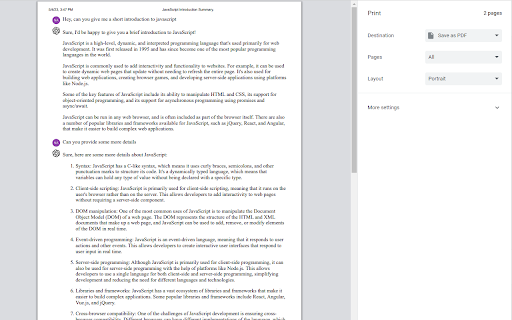
Export your AI conversations from ChatGPT and Gemini into polished documents.

Features
- Export to PDF with cleaner print layout
- Export to HTML with per-message one-click copy buttons
- Support for ChatGPT and Gemini
- Smart cleanup of UI noise (toolbars, action buttons, sticky/overflow containers)
- Improved readability for code blocks, tables, and long responses

Supported Sites
- https://chatgpt.com
- https://chat.openai.com
- https://gemini.google.com

How It Works
1. Open a conversation on ChatGPT or Gemini.
2. Click the floating export icon.
3. Choose `Export PDF` or `Export HTML`.

Notes
- PDF is optimized for sharing and printing.
- HTML preserves interactive copy buttons for each message.
- Apr 26, 2026short_description
An extension to export your chats with pre-trained transformers
Export ChatGPT and Gemini conversations to clean PDF or interactive HTML with one-click copy buttons.
- Apr 26, 2026name
Export GPT - Export your chats with GPTs
Export GPT & Gemini
Permissions & access
- Permissions
- None declared
- Host access
- None declared
Screenshots

About
Export your AI conversations from ChatGPT and Gemini into polished documents.

Features
- Export to PDF with cleaner print layout
- Export to HTML with per-message one-click copy buttons
- Support for ChatGPT and Gemini
- Smart cleanup of UI noise (toolbars, action buttons, sticky/overflow containers)
- Improved readability for code blocks, tables, and long responses

Supported Sites
- https://chatgpt.com
- https://chat.openai.com
- https://gemini.google.com

How It Works
1. Open a conversation on ChatGPT or Gemini.
2. Click the floating export icon.
3. Choose `Export PDF` or `Export HTML`.

Notes
- PDF is optimized for sharing and printing.
- HTML preserves interactive copy buttons for each message.
Technical
- Version
- 1.1.0
- Manifest
- V3
- Size
- 272KiB
- Min Chrome
- 88
- Languages
- 1
- Featured
- Yes
Metadata
- ID
- pipfffccmkdbpmnnpcnbecjmbgacnkob
- Developer ID
- ub662c07be03e671fae32540145bcb4fb
- Developer Email
- [email protected]
- Created
- May 6, 2023
- Last Updated (Store)
- Apr 11, 2026
- Last Scraped
- Jun 20, 2026
- Website
- —
- Support URL
- —
- Privacy Policy
- —
Similar extensions
Alternatives to Export GPT & Gemini, ranked by description similarity.
gpt2pdf
Convert your chats into a pdf.
55
★ 5.0

ChatGPT Plus - Batch Export GPT Conversations
ChatGPT with a touch of color! Made easy adding extra features including download and share.
1.0K
★ 2.7

Chat Exporter: Save to PDF & Markdown
Export your AI conversations to Markdown, JSON, and PDF. Features selection mode and printer-friendly formatting.
—

ChatGPT Conversation Exporter
A simple extension to export ChatGPT conversation as an HTML file.
366
★ 3.4

ChatGPT File Uploader & Conversation Saver
Help you upload files to ChatGPT and save ChatGPT conversation as pdf.
7.0K
★ 3.0

ChatGPT to Word or PDF
Convert the ChatGPT content into a Word or a PDF format in a single click.
70.0K
★ 4.8

ChatGPT Session Exporter
For exporting ChatGPT conversation into a HTML or TXT file.
ChatGPT Exporter is a lightweight Chrome extension that enables users…
554
★ 5.0

ChagtGPT Exporter
export ChagtGPT conversation to txt, png, markdown, pdf and so on
541
Data sourced from the Chrome Web Store · last verified Jun 20, 2026.