
Gmail Templates & Responses — SnapReply
Save & insert Gmail templates in one click. Canned responses, variables, rich text & shortc... | Not affiliated with Anthropic, PBC.
As of June 2026, Gmail Templates & Responses — SnapReply has 7 users and a 5.00/5 rating from 1 reviews in the Productivity category.
Usersno change0%
7
7
Ratingno change0%
5.00
1 reviews
Reviewsno change0%
1
Version
1.0.5
Manifest V3
90-day change · In the last 90 days this extension 3 version updates.
History
7 snapshotsTracking since Apr 4, 2026.
View as table
| Date | Users | Rating | Reviews | Version |
|---|---|---|---|---|
| Apr 4, 2026 | — | — | — | 1.0.1 |
| Apr 25, 2026 | — | — | — | 1.0.1 |
| May 2, 2026 | 1 | 5.00 | 1 | 1.0.2 |
| May 9, 2026 | 2 | 5.00 | 1 | 1.0.3 |
| May 19, 2026 | 4 | 5.00 | 1 | 1.0.3 |
| May 25, 2026 | 5 | 5.00 | 1 | 1.0.3 |
| Jun 1, 2026 | 8 | 5.00 | 1 | 1.0.5 |
| Now | 7 | 5.00 | 1 | 1.0.5 |
Changelog
- May 25, 2026short_description
Save & insert Gmail templates in one click. Canned responses, variables, rich text & shortcuts. Boost email productivity for free.
Save & insert Gmail templates in one click. Canned responses, variables, rich text & shortc... | Not affiliated with Anthropic, PBC.
- May 2, 2026name
SnapReply for Gmail™ - Email Templates
Gmail Templates & Responses — SnapReply
- Apr 25, 2026name
SnapReply for Gmail - Email Templates
SnapReply for Gmail™ - Email Templates
Permissions & access
- Permissions
- storageactiveTabalarms
- Host access
- https://mail.google.com/*, https://www.google-analytics.com/*
Screenshots



About
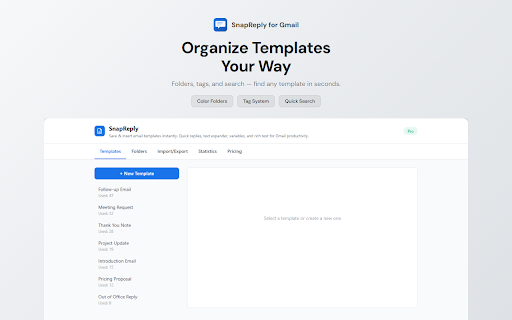
SnapReply for Gmail™ lets you create, organize, and instantly insert email templates right inside Gmail's compose window.
Stop retyping the same emails over and over. With SnapReply, you can build a library of reusable templates, organize them into folders, and insert them with a single click — complete with dynamic variables like {{name}}, {{company}}, and {{date}} that auto-fill or prompt you before insertion.
FEATURES:

Template Library — Create and manage reusable email templates
Dynamic Variables — Use {{name}}, {{date}}, {{company}} and more. Variables are auto-filled or prompted before insertion
Folder Organization — Group templates into color-coded folders for quick access
Instant Search — Find any template instantly by title or content
One-Click Insertion — Insert templates at cursor position, top, or bottom of your email
Works Everywhere in Gmail — New compose, reply, and forward windows
Keyboard Shortcut — Quick access with Ctrl+Shift+T
Dark Mode — Supports both light and dark themes

PRO FEATURES ($4.99/month or $29.99/year):

Unlimited templates (free: 10)
Rich text formatting (bold, italic, links, images)
Conditional logic — {{if:variable}}...{{/if:variable}}
Usage statistics dashboard
Import/Export templates as JSON
7-day free trial available

PERFECT FOR:

Sales teams sending follow-ups and proposals
Freelancers managing client communications
Recruiters sending outreach emails
Support teams handling common inquiries
Anyone who sends repetitive emails

PRIVACY:
All templates and settings are stored locally on your device. No email content is read, collected, or transmitted to any server. The only external communication is with ExtensionPay for subscription management.
Gmail is a trademark of Google LLC. Use of this trademark is subject to Google Permissions.
Technical
- Version
- 1.0.5
- Manifest
- V3
- Size
- 335KiB
- Min Chrome
- 88
- Languages
- 9
- Featured
- No
Metadata
- ID
- pijandokkbhdejnoienhjmoicjapgpmk
- Developer ID
- ufda4581509ee89fcf047c472c841f768
- Developer Email
- [email protected]
- Created
- Apr 3, 2026
- Last Updated (Store)
- May 20, 2026
- Last Scraped
- Jun 7, 2026
- Website
- —
- Support URL
- —
- Privacy Policy
- —
Data sourced from the Chrome Web Store · last verified Jun 7, 2026.