
CloudPrompt
Save, organize, and access your AI prompts instantly. Stored privately in your Google Drive.
As of June 2026, CloudPrompt has 809 users and a 4.70/5 rating from 10 reviews in the Productivity category.
Usersup 269.4 percent+269.4%
809
809
Ratingup 1.5 percent+1.5%
4.70
10 reviews
Reviewsup 25.0 percent+25.0%
10
Version
1.2.0
Manifest V3
90-day change · In the last 90 days this extension 1 version update, changed permissions.
History
11 snapshotsTracking since Apr 1, 2026.
View as table
| Date | Users | Rating | Reviews | Version |
|---|---|---|---|---|
| Apr 1, 2026 | 219 | 4.63 | 8 | 1.1.0 |
| Apr 16, 2026 | 223 | 4.70 | 10 | 1.1.0 |
| Apr 22, 2026 | 307 | 4.70 | 10 | 1.1.0 |
| Apr 27, 2026 | 306 | 4.70 | 10 | 1.1.0 |
| May 4, 2026 | 313 | 4.70 | 10 | 1.1.0 |
| May 10, 2026 | 275 | 4.70 | 10 | 1.2.0 |
| May 15, 2026 | 338 | 4.70 | 10 | 1.2.0 |
| May 21, 2026 | 342 | 4.70 | 10 | 1.2.0 |
| May 28, 2026 | 653 | 4.70 | 10 | 1.2.0 |
| Jun 4, 2026 | 827 | 4.70 | 10 | 1.2.0 |
| Jun 9, 2026 | 826 | 4.70 | 10 | 1.2.0 |
| Now | 809 | 4.70 | 10 | 1.2.0 |
Changelog
- May 4, 2026description
Never lose a great AI prompt again.

CloudPrompt is a privacy-first AI prompt manager for people who use ChatGPT, Claude, Gemini, and other AI tools daily. Save your best prompts, organize them with folders and tags, and access them anywhere with a keyboard shortcut. Works on Chrome, Edge, and Comet.

NEW in v1.1.0: Context-aware prompts and cross-browser support
CloudPrompt now detects which AI platform you are using and automatically shows your relevant prompts first. Open ChatGPT, press Ctrl+Shift+Y, and your ChatGPT prompts appear at the top. Same for Claude, Gemini, and Copilot. Plus, CloudPrompt now works on Microsoft Edge and Comet by Perplexity, not just Chrome.

How it works
1. Install CloudPrompt and connect Google Drive (one time, secure OAuth)
2. Save prompts with titles, categories, and tags
3. Press Ctrl+Shift+Y (Cmd+Shift+Y on Mac) on any page to search and insert
4. Your prompts appear in context. On ChatGPT, your ChatGPT folder shows first.

Key features
- Context-aware prompts: detects ChatGPT, Claude, Gemini, and Copilot and shows matching prompts first
- Cross-browser: works on Chrome, Microsoft Edge, and Comet by Perplexity
- Instant prompt library overlay on any tab
- Folders, tags, and fast search
- Pin favorites for one-click reuse
- Templates with [VARIABLE] placeholders
- Google Drive sync using the drive.file scope (we only access files CloudPrompt creates)
- Import and export your library (JSON or CSV)
- Dark mode, offline cache, and storage monitoring

Privacy and permissions, explained in plain English
- Identity and Google Drive API: used only to connect to Google Drive and read or write the CloudPrompt prompts file. Non-Chrome browsers authenticate via a secure OAuth flow through cloudprompt.app. No tokens or credentials are stored on our servers.
- Storage: used to cache your library, save settings like theme, and monitor storage usage.
- Tabs: used to handle secure Google sign-in on non-Chrome browsers. CloudPrompt does not monitor or track your browsing activity.
- Host permissions (all websites): used so the keyboard shortcut can show the CloudPrompt overlay on any page. CloudPrompt does not track your browsing history and does not transmit your prompt library to CloudPrompt servers.

What you get
- Unlimited prompts, folders, and tags
- Context-aware prompt sorting
- Google Drive sync across devices
- Search, filtering, and pinning
- Import and export (JSON, CSV)
- Dark mode
- Templates: 5 templates, up to 5 variables each

Supported browsers
- Google Chrome (primary)
- Microsoft Edge
- Comet by Perplexity
AI prompt manager with private Google Drive sync. Save, tag, and reuse prompts instantly with Ctrl+Shift+Y. Now with context-aware sorting and cross-browser support.
Support Email: [email protected] Not affiliated with or endorsed by OpenAI, Anthropic, or Google. Google Drive is a trademark of Google LLC. Use of this trademark is subject to Google Permissions.
Never lose a great AI prompt again. CloudPrompt is a privacy-first AI prompt manager for people who use ChatGPT, Claude, Gemini, and other AI tools daily. Save your best prompts, organize them with folders and tags, and access them anywhere with a keyboard shortcut. Works on Chrome, Edge, and Comet. Free forever. NEW in v1.2.0: Right-click to save prompts and redesigned popup Save any text as a prompt without leaving the page. Select text, right-click, and choose "Save to CloudPrompt." A floating dialog lets you add a title, pick a folder, and save — all without opening the popup or library. Plus, the popup has been completely redesigned with cleaner cards, hover-reveal actions, and improved badge icons for pinned and template prompts. What's new in v1.2.0 - Right-click "Save to CloudPrompt" on any webpage — select text and save instantly - Redesigned popup with cleaner card layout and hover-reveal action buttons - Improved pin and template badges — compact SVG icons replace emoji badges - Unified modal design across popup, library, and save dialog - Architecture improvements for faster load times and better reliability How it works 1. Install CloudPrompt and connect your Google Drive (one-time secure OAuth setup) 2. Save prompts with a title, folder, and tags — or right-click any text to save instantly 3. Press Ctrl+Shift+Y (Cmd+Shift+Y on Mac) on any page to search and insert prompts 4. Your prompts appear in context — on ChatGPT, your ChatGPT folder shows first Key features - Right-click to save: select any text on any webpage and save it as a prompt instantly - Context-aware prompts: detects ChatGPT, Claude, Gemini, and Copilot and shows matching prompts first - Cross-browser: works on Chrome, Microsoft Edge, and Comet by Perplexity - Instant prompt overlay on any tab with Ctrl+Shift+Y keyboard shortcut - Folders, tags, and fast full-text search - Pin your favorite prompts for one-click access - Templates with {{variable}} placeholders — fill in the blanks and go - Google Drive sync using the drive.file scope (we only access files CloudPrompt creates) - Import and export your entire library as JSON or CSV - Dark mode with system preference detection - Offline access — cached prompts available even without internet - Storage monitoring with usage alerts Privacy and permissions, explained in plain English - Identity and Google Drive API: used only to connect to your Google Drive and read or write the CloudPrompt prompts file. Non-Chrome browsers authenticate via a secure OAuth flow through cloudprompt.app. No tokens or credentials are stored on our servers. - Storage: used to cache your prompt library locally, save your preferences like theme and view mode, and monitor storage usage. - Tabs: used to handle secure Google sign-in on non-Chrome browsers. CloudPrompt does not monitor or track your browsing activity. - Context menus: used for the right-click "Save to CloudPrompt" feature. Only activates when you choose it from the menu. - Host permissions (all websites): required so the keyboard shortcut overlay and right-click save work on any page. CloudPrompt does not track your browsing history and does not transmit your data to CloudPrompt servers. What you get — completely free - Unlimited prompts, folders, and tags - Right-click save on any webpage - Context-aware prompt sorting - Google Drive sync across all your devices - Full-text search, filtering, and pinning - Import and export (JSON and CSV) - Dark mode - Templates: 5 templates with up to 5 variables each Supported browsers - Google Chrome (primary) - Microsoft Edge - Comet by Perplexity Support Email: [email protected] Website: cloudprompt.app Not affiliated with or endorsed by OpenAI, Anthropic, or Google. Google Drive is a trademark of Google LLC. Use of this trademark is subject to Google Permissions. - May 4, 2026permissions
storage, unlimitedStorage, identity, tabs
storage, unlimitedStorage, identity, tabs, contextMenus
Permissions & access
- Permissions
- storageunlimitedStorageidentitytabscontextMenus
- Host access
- https://www.googleapis.com/*
Screenshots


About
Never lose a great AI prompt again.

CloudPrompt is a privacy-first AI prompt manager for people who use ChatGPT, Claude, Gemini, and other AI tools daily. Save your best prompts, organize them with folders and tags, and access them anywhere with a keyboard shortcut. Works on Chrome, Edge, and Comet. Free forever.

NEW in v1.2.0: Right-click to save prompts and redesigned popup

Save any text as a prompt without leaving the page. Select text, right-click, and choose "Save to CloudPrompt." A floating dialog lets you add a title, pick a folder, and save — all without opening the popup or library. Plus, the popup has been completely redesigned with cleaner cards, hover-reveal actions, and improved badge icons for pinned and template prompts.

What's new in v1.2.0
- Right-click "Save to CloudPrompt" on any webpage — select text and save instantly
- Redesigned popup with cleaner card layout and hover-reveal action buttons
- Improved pin and template badges — compact SVG icons replace emoji badges
- Unified modal design across popup, library, and save dialog
- Architecture improvements for faster load times and better reliability

How it works
1. Install CloudPrompt and connect your Google Drive (one-time secure OAuth setup)
2. Save prompts with a title, folder, and tags — or right-click any text to save instantly
3. Press Ctrl+Shift+Y (Cmd+Shift+Y on Mac) on any page to search and insert prompts
4. Your prompts appear in context — on ChatGPT, your ChatGPT folder shows first

Key features
- Right-click to save: select any text on any webpage and save it as a prompt instantly
- Context-aware prompts: detects ChatGPT, Claude, Gemini, and Copilot and shows matching prompts first
- Cross-browser: works on Chrome, Microsoft Edge, and Comet by Perplexity
- Instant prompt overlay on any tab with Ctrl+Shift+Y keyboard shortcut
- Folders, tags, and fast full-text search
- Pin your favorite prompts for one-click access
- Templates with {{variable}} placeholders — fill in the blanks and go
- Google Drive sync using the drive.file scope (we only access files CloudPrompt creates)
- Import and export your entire library as JSON or CSV
- Dark mode with system preference detection
- Offline access — cached prompts available even without internet
- Storage monitoring with usage alerts

Privacy and permissions, explained in plain English
- Identity and Google Drive API: used only to connect to your Google Drive and read or write the CloudPrompt prompts file. Non-Chrome browsers authenticate via a secure OAuth flow through cloudprompt.app. No tokens or credentials are stored on our servers.
- Storage: used to cache your prompt library locally, save your preferences like theme and view mode, and monitor storage usage.
- Tabs: used to handle secure Google sign-in on non-Chrome browsers. CloudPrompt does not monitor or track your browsing activity.
- Context menus: used for the right-click "Save to CloudPrompt" feature. Only activates when you choose it from the menu.
- Host permissions (all websites): required so the keyboard shortcut overlay and right-click save work on any page. CloudPrompt does not track your browsing history and does not transmit your data to CloudPrompt servers.

What you get — completely free
- Unlimited prompts, folders, and tags
- Right-click save on any webpage
- Context-aware prompt sorting
- Google Drive sync across all your devices
- Full-text search, filtering, and pinning
- Import and export (JSON and CSV)
- Dark mode
- Templates: 5 templates with up to 5 variables each

Supported browsers
- Google Chrome (primary)
- Microsoft Edge
- Comet by Perplexity

Support
Email: [email protected]
Website: cloudprompt.app

Not affiliated with or endorsed by OpenAI, Anthropic, or Google.
Google Drive is a trademark of Google LLC. Use of this trademark is subject to Google Permissions.
Technical
- Version
- 1.2.0
- Manifest
- V3
- Size
- 279KiB
- Min Chrome
- 115
- Languages
- 1
- Featured
- No
Metadata
- ID
- pihepfhlibcboglgpnpdamkgjlgaadog
- Developer ID
- u629919edcb3d7c730571fb2c84421624
- Developer Email
- [email protected]
- Created
- Jan 3, 2026
- Last Updated (Store)
- May 1, 2026
- Last Scraped
- Jun 9, 2026
- Website
- cloudprompt.app
- Support URL
- https://cloudprompt.app/help.html
- Privacy Policy
- https://cloudprompt.app/privacy.html
Similar extensions
Alternatives to CloudPrompt, ranked by description similarity.

Promptifex - Smart AI Prompt Manager
Your AI prompt command center. Save, organize and instantly deploy prompts across LLMs and tools like ChatGPT, Midjourney, and more.
12

PromptVault - AI Prompt Manager
Save, organize & one-click insert prompts into ChatGPT, Claude, Gemini & Perplexity. Variables, folders, tags & sync.
4

Prompt Professor
Save and manage your favorite AI prompts for quick access.
33
★ 5.0
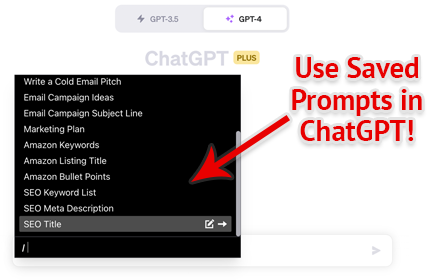
PromptFolder - ChatGPT Prompt Manager
Save, share, and discover prompts for ChatGPT, Midjourney, and other AI tools.
5.0K
★ 4.3

FindMyPrompt
AI-powered prompt generator. Create, save, and organize AI prompts for ChatGPT and other AI assistants.
11
★ 4.0

AI Prompt Library
Save and quickly copy your favorite AI prompts for ChatGPT, Claude, Grok, etc.
—

P_prompts - Save and manage your prompts
The easiest way to save, manage, and reuse your prompts for ChatGPT, Gemini, and Claude.
5
★ 5.0

PromptCache
Lightning-fast prompt management for AI workflows
13
★ 5.0
Data sourced from the Chrome Web Store · last verified Jun 9, 2026.