
Paste Tab
Click to open the copied URL in a new tab.
As of June 2026, Paste Tab has 10 users in the Functionality & UI category.
Usersup 400.0 percent+400.0%
10
10
Ratingno change0%
—
— reviews
Reviewsno change0%
—
Version
1.0
Manifest V3
History
7 snapshotsTracking since Apr 1, 2026.
View as table
| Date | Users | Rating | Reviews | Version |
|---|---|---|---|---|
| Apr 1, 2026 | 2 | — | — | 1.0 |
| Apr 17, 2026 | 2 | — | — | 1.0 |
| Apr 24, 2026 | 3 | — | — | 1.0 |
| May 1, 2026 | 5 | — | — | 1.0 |
| May 8, 2026 | 8 | — | — | 1.0 |
| May 18, 2026 | 9 | — | — | 1.0 |
| May 24, 2026 | 11 | — | — | 1.0 |
| Now | 10 | — | — | 1.0 |
Permissions & access
- Permissions
- clipboardRead
- Host access
- None declared
Screenshots
About
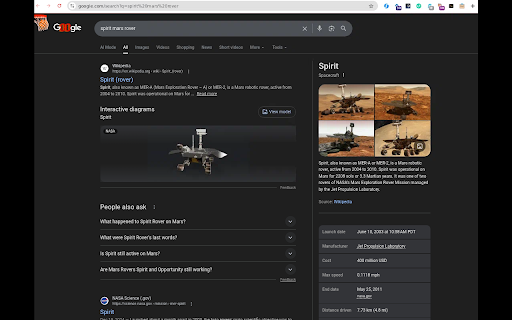
Open the URL in your clipboard in a new tab -- or, if your clipboard content doesn't look like a URL, do a Google search for that content instead. Pin this extension to the toolbar, click the little "+" sign, and that's all there is to it.

You used to be able to do this by middle-clicking the "+" (new tab) button, but that was removed recently (https://crbug.com/457495649) and a lot of us miss it. So this is the next best thing I could think of.

Unfortunately, under Linux, this won't search for the primary selection (text you have highlighted but not copied to the clipboard). The old Chrome behavior did use the primary selection, but Chrome extensions seem to be unable to access the primary selection, so I can't do that here. Sadly, then, this is not a complete replacement, at least not under Linux. I wish it were. If you know a way I can access the primary selection from an extension, please let me know and I'll add that right away!

The extension obviously does have to read your clipboard, but it does not store or transmit any data except in the very limited sense described above.
Technical
- Version
- 1.0
- Manifest
- V3
- Size
- 4.12KiB
- Min Chrome
- 88
- Languages
- 1
- Featured
- No
Metadata
- ID
- pifnnilijjpdjgpeahkajlceejpififc
- Developer ID
- u618d61abdb010c508a544a6257c70858
- Developer Email
- [email protected]
- Created
- Mar 27, 2026
- Last Updated (Store)
- Mar 27, 2026
- Last Scraped
- Jun 6, 2026
- Website
- —
- Support URL
- https://deepspace.social/@marsroverdriver
- Privacy Policy
- —
Data sourced from the Chrome Web Store · last verified Jun 6, 2026.