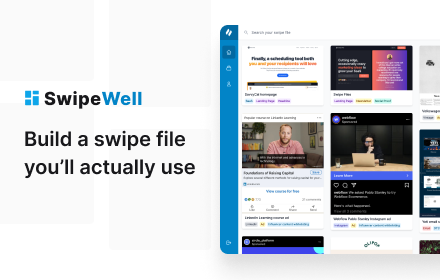
SwipeWell — Screenshot Websites & Save Ads From Facebook, TikTok, LinkedIn
The only Chrome extension dedicated to helping you save, organize, and reference marketing examples (so you never feel stumped).
As of June 2026, SwipeWell — Screenshot Websites & Save Ads From Facebook, TikTok, LinkedIn has 2,000 users and a 4.20/5 rating from 5 reviews in the Productivity category.
Usersno change0%
2.0K
2,000
Ratingno change0%
4.20
5 reviews
Reviewsno change0%
5
Version
0.6.32
Manifest V3
History
4 snapshotsTracking since Apr 16, 2026.
View as table
| Date | Users | Rating | Reviews | Version |
|---|---|---|---|---|
| Apr 16, 2026 | 2.0K | 4.20 | 5 | 0.6.32 |
| Apr 26, 2026 | 2.0K | 4.20 | 5 | 0.6.32 |
| May 13, 2026 | 2.0K | 4.20 | 5 | 0.6.32 |
| May 22, 2026 | 3.0K | 4.20 | 5 | 0.6.32 |
| Now | 2.0K | 4.20 | 5 | 0.6.32 |
Permissions & access
- Permissions
- tabsactiveTabstorageidentityscriptingdebugger
- Host access
- <all_urls>
Screenshots


About
✨ Capture full page screenshots or any section on a page ✨

Finally, a way to save all your marketing inspiration in one place.

✓ Facebook Ads

✓ TikTok Ads

✓ LinkedIn Ads

✓ Google Ads

✓ YouTube videos and shorts

✓ Web pages

✓ Social Media Ads

✓ Tweets

✓ Emails


📸 One-click screenshots

• Swipe full page → Screenshot the entire page.

• Swipe visible screen → Screenshot the visible portion of the page.

• Swipe section → Select a specific element on the page to swipe.

• Paste to upload → Copy and paste any image to quickly swipe it.

• Show Swipe button on images → Overlay a Swipe button on every image so you can capture it instantly.

The choice is yours! It’s never been easier to swipe an ad, headline, or landing page you love.

Even if you’ve never kept a swipe file before, you’ll feel like a pro in no time.

① Install the Chrome extension

② Swipe remarkable marketing examples

③ Organize in flow with tags, collections, and notes

We want you to unlock your full creativity in marketing.

So let’s finally build that swipe file you’ve always dreamed of.
Technical
- Version
- 0.6.32
- Manifest
- V3
- Size
- 320KiB
- Min Chrome
- 88
- Languages
- 1
- Featured
- No
Metadata
- ID
- phoibianbflfapemikjhjjohoobljlgd
- Developer ID
- u165b913316d681f791b5fa87173f92af
- Developer Email
- [email protected]
- Created
- Mar 3, 2022
- Last Updated (Store)
- Jan 8, 2026
- Last Scraped
- Jun 9, 2026
- Website
- swipewell.app
- Support URL
- https://www.swipewell.app
- Privacy Policy
- https://www.swipewell.app/privacy
Similar extensions
Alternatives to SwipeWell — Screenshot Websites & Save Ads From Facebook, TikTok, LinkedIn, ranked by description similarity.

TubeSwipe
Save YouTube video ideas into a swipe file with one right-click.
—

CopyThief
Save ads from Facebook, TikTok, Instagram and Google
33
★ 5.0

Ad Library downloader
Spy on your competitor's ads by saving their ads from the Ads library and other sources
30.0K
★ 4.2

Screen Stitcher
Captures an entire long web page as a single image without scrolling.
14

Screenshot Entire Webpage
Capture a full page screenshot easily with the Screenshot Entire Webpage extension. Perfect for whole page screen capture.
30.0K
★ 4.7

Full Page Screenshot
Capture full page screenshots and edit with powerful image editor
7

Full Page Snap - Capture Full Page Screenshots
Quickly capture entire web pages with Full Page Snap. Save full-page screenshots as high-quality images easily.
820
★ 4.5

ScreenCapture Light - Screenshot Tool with Annotation & Scroll Capture
Capture full page, visible area, or regions with editing, annotations, cropping, and watermarks. Simple and powerful.
35
Data sourced from the Chrome Web Store · last verified Jun 9, 2026.