
Bookmarks AI Topic - AI Bookmark Manager
A beautiful, feature-complete bookmark manager with AI topic generation.
As of June 2026, Bookmarks AI Topic - AI Bookmark Manager has — users in the Productivity category.
Usersno change0%
—
—
Ratingno change0%
—
— reviews
Reviewsno change0%
—
Version
1.0.1
Manifest V3
History
2 snapshotsTracking since Apr 17, 2026.
Not enough history yet for this metric — the chart fills in as we collect more snapshots.
View as table
| Date | Users | Rating | Reviews | Version |
|---|---|---|---|---|
| Apr 17, 2026 | — | — | — | 1.0.1 |
| Apr 22, 2026 | — | — | — | 1.0.1 |
| Now | — | — | — | 1.0.1 |
Permissions & access
- Permissions
- bookmarksstoragealarmsdownloadssidePaneltabs
- Host access
- http://*/*, https://*/*
Screenshots


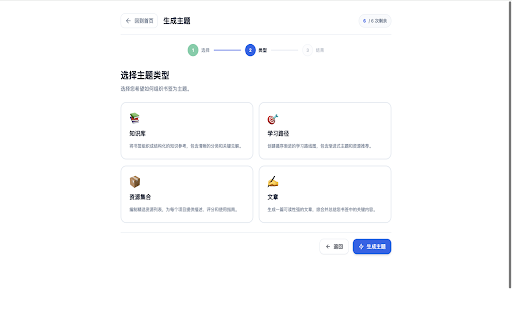
About
Bookmarks Topic - AI-Powered Bookmark Manager

  Bookmarks Topic is a Chrome extension (Manifest V3) that transforms your browser
   bookmarks into structured, shareable content using AI. It combines traditional
  bookmark management with intelligent topic generation capabilities.

  Core Features

  AI Topic Generation
  - Generate Knowledge Base, Learning Path, Resource Collection, or Article from
  selected bookmarks
  - Convert topics to Markdown, HTML, Zhihu article format, or Xiaohongshu (Little
   Red Book) content
  - Bookmark auto-classification with categories and tags
  - Daily free quota (6 generations/day), Pro unlimited

  Bookmark Management
  - Browse, search, create folders/bookmarks via popup or sidebar
  - Pin up to 20 important bookmarks
  - Custom tags support
  - XMind format export

  Usage Statistics
  - Click history tracking
  - Popular bookmarks ranking
  - Today's active bookmarks
  - Oldest bookmarks view
  - Clear history/stats options

  Interface & Localization
  - Light/Dark/Auto theme
  - Popup or Sidebar display mode
  - 47 language support
  - Keyboard shortcuts (Ctrl+Shift+P to pin, Ctrl+Shift+S for sidebar)
Technical
- Version
- 1.0.1
- Manifest
- V3
- Size
- 616KiB
- Min Chrome
- 88
- Languages
- 52
- Featured
- No
Metadata
- ID
- phofbknbcbmafmmlllagefogghcnkcha
- Developer ID
- u4793679fdc3145e34da500667685d702
- Developer Email
- [email protected]
- Created
- Apr 16, 2026
- Last Updated (Store)
- Apr 16, 2026
- Last Scraped
- Jun 13, 2026
- Website
- —
- Support URL
- —
- Privacy Policy
- https://cybertext.halo26812.eu.org/privacy
Data sourced from the Chrome Web Store · last verified Jun 13, 2026.