MultiView: Split Screen Tab Extension
> Overview Multiview is a transformative Chrome extension designed to revolutionise the way users interact with the web. By…
As of May 2026, MultiView: Split Screen Tab Extension has 3,000 users and a 2.09/5 rating from 23 reviews in the Functionality & UI category.
Usersdown 25.0 percent−25.0%
3.0K
3,000
Ratingno change0%
2.09
23 reviews
Reviewsno change0%
23
Version
1.0
Manifest V3
90-day change · In the last 90 days this extension lost 1.0K users.
History
1 snapshotsTracking since Apr 25, 2026.
View as table
| Date | Users | Rating | Reviews | Version |
|---|---|---|---|---|
| Apr 25, 2026 | 4.0K | 2.09 | 23 | 1.0 |
| Now | 3.0K | 2.09 | 23 | 1.0 |
Permissions & access
- Permissions
- storage
- Host access
- <all_urls>
Screenshots


About
> Overview

Multiview is a transformative Chrome extension designed to revolutionise the way users interact with the web. By introducing a dynamic split-screen functionality directly within your browser, it offers unparalleled multitasking, research, and browsing efficiency.

> Core Features

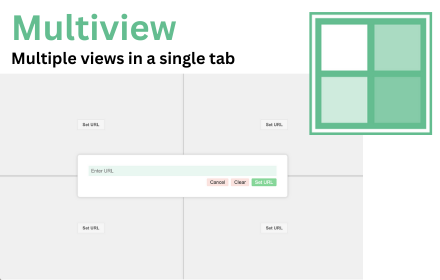
Split-Screen Functionality: Seamlessly divide your browser tab into two or four independent sections. Each section functions as a standalone browser window, allowing you to view and interact with different websites simultaneously.

> Customizable Layouts

Choose between a dual-view or a quad-view layout to suit your specific task. Whether it's comparing products, conducting research, or keeping an eye on social feeds while working, our extension adapts to your needs.
Easy URL Management: Set and change the URLs in each split section with intuitive controls. Load your favorite websites, search results, or any URL you need without leaving the extension.

> Resizable Screens

Adjust the size of each screen segment with easy-to-use resizing tools. Optimize your view based on the content you're interacting with, ensuring you get the most out of your screen real estate.

> Session Memory

Thanks to the integrated storage permission, your customized layouts and URLs are remembered. Pick up right where you left off, saving you valuable time and enhancing productivity.

> User Experience

Intuitive Interface: Designed with simplicity and ease of use in mind, the extension's interface is clean, straightforward, and integrates seamlessly into your browsing experience.

> Seamless Integration

Works harmoniously with your existing Chrome setup. Enjoy a clutter-free experience that feels like a natural extension of your browser.

> Performance Optimized

Despite its powerful features, Multiview is lightweight and designed to maintain optimal browser performance.

> Privacy and Security

We prioritize your privacy and security. The extension does not collect personal data, and its functionality is transparent and user-centric. Host permissions are utilized responsibly, allowing the extension to function effectively while respecting user privacy and security.

> Ideal Use Cases

Professionals: Enhance productivity by managing multiple projects, tracking real-time data, or comparing information across different platforms.

Students and Researchers: Open academic resources, reference materials, and notes side by side for efficient studying and paper writing.

Casual Users: Stream a video, follow social media, shop online, and read news, all at the same time.

> Future Updates and Feedback

We are committed to continually improving Multiview. Future updates will include more customization options, enhanced performance, and new features based on user feedback.

> Support and Contact

For support, questions, or feedback, please contact us. We value your input and strive to make Multiview the best possible.

> Disclaimer

Please note that Multiview uses iframes to display content from various websites. Due to security policies set by some websites, our extension may not display all content as intended. This tool is particularly useful for users who have permissions to embed their own or specific websites. We are not responsible for any restrictions or limitations imposed by third-party websites on embedding their content. Users should ensure they have the right to display website content through iframes. Use Multiview at your own risk.
Technical
- Version
- 1.0
- Manifest
- V3
- Size
- 18.21KiB
- Min Chrome
- 88
- Languages
- 1
- Featured
- Yes
Metadata
- ID
- phhchccmfphkdkpfaghkcpmbakcbjmjp
- Developer ID
- ub462b0fba9068d4346961e379b4515ab
- Developer Email
- [email protected]
- Created
- Nov 26, 2023
- Last Updated (Store)
- Nov 26, 2023
- Last Scraped
- May 22, 2026
- Website
- plugna.com
- Support URL
- https://plugna.com/multiview
- Privacy Policy
- https://plugna.com/multiview/privacy/
Similar extensions
Alternatives to MultiView: Split Screen Tab Extension, ranked by description similarity.

Screen Splitter - Tab Resize - Split Screen
Split Screen for Google Chrome. Splits your screen into multiple windows. Screen Splitter Multi Monitor support.
1.0K
★ 5.0

Sidebar
Open any web page in the sidebar
310
★ 2.5

TabMeister
Organize tabs into a smart dashboard. Add notes, reminders, secure passwords, and sync across devices with Flipbook view.
11
★ 5.0

Reuse Tabs
Avoid duplicate tabs with the same URL by reusing and recycling existing tabs.
4.0K
★ 4.3

Svafa - Multi-Page Grid Viewer
Display multiple web pages in a customizable grid layout
—

Enhanced Tab Manager
Manage your browser tabs efficiently with enhanced features
121
★ 4.5

Video Zen: Full Window Video Maximizer
Silence the noise. Amplify the video. Transform any web video into a focused, distraction-free experience.
78
Page Sidebar | Open any page in side panel
Effortlessly open any website in your web browser's sidebar – streamline your workflow instantly!
20.0K
★ 4.3
Data sourced from the Chrome Web Store · last verified May 22, 2026.