
Video Notes — Timestamped YouTube Notes
Take notes while watching youtube videos.
As of June 2026, Video Notes — Timestamped YouTube Notes has 25 users and a 5.00/5 rating from 4 reviews in the Productivity category.
Usersup 108.3 percent+108.3%
25
25
Ratingno change0%
5.00
4 reviews
Reviewsup 100.0 percent+100.0%
4
Version
2.2.0
Manifest V3
90-day change · In the last 90 days this extension 1 version update, changed permissions.
History
8 snapshotsTracking since Apr 7, 2026.
View as table
| Date | Users | Rating | Reviews | Version |
|---|---|---|---|---|
| Apr 7, 2026 | 12 | 5.00 | 2 | 2.0.0 |
| Apr 19, 2026 | 10 | 5.00 | 3 | 2.0.0 |
| May 3, 2026 | 16 | 5.00 | 4 | 2.0.0 |
| May 9, 2026 | 14 | 5.00 | 4 | 2.0.0 |
| May 20, 2026 | 15 | 5.00 | 4 | 2.0.0 |
| May 27, 2026 | 14 | 5.00 | 4 | 2.2.0 |
| Jun 3, 2026 | 21 | 5.00 | 4 | 2.2.0 |
| Jun 8, 2026 | 24 | 5.00 | 4 | 2.2.0 |
| Now | 25 | 5.00 | 4 | 2.2.0 |
Changelog
- May 20, 2026description
Video Notes — Timestamped Notes for YouTube

Take notes while watching YouTube videos with timestamps that link directly to the moment you captured them. Click any timestamp to jump back to that exact point in the video.

How it works
When you're on a YouTube video, a visual timeline track appears below the video title. Click anywhere on the track — or press Alt+N (Option+N on Mac) — to create a note at the current timestamp. Your notes appear as blue markers on the timeline. Hover to preview, click to edit.

Features

▸ Inline note editor — Create, edit, and delete notes without leaving the YouTube page
▸ Visual timeline — See all your notes as markers on a track beneath the video title. Click any marker to seek to that moment
▸ Keyboard shortcut — Alt+N (Option+N on Mac) to start a note at the current timestamp
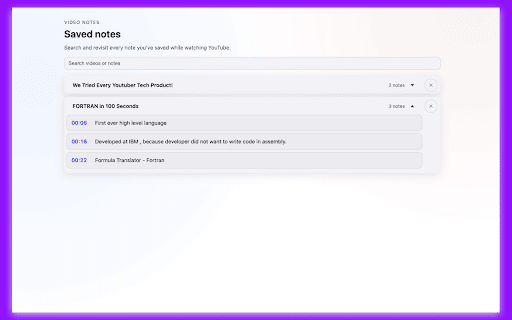
▸ Searchable dashboard — Browse all your videos and notes from the popup. Search by video title or note text
▸ Click-to-seek timestamps — Click any timestamp in the popup to open the video at that exact second
▸ Share notes — Generate a shareable link so others can view your notes alongside the video
▸ Markdown export — Copy notes as Markdown with a customizable template. Great for pasting into Notion, Obsidian, or GitHub
▸ JSON backup — Export and import your notes as JSON. Smart merge on import means no data loss
▸ Zen mode — Hide YouTube recommendations, comments, and merchandise to stay focused
▸ Hold-to-confirm delete — Optional safety feature that requires a 2-second hold to delete notes
▸ Light and dark theme — Automatically matches YouTube's current theme
▸ Works offline — All notes are stored locally in your browser. No account required, no cloud sync, no tracking

Permissions explained
▸ Storage — To save your notes locally in the browser
▸ Host permission (share-api.video-notes.workers.dev) — Only used when you explicitly click "Share" to generate a shareable link. No data is sent otherwise

Privacy
Your notes never leave your browser unless you choose to share them. There is no analytics, no tracking, and no account required. The extension is open source.

Keyboard shortcuts
▸ Alt+N / Option+N — Create a note at the current timestamp
▸ Ctrl+Enter / Cmd+Enter — Save a note
▸ Escape — Cancel and close the editor

Open source
This extension is free and open source. Contributions and feedback are welcome on GitHub.
Video Notes — Timestamped YouTube Notes (Free & Private)

Take notes while watching YouTube videos with timestamps that link directly to the moment you captured them. Click any timestamp to jump back to that exact point in the video.

How it works
When you're on a YouTube video, a visual timeline track appears below the video title. Click anywhere on the track — or press Alt+N (Option+N on Mac) — to create a note at the current timestamp. Your notes appear as blue markers on the timeline. Hover to preview, click to edit.

Features

▸ Inline note editor — Create, edit, and delete notes without leaving the YouTube page
▸ Visual timeline — See all your notes as markers on a track beneath the video title. Click any marker to seek to that moment
▸ Keyboard shortcut — Alt+N (Option+N on Mac) to start a note at the current timestamp
▸ Searchable dashboard — Browse all your videos and notes from the popup. Search by video title or note text
▸ Click-to-seek timestamps — Click any timestamp in the popup to open the video at that exact second
▸ Share notes — Generate a shareable link so others can view your notes alongside the video
▸ Markdown export — Copy notes as Markdown with a customizable template. Great for pasting into Notion, Obsidian, or GitHub
▸ JSON backup — Export and import your notes as JSON. Smart merge on import means no data loss
▸ Zen mode — Hide YouTube recommendations, comments, and merchandise to stay focused
▸ Hold-to-confirm delete — Optional safety feature that requires a 2-second hold to delete notes
▸ Light and dark theme — Automatically matches YouTube's current theme
▸ Works offline — All notes are stored locally in your browser. No account required, no cloud sync, no tracking

Permissions explained
▸ Storage — To save your notes locally in the browser
▸ Host permission (share-api.video-notes.workers.dev) — Only used when you explicitly click "Share" to generate a shareable link. No data is sent otherwise

Privacy
Your notes never leave your browser unless you choose to share them. There is no analytics, no tracking, and no account required. The extension is open source.

Keyboard shortcuts
▸ Alt+N / Option+N — Create a note at the current timestamp
▸ Ctrl+Enter / Cmd+Enter — Save a note
▸ Escape — Cancel and close the editor

Open source
This extension is free and open source. Contributions and feedback are welcome on GitHub.
- May 20, 2026name
Video Notes
Video Notes — Timestamped YouTube Notes
- May 20, 2026host_permissions
https://share-api.video-notes.workers.dev/*
https://share-api.video-notes.workers.dev/*, https://generativelanguage.googleapis.com/*
Permissions & access
- Permissions
- storage
- Host access
- https://share-api.video-notes.workers.dev/*, https://generativelanguage.googleapis.com/*
Screenshots



About
Video Notes — Timestamped YouTube Notes (Free & Private)

Take notes while watching YouTube videos with timestamps that link directly to the moment you captured them. Click any timestamp to jump back to that exact point in the video.

How it works
When you're on a YouTube video, a visual timeline track appears below the video title. Click anywhere on the track — or press Alt+N (Option+N on Mac) — to create a note at the current timestamp. Your notes appear as blue markers on the timeline. Hover to preview, click to edit.

Features

▸ Inline note editor — Create, edit, and delete notes without leaving the YouTube page
▸ Visual timeline — See all your notes as markers on a track beneath the video title. Click any marker to seek to that moment
▸ Keyboard shortcut — Alt+N (Option+N on Mac) to start a note at the current timestamp
▸ Searchable dashboard — Browse all your videos and notes from the popup. Search by video title or note text
▸ Click-to-seek timestamps — Click any timestamp in the popup to open the video at that exact second
▸ Share notes — Generate a shareable link so others can view your notes alongside the video
▸ Markdown export — Copy notes as Markdown with a customizable template. Great for pasting into Notion, Obsidian, or GitHub
▸ JSON backup — Export and import your notes as JSON. Smart merge on import means no data loss
▸ Zen mode — Hide YouTube recommendations, comments, and merchandise to stay focused
▸ Hold-to-confirm delete — Optional safety feature that requires a 2-second hold to delete notes
▸ Light and dark theme — Automatically matches YouTube's current theme
▸ Works offline — All notes are stored locally in your browser. No account required, no cloud sync, no tracking

Permissions explained
▸ Storage — To save your notes locally in the browser
▸ Host permission (share-api.video-notes.workers.dev) — Only used when you explicitly click "Share" to generate a shareable link. No data is sent otherwise

Privacy
Your notes never leave your browser unless you choose to share them. There is no analytics, no tracking, and no account required. The extension is open source.

Keyboard shortcuts
▸ Alt+N / Option+N — Create a note at the current timestamp
▸ Ctrl+Enter / Cmd+Enter — Save a note
▸ Escape — Cancel and close the editor

Open source
This extension is free and open source. Contributions and feedback are welcome on GitHub.
Technical
- Version
- 2.2.0
- Manifest
- V3
- Size
- 232KiB
- Min Chrome
- 88
- Languages
- 1
- Featured
- No
Metadata
- ID
- phgnkidiglnijkpmmdjcgdkekfoelcom
- Developer ID
- u8441df1403e6f72ea8d7781cbd716b3d
- Developer Email
- [email protected]
- Created
- Nov 18, 2025
- Last Updated (Store)
- May 17, 2026
- Last Scraped
- Jun 8, 2026
- Support URL
- https://prameshbajra.github.io/video-notes/
- Privacy Policy
- https://prameshbajra.github.io/video-notes/privacy.html
Similar extensions
Alternatives to Video Notes — Timestamped YouTube Notes, ranked by description similarity.

YouTube Timestamp Notes
Take timestamped notes on YouTube videos. Click any note to jump back instantly.
52

Video Notes for YouTube | Timestamped Notes
Timestamped notes on any YouTube video. Export to Obsidian, Notion, or Markdown. 100% local, no account needed.
24
★ 5.0

Video Notes
Transform your video experience with Video Note Taker! Capture and organize your thoughts effortlessly while watching any video.
3

GlassNote
Premium Video Notes Extension
5
★ 5.0

YouTube Notetaker
Take notes on YouTube videos with timestamps and positions.
3
★ 5.0

YT SideNotes | Take Smarter Notes on YouTube
Private, local notes for YouTube videos. No accounts. No sync. Stored only in your browser.
5

TubeNotes for YouTube
Pin YouTube screenshots/video clips, add text/audio notes, and export in one click.
8
★ 5.0

SmartTube
Take timestamped notes, summaries, and share insights on YouTube videos.
65
★ 5.0
Data sourced from the Chrome Web Store · last verified Jun 8, 2026.