SecureSafe Password Manager
Use the SecureSafe password manager to keep track of your ever-growing list of passwords.
As of June 2026, SecureSafe Password Manager has 6,000 users and a 3.25/5 rating from 16 reviews in the Privacy & Security category.
Usersdown 14.3 percent−14.3%
6.0K
6,000
Ratingno change0%
3.25
16 reviews
Reviewsno change0%
16
Version
1.4.1
Manifest V3
90-day change · In the last 90 days this extension lost 1.0K users.
History
1 snapshotsTracking since Jun 3, 2026.
View as table
| Date | Users | Rating | Reviews | Version |
|---|---|---|---|---|
| Jun 3, 2026 | 7.0K | 3.25 | 16 | 1.4.1 |
| Now | 6.0K | 3.25 | 16 | 1.4.1 |
Permissions & access
- Permissions
- tabsactiveTabstoragewebNavigationalarmsnotifications
- Host access
- https://*/*, http://*/*
Screenshots


About
––––––––––––––––––––––––––––––––––––––––––––––
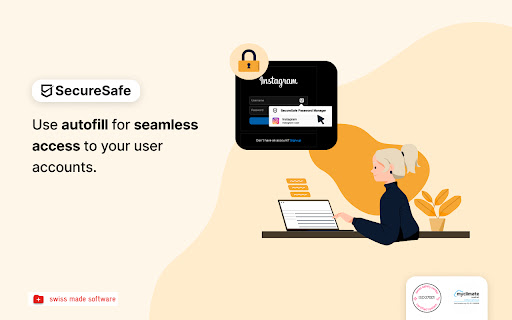
With the SecureSafe Browser Extension, you can log into websites, online stores or web applications directly from your browser.

––––––––––––––––––––––––––––––––––––––––––––––

How do I log in to the SecureSafe Password Manager from my browser?

Open the SecureSafe password manager by clicking on the SecureSafe icon in the top right-hand corner of the browser bar. Now log in with your SecureSafe username and password. If you do not yet have a SecureSafe account, you can register for free via our web or mobile app.

––––––––––––––––––––––––––––––––––––––––––––––

How can I automatically insert passwords in the login field?

Search for the password entry using the search field. Select the desired password entry with the mouse and click on the "Fill in" button to automatically populate the login fields.
Technical
- Version
- 1.4.1
- Manifest
- V3
- Size
- 4.5MiB
- Min Chrome
- 88
- Languages
- 1
- Featured
- No
Metadata
- ID
- phdlikmfdicjbgbeppbffcgidpneifbp
- Developer ID
- u92980d395468942694977ce8d03a6391
- Developer Email
- [email protected]
- Created
- Jun 13, 2022
- Last Updated (Store)
- Nov 7, 2025
- Last Scraped
- Jun 3, 2026
- Website
- —
- Support URL
- https://www.securesafe.com/en/support/
- Privacy Policy
- https://www.securesafe.com/en/data-protection-notes
Similar extensions
Alternatives to SecureSafe Password Manager, ranked by description similarity.

Sekure Password
Store and manage your passwords. Sign into sites quicker with the autofill feature.
12
★ 5.0

SecureSafe Pass Extension
Your passwords, our protection – wherever you need to access them.
748
★ 5.0

DualSafe Password Manager & Digital Vault
DualSafe Password Manager extension lets you safely manage passwords in one place to autosave, autofill & access them anytime.
200.0K
★ 4.4

Browserpass
Browser extension for zx2c4's pass (password manager)
3.0K
★ 4.7

PassHub.net
Securely autofill login forms and payment details with PassHub password manager, built using zero-trust architecture.
255
★ 5.0
PassMan Secure Login
This extension helps you to login easier to webtargets using our Business Password Manager tool, PassMan.
136
★ 5.0

Lockwell
Lockwell provides fast and secure access to you and your team’s passwords. Easily view, copy, and autofill logins.
178
★ 5.0

Browser Profiles Authentication - Secure Profile Lock
Password protection for all Browser Profiles
199
★ 2.0
Data sourced from the Chrome Web Store · last verified Jun 3, 2026.