PhraseGuard: Passphrase Generator
Passphrase generator for secure and memorable passwords.
As of May 2026, PhraseGuard: Passphrase Generator has 241 users in the Workflow & Planning category.
Usersup 0.4 percent+0.4%
241
241
Ratingno change0%
—
— reviews
Reviewsno change0%
—
Version
1.0
Manifest V3
History
2 snapshotsTracking since Apr 25, 2026.
View as table
| Date | Users | Rating | Reviews | Version |
|---|---|---|---|---|
| Apr 25, 2026 | 240 | — | — | 1.0 |
| May 22, 2026 | 239 | — | — | 1.0 |
| Now | 241 | — | — | 1.0 |
Permissions & access
- Permissions
- None declared
- Host access
- None declared
Screenshots

About
Introducing PhraseGuard, the ultimate Chrome Extension for enhancing your password security. With its simple and intuitive user interface, you can easily generate uncrackable passphrases that are both memorable and easy to type.

🤔 Why Passphrases?

Passphrases offer a significant boost in security due to the combination of large word lists, randomized ordering, and yet remaining easy to remember. They are often longer, harder to guess for computers, and consist of multiple words or a combination of words and other characters. This complexity makes them exponentially harder for hackers to crack using brute force or dictionary attacks.

🛍️ Common Use Cases for Passphrases

Whether you're protecting your personal email, WiFi, online banking, or social media accounts, PhraseGuard has your back! It ensures that your valuable information remains shielded from unauthorized access, providing peace of mind.

📝 Password Requirement Coverage

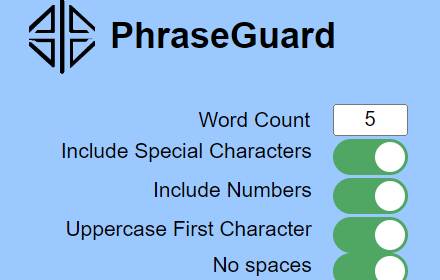
With PhraseGuard, you can rest assured that all standard password requirements are supported. From special characters and numbers to capital letters and the exclusion of spaces, our extension covers all the bases, allowing you to create passphrases that meet the requirements you come across.

🔒 Secure Password Generation

Unlike many other password generators, PhraseGuard ensures that all your data remains securely stored within your browser. There are no external calls made from the extension code, guaranteeing the safety and integrity of your passphrases. Also, the passphrases are not stored within the PhraseGuard extension.

🔍 How to Use PhraseGuard

1) Add PhraseGuard Extension to your browser
2) Click the PhraseGuard icon (Extensions --> PhraseGuard)
3) Customize the password requirements for the passphrase you want to create
4) Click "Generate & Copy Passphrase" to create your unique passphrase and copy it to your clipboard.
5) Save the passphrase wherever you store your passwords

🚀 Upgrade your password security today with PhraseGuard, the best-in-class Chrome Extension that empowers you with unbreakable passphrases. Experience the convenience of enhanced security while enjoying peace of mind, knowing that your online presence is protected.
Technical
- Version
- 1.0
- Manifest
- V3
- Size
- 48.25KiB
- Min Chrome
- 88
- Languages
- 1
- Featured
- Yes
Metadata
- ID
- phbpjmcafjjbjalncdfffjioeenghkni
- Developer ID
- u9376dad198d92b7d47e46d707a2def75
- Developer Email
- [email protected]
- Created
- Aug 14, 2023
- Last Updated (Store)
- Aug 14, 2023
- Last Scraped
- May 22, 2026
- Website
- —
- Support URL
- —
- Privacy Policy
- —
Similar extensions
Alternatives to PhraseGuard: Passphrase Generator, ranked by description similarity.

PassPocket
Generate high quality passwords with the click of a button.
2

Password Generator
this extension will generate random password
—

Password Generator Free
Password Generator Free – random password generator for Chrome. Instantly create strong password in any tab. Fast and free tool!
242
★ 5.0

PassG: Random Password Generator
Create strong, customizable passwords for enhanced online security.
188
★ 5.0

Password Generator
Generate strong passwords with one click!
—

Safepass: password generator - unique, random, and strong
SafePass – a unique, strength-driven password generator ensures your passwords are robust and random, offering security for free.
1.0K
★ 4.3

Password Generator
A simple password generator extension.
—

GetMyPassword - Create Strong, Random Passwords Instantly
Fast and simple Chrome extension with an on-page widget for generating strong, random passwords directly in website forms
93
★ 5.0
Data sourced from the Chrome Web Store · last verified May 22, 2026.