
Cy-Fi
Records user actions on a web page and generates Cypress code for automation and testing.
As of May 2026, Cy-Fi has 1,000 users and a 4.53/5 rating from 19 reviews in the Workflow & Planning category.
Usersno change0%
1.0K
1,000
Ratingup 0.7 percent+0.7%
4.53
19 reviews
Reviewsup 5.6 percent+5.6%
19
Version
1.0.2
Manifest V3
History
1 snapshotsTracking since Apr 25, 2026.
View as table
| Date | Users | Rating | Reviews | Version |
|---|---|---|---|---|
| Apr 25, 2026 | 1.0K | 4.50 | 18 | 1.0.2 |
| Now | 1.0K | 4.53 | 19 | 1.0.2 |
Permissions & access
- Permissions
- webNavigationactiveTabstorage
- Host access
- None declared
Screenshots
About
Introducing Cy-Fi, the Cypress Code Generator that simplifies automation testing by recording your actions and generating Cypress code for you. This extension allows you to easily record your interactions with web pages and then automatically generates Cypress code that can be used to repeat those actions during automated testing. With this extension, you can quickly and easily create comprehensive test suites that cover all of the functionality of your web application, without the need for manual coding. Try it out today and see the difference it can make in your automation testing workflow.

What are the features?

* Uses cypress commands from @testing-library/cypress for identifying HTML elements to follow best practices in automation.
* User-friendly interface and easy navigation.
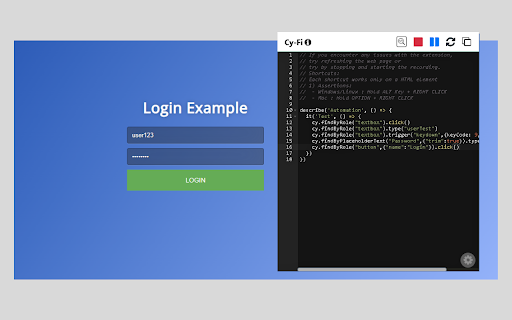
* Records clicks, typing, web navigations and form submissions.
* Automatically generates Cypress code from recorded actions.
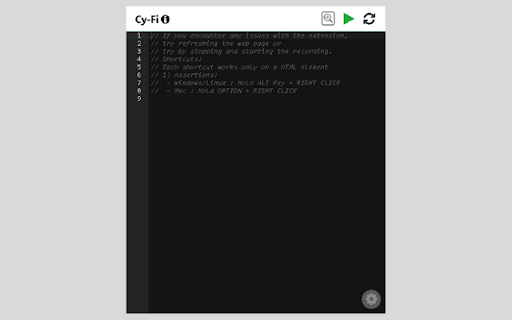
* A code editor to edit, delete or reset the actions you performed.
* Pause and resume recording.
* Copy the generated code to your clipboard.
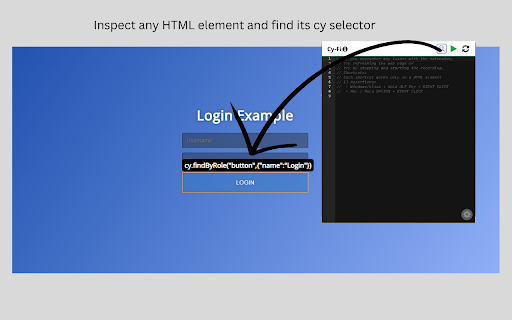
* Find the best selector of an element by inspecting it.
* Provides different cypress commands to play with.
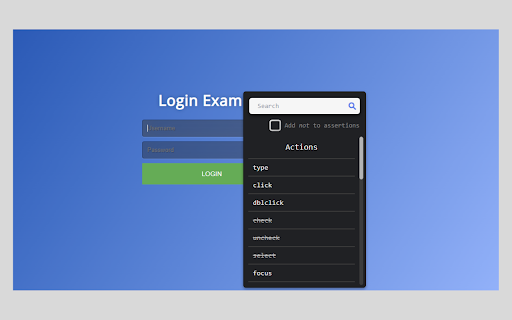
* Add cypress assertions based on the element.

How to use?

* Open the extension and click on 'Play' button to begin recording actions.
* Check your actions by opening the popup at any time during recording
* Click the 'Stop' button to stop recording.
* Click the 'Resume' button to resume recording.
* You can also reset, or copy the generated code to your clipboard.
* Click on 'Inspect' button to start inspecting an element.
    - Click on an HTML element to get it's cy selector.
    - Press 'ESCAPE' key to continue the inspection.
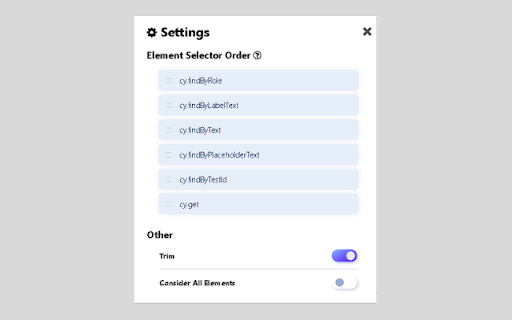
* You can rearrange different cypress commands in the settings tab.
* To use assertions:
    - Start the recording by clicking on the play button.
    - Hold ALT(Win)/OPTION(Mac) + RIGHT CLICK on any HTML element to get list of
      assertions.
    - Select one of the assertions and provide any additional input if required to generate cypress
      code for that assertion
Technical
- Version
- 1.0.2
- Manifest
- V3
- Size
- 1.01MiB
- Min Chrome
- 88
- Languages
- 1
- Featured
- Yes
Metadata
- ID
- pgofdpaacanjbcchniaehpiobldjcgcn
- Developer ID
- u04cfd46fee43d3f5e6ef2c26b7c2bb7e
- Developer Email
- [email protected]
- Created
- May 3, 2023
- Last Updated (Store)
- Aug 10, 2023
- Last Scraped
- May 22, 2026
- Website
- —
- Support URL
- —
- Privacy Policy
- —
Similar extensions
Alternatives to Cy-Fi, ranked by description similarity.

Simple Test E2E Recorder
Record E2E interactions with your web applications to the cloud.
36

Clipy — Screen Recorder, Annotate & Share
Record screen, tab, or webcam in Chrome. Annotate, blur, spotlight cursor. Get a shareable link the second you stop.
128
★ 5.0

Zoho QEngine Recorder
The Zoho QEngine extension for Chrome is used to create test cases using the software's recorder feature.
1.0K
★ 5.0

Cliperact: Create Interactive Product Demos With AI
Cliperact – Turn Clicks into Interactive Videos Effortlessly!
What is Cliperact?
Cliperact is an innovative interactive video…
12
★ 5.0

Gumloop
Automate any web browsing workflow with AI.
6.0K
★ 3.2
Efficient Coder
Developer dashboard to produce desired results without wasting your time and energy
114
★ 1.0

Screen recorder
Elevate your productivity with Screen Recorder tool. Effortlessly capture and share your screen recordings for optimal efficiency.
4.0K
★ 3.6

Assistant for qTest Manager
Add extra functionality to qTest Manager.
32
Data sourced from the Chrome Web Store · last verified May 22, 2026.